This document describes the Haden Espresso Machine, a coffee maker designed for domestic use, with a focus on ease of operation, maintenance, and safety.
Function Description
The Haden Espresso Machine is designed to brew espresso, make cappuccinos, and froth milk. It features a portafilter system for ground coffee, a steam wand for frothing milk, and a hot water function. The machine includes a pressure gauge to monitor brewing pressure and indicator lights to guide the user through various stages of operation, such as preheating, brewing, and steaming. It is intended for preparing a variety of coffee beverages at home.
Important Technical Specifications
- Product Codes: 204486, 204493, 204509
- Rated Voltage: 220V-240V 50-60Hz
- Rated Power: 1100W
- Capacity: 1.5 Litres (Water Tank)
- Warranty: 2 years from the date of original purchase (UK & Ireland only), covering faulty materials or workmanship. Exclusions include cosmetic damage, normal wear and tear, incorrect voltage, power surges, customer misuse, modifications, adjustments, and products with unreadable/removed serial numbers.
- Components:
- ON/OFF button
- Temperature dial
- Coffee button
- Steam button
- 2 cup coffee filter
- Porta-filter
- Drip plate
- Drip tray
- Water tank lid
- Water tank
- Steam knob
- Steam wand
- Coffee scoop / press
Usage Features
The machine offers a straightforward user experience with clear instructions for each function.
Before First Use:
- Fill the water tank with clean water, ensuring the water level does not exceed the "MAX" mark.
- Insert the coffee filter into the porta-filter and attach it to the machine.
- Place a cup on the removable shelf.
- Connect the power source and turn the ON/OFF button to "ON." The blue power indicator will illuminate.
- Press the coffee button to pump water, then press it again to stop.
- Press the steam button to allow steam to flow out, then press it again to stop.
- After flushing, press the coffee button again to fill a cup with water, then discard the water. This process cleans the internal system.
Preheating:
- Ensure the water tank is filled.
- Insert the porta-filter (without coffee) and lock it into place.
- Turn the ON/OFF button to "ON." The blue power indicator will illuminate.
- Wait for the coffee button to illuminate, indicating the machine has reached the correct brewing temperature.
- After the coffee button illuminates, press it to allow hot water to flow out, then press it again to stop. The preheating is finished.
Making an Espresso:
- Remove the porta-filter by turning it anti-clockwise.
- Add ground coffee to the filter using the measuring scoop, pressing it down firmly with the press.
- Insert the porta-filter into the machine and lock it into place.
- Place a cup under the porta-filter.
- Ensure the steam control knob is in the OFF position.
- Once the coffee button illuminates, press it to start brewing.
- Press the coffee button again when the desired amount of coffee is obtained.
- WARNING: Do not leave the coffee maker unattended during brewing.
Making Cappuccino / Frothed Milk:
- Prepare espresso first.
- Turn the steam knob anti-clockwise to the "ON" position. The steam indicator will start blinking. Wait for the light to stop blinking, indicating the correct temperature.
- Fill a jug with about 100 ml of milk for each cappuccino.
- In order to get better milk foam performance, open the steam knob for approximately 15 seconds without putting it in the milk yet. This will clear out any cold water in the system. Then put the knob back to OFF position and conduct the next step.
- Immerse the steam wand into the milk about two centimetres deep.
- Turn the steam knob slowly anti-clockwise. Steam will come out from the steam wand. Move the jug around, up and down to froth the milk.
- Note: Never touch the steam outlet during steam jetting and be careful not to get burnt.
- Note: Never turn the steam control button rapidly, as the steam will accumulate rapidly in short time which may increase the potential of the risk of explosion.
Hot Water:
- When the preheating is finished, the coffee indicator lights up solidly.
- Then press the coffee button and the water pump starts to pump water.
- Turn the steam knob to "Hot water," and then hot water will flow out of the steam pipe.
- To stop making hot water, press the coffee switch again.
- Hot water is used for warming cups, making tea or cooling down the appliance.
- NOTE: The maximum working time of the hot water pump is 60 seconds.
Auto Power Off:
- If there is no operation within 25 minutes, the appliance will power off automatically.
Maintenance Features
Regular cleaning and descaling are crucial for maintaining the machine's performance and longevity.
Cleaning and Maintenance:
- Cut off power source and let the coffee maker cool down completely before cleaning.
- Clean housing of coffee maker with moisture-proof sponge often and clean water tank, drip tray and removable shelf regularly.
- Note: Do not clean with alcohol or solvent cleaner. Never immerse the housing in water for cleaning.
- Detach the metal funnel by turning it clockwise, get rid of coffee residue inside, then you can clean it with cleanser, but at last you must rinse with clear water.
- Clean all the attachments in the water and dry thoroughly.
Descaling:
- To ensure efficient internal piping, the machine must be cleaned regularly.
- The manufacturer recommends descaling every 2 weeks or every 4 weeks depending on water hardness.
- Steps for Descaling:
- Fill the water tank with water and descaler (4:1 ratio).
- Press the ON/OFF button to turn on the unit. The coffee button indicator will start blinking. After preheating, the coffee indicator light stops blinking and turns solid blue.
- Press the coffee button to pump water out.
- Once the coffee indicator light stops blinking, press the coffee button and allow two coffee cups of water flow out of the unit. Then press the coffee button again to stop.
- Press the steam button. The indicator light will start to blink. Wait for the light to stop blinking, indicating it's reached the correct temperature.
- Place a cup under the steam wand and open the steam knob for 2 minutes, then turn the steam knob to the off position.
- Press the ON/OFF button to turn on the unit immediately, leave the descaler in the unit for at least 15 minutes.
- Empty the tank and refill with clean water. Repeat the above steps at least 3 times with clean water.
Troubleshooting:
The manual provides a detailed troubleshooting guide for common issues such as:
- Metal parts in the tank having rust.
- Water leaks from the bottom of the coffee maker.
- Water leaks out of outer side of filter.
- Not cleaned correctly after cleaning mineral deposits.
- Acid (vinegar) taste exists in Espresso coffee.
- The coffee maker cannot work any more.
- The power outlet is not plugged well.
- The steam ready indicator is not illuminated.
- The container is too big or the shape is not fit.
- You have used skimmed milk.
For each problem, a cause and solution are provided to help users resolve issues without needing to contact customer support. If problems persist, users are advised to contact Haden's technical support team.

 Need help?
 General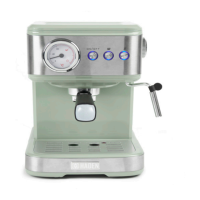

 To Next Page