hager
"DALI Gateway C00Cx2" software
Functional description
Seite 71 von 130
Soft-ON/OFF function
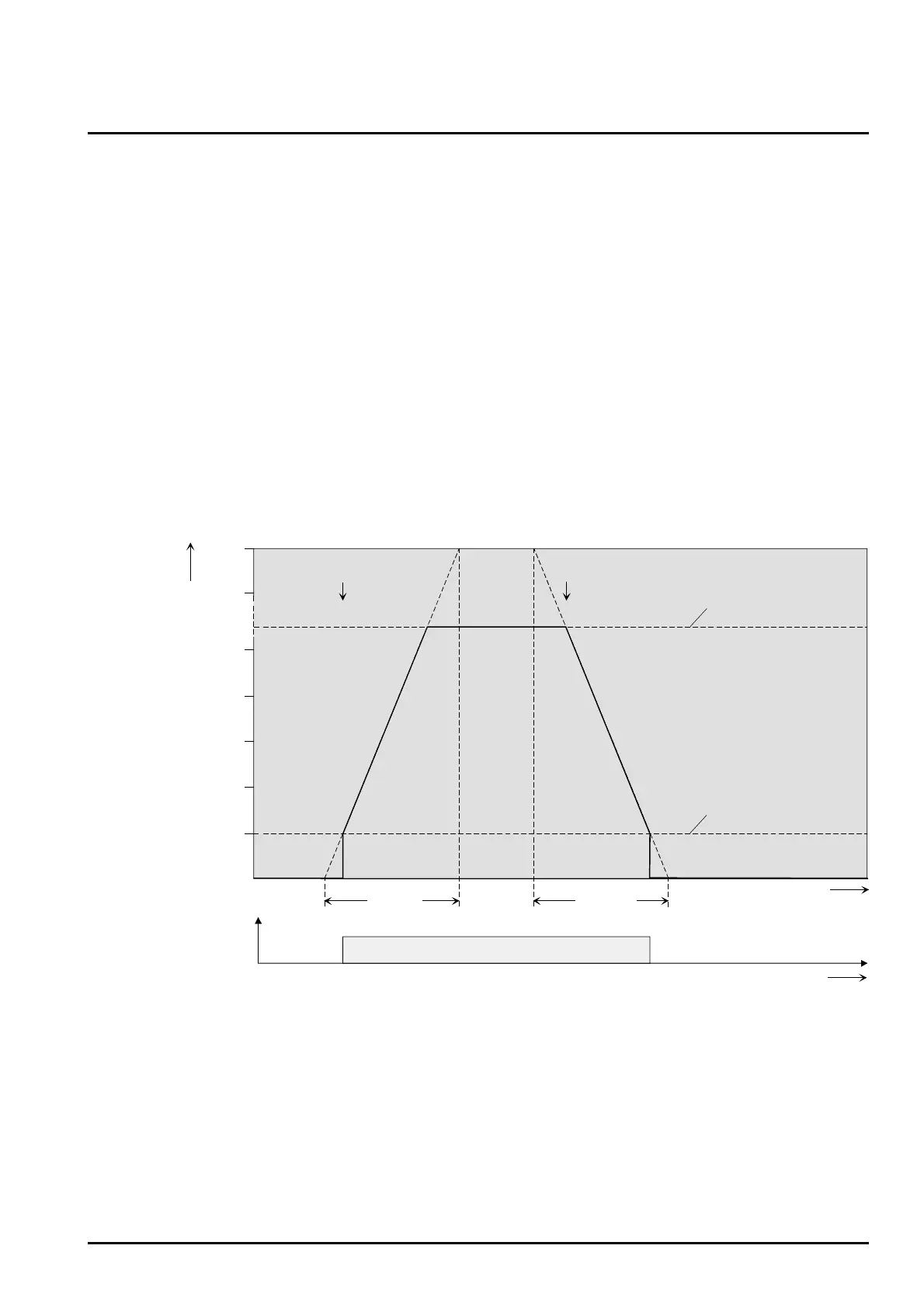
The Soft functions permit the slowed- down switching on or off of a DALI group if a switching command
is received via the “Switching” or “Switching central function” communication objects.
If a Soft-ON function is activated, dimming will be executed until the parameterized switch-on
brightness has been reached. This will also be the case if the DALI group has been switched on to a
brightness value that is smaller than the switch-on brightness value. If a Soft-OFF function is activated
dimming will take place after receiving an OFF telegram until 0 % brightness is reached (cf. figure 22).
The dimming speeds can be parameterized separately for the Soft-ON as well as the Soft-OFF function
in the ETS plug-in. As is the case with the relative or absolute dimming, the dimming time will be
provided for the entire brightness range and thus for a brightness change of 0 % to 100 %. The DALI
Gateway computes the dimming speed for a dimming increment of the Soft functions from the provided
dimming time.
The Soft-ON or the Soft-OFF functions cannot be retriggered due to the reception of other switching
telegrams while tracking the switching status. The Soft-functions can be activated and configured
separately in the ETS plug-in.
Time for
Soft-ON
time
0 %
100 %
90 %
50 %
10 %
20 %
30 %
40 %
Brightness value
Switch-on brightness
Soft-ON Soft-OFF
Time for
Soft-OFF
Minimum brightness
ON OFF
Switching status
feedback
time
EIN
AUS
Figure 22: Dimming response of the Soft-ON/OFF functions
for example: minimum brightness > 0%
• The dimming of a Soft-ON function starts with the minimum brightness configured in the ETS plug-in.
If a DALI group is switched off (brightness value = 0 %) and then switched on, the group will jump to
the parameterized minimum brightness and will start the Soft-ON dimming with the switch-on
brightness (cf. figure 22).


 To Next Page