3
Controller Operation Instruction
■ Description of controller panel
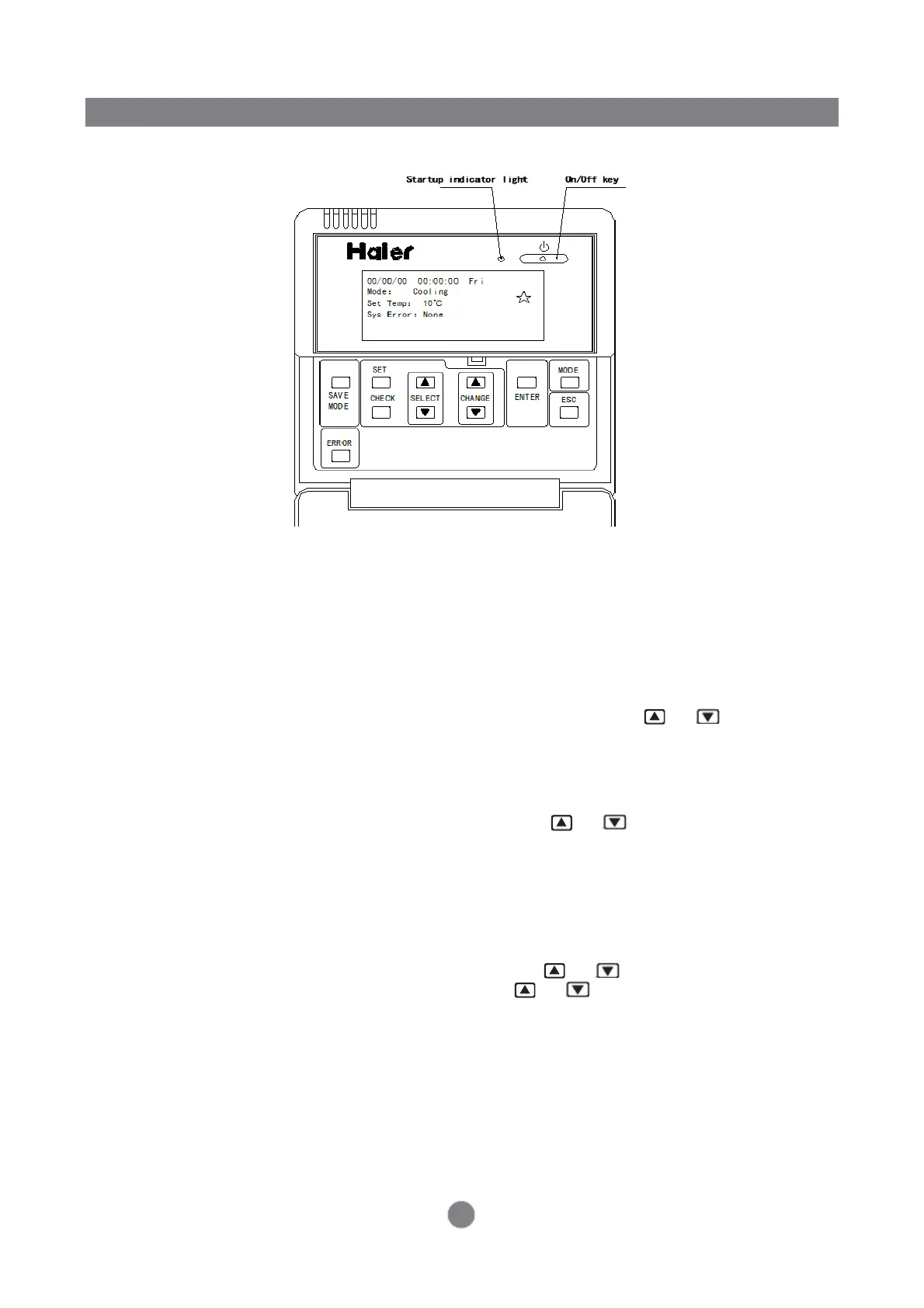
◆ Key description of wired controller
1. [On/Off] key: this key is used for the system on/off control; if the initial status is “off”, and the system
is started up when pressing this key once, and vice versa. During the startup, the LED indicator light
(green) is on.
2. [Mode] key: this key used is to change the system operation mode; once pressed this key, the
operation mode is switched between cooling and heating.
3. [Power Save] key: this key is to operate the system in “Power Save” mode;if pressed this key, the
target temperature of return water is set at 15℃ and 37℃ respectively for cooling and heating.
4. [Modify] key: this key used is used to adjust setting parameters; press or on the [Modify]
key to increase or decrease setting parameters; when the wired controller is not in setting mode,
this key is used to set the return water temperature and passwords.
5. [Set] key: press this key to enter the parameter setting interface; after logging into the parameter
setting interface, general items (set time/timing mode/set timing) and special items can be set.
6. [Select] key: this key is used to select setting items; press or on the [Select] key to select
items, and the selected character object is displayed on a black background.
7. [Ok] key: this key is used to confirm the setting items; you can press this key to select a setting item
and enter the corresponding parameter setting interface.
8. [Exit] key: this key is used to exit (back); the system returns to the previous interface after each
press and finally returns to the main interface of the wired controller.
9. [Query] key: this key is used to query the parameter interface of the modular unit; after logging into
the parameter query interface of the modular unit, press or on the [Modify] key to select
the address of the queried modular unit, and press or on the [Select] key to query the
electrical performance parameters and operation conditions of the modular unit.
10. [Fault] key: this key is used to query the fault of the modular unit and log into the fault query
interface.


 To Next Page