EasyManua.ls Logo

Haier H3PH-1J6K-EU - User Manual

Haier H3PH-1J6K-EU
49 pages
Print Icon
To Next Page IconTo Next Page
Loading...
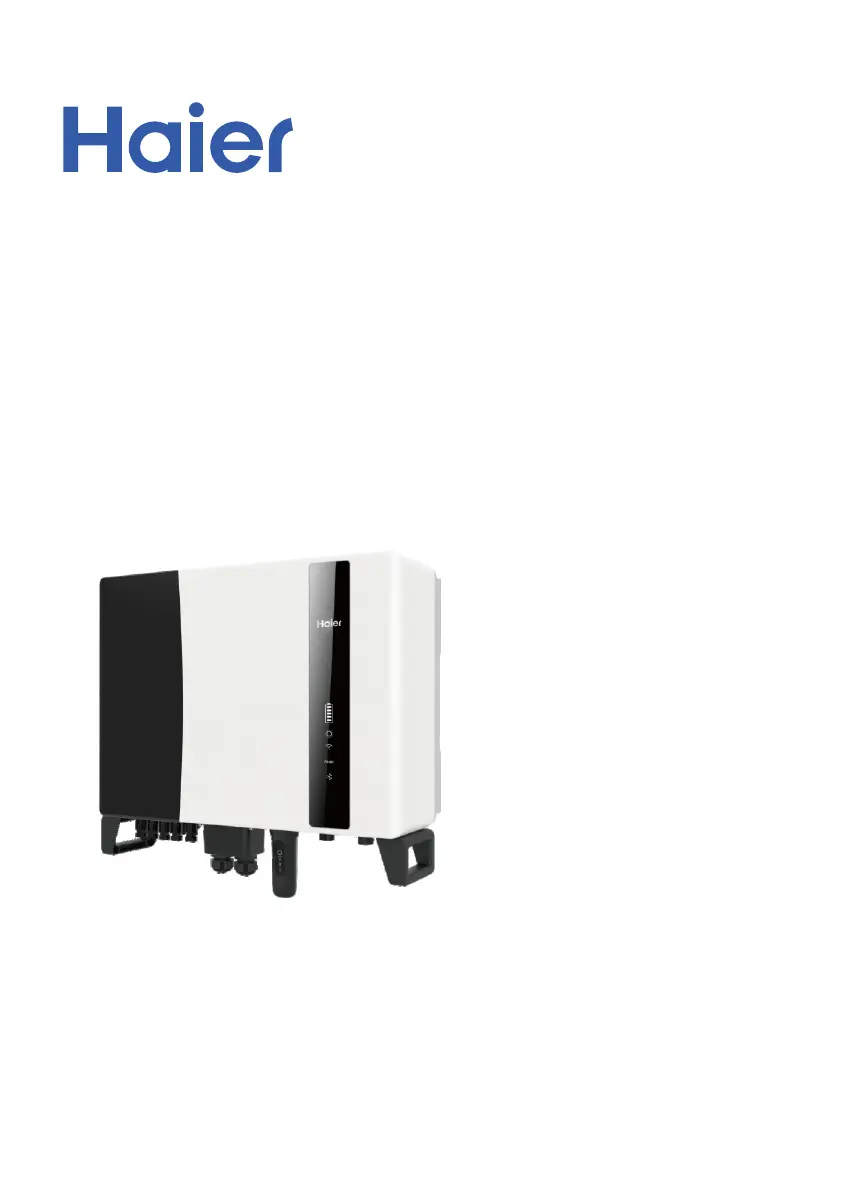
User Manual
Hybrid Inverter
Version 1.0, Release Date: 07,2023
Applicable models
H3PH-1J5K-EU
H3PH-1J6K-EU
H3PH-1J8K-EU
H3PH-1J10K-EU
Applicable System
Three phase system

Questions and Answers

  • D
    davidbyrdAug 20, 2025
    What to do if my Haier Inverter shows Over-Load?
    • C
      Christina RamirezAug 20, 2025
      If your Haier Inverter indicates an Over-Load, it means the backup load power is too large, or some inductive load startup power is too large. You should remove some of the backup load or remove the inductive load on the backup.
  • T
    Tracy SinghAug 22, 2025
    Why does my Haier Inverter show CAN Fail?
    • M
      Mercedes RodriguezAug 22, 2025
      CAN Fail indicates a communication failure between the inverter and the battery. Here's what you should do: * Check the cable conditions. * Ensure the cable is plugged into the CAN port of both the battery and the inverter. * Verify you are using the correct cable, as some batteries need a special cable from the battery manufacturer.
  • J
    john44Aug 25, 2025
    What does OV-Vbatt mean on my Haier Inverter and how to fix it?
    • S
      Scott ReidAug 25, 2025
      If your Haier Inverter displays OV-Vbatt, it indicates an over-voltage issue with the battery. First, verify the battery voltage is within the specified standards. Next, measure the battery voltage at the inverter connection point. If the problem persists, contact your battery manufacturer for further assistance.
  • M
    Mrs. Elizabeth ReyesAug 26, 2025
    How to fix a Fan Alarm on a Haier H3PH-1J6K-EU Inverter?
    • J
      Jennifer FuentesAug 26, 2025
      If your Haier Inverter is showing a Fan Alarm, check if the internal fan is working correctly or if it is jammed. Clear any obstructions to the fan's movement.
  • M
    Miranda GilbertAug 28, 2025
    What to do if I see a Surge Alarm on my Haier Inverter?
    • J
      James JohnsonAug 28, 2025
      If your Haier Inverter displays a Surge Alarm, this indicates a grid side fault. Restart the device. If the alarm persists, contact the manufacturer's customer service.
  • M
    Margaret RobinsonAug 29, 2025
    What does OV-TEM mean on my Haier H3PH-1J6K-EU?
    • C
      courtneyeverettAug 29, 2025
      If your Haier Inverter displays OV-TEM, it indicates an over-temperature issue. Check whether the surrounding environment of the inverter has poor heat dissipation. Also, confirm whether the product installation meets the requirements.
  • V
    Victoria BallAug 31, 2025
    What does OV-DC01 mean on my Haier Inverter?
    • R
      rickychapmanAug 31, 2025
      If your Haier Inverter displays OV-DC01, it indicates that the PV voltage is abnormal. Restart the system and check if the fault continues.
  • A
    allen96Sep 2, 2025
    What does ARC- FAULT mean on my Haier H3PH-1J6K-EU?
    • J
      Jennifer LaraSep 2, 2025
      If your Haier Inverter displays ARC- FAULT, it means that you should verify connections are tight within your PV system. Arc fault settings can be changed in advanced settings if further adjustment is necessary.
  • T
    Tiffany MccoySep 4, 2025
    What does GRID-INTF02 mean on my Haier Inverter?
    • J
      James EdwardsSep 4, 2025
      If your Haier Inverter displays GRID-INTF02, confirm whether the grid is seriously distorted and check whether the AC cable is connected reliably.
  • E
    Erika TranSep 6, 2025
    What does DCInj-FAULT mean on my Haier H3PH-1J6K-EU?
    • C
      Corey HendersonSep 6, 2025
      If your Haier Inverter displays DCInj-FAULT, confirm that the grid is abnormal. Also, confirm that the AC cable connection is not abnormal and restart the system to see if the fault continues.

Summary

2. Safety & Warning

2.1 Safety

Defines danger, warning, caution, and note symbols used in the manual.

2.2 General Safety Instructions

Provides essential safety guidelines for installation, operation, and handling.

2.3 Notice for Use

Specifies conditions and requirements for proper inverter installation and usage.

4. Installation

4.1 Select a Location for the Inverter

Details criteria for choosing an optimal and safe installation location for the inverter.

4.2 Mounting the Inverter

Provides instructions and clearance requirements for physically mounting the inverter.

4.4 PV Input Cable Installation

Guides on connecting the DC input cables from the PV array to the inverter.

4.5 Battery Power Cable Installation

Explains how to connect the DC power cables for the battery system.

4.6 AC Cable Installation

Covers the procedures for connecting AC power cables for grid and backup.

5. Commissioning & Shutdown

5.1 Preparation

Lists essential checks and requirements before commissioning the inverter.

7. Troubleshooting

7.1 Fault Message and Description

Lists common fault messages, their descriptions, and troubleshooting suggestions.

8. Specifications

Haier H3PH-1J6K-EU Specifications

General IconGeneral
RefrigerantR32
TypeWall-mounted
Power Supply220-240V, 50Hz
Energy Efficiency Ratio (Heating)4.0
Operating Temperature (Heating)-15~24 °C

Related product manuals