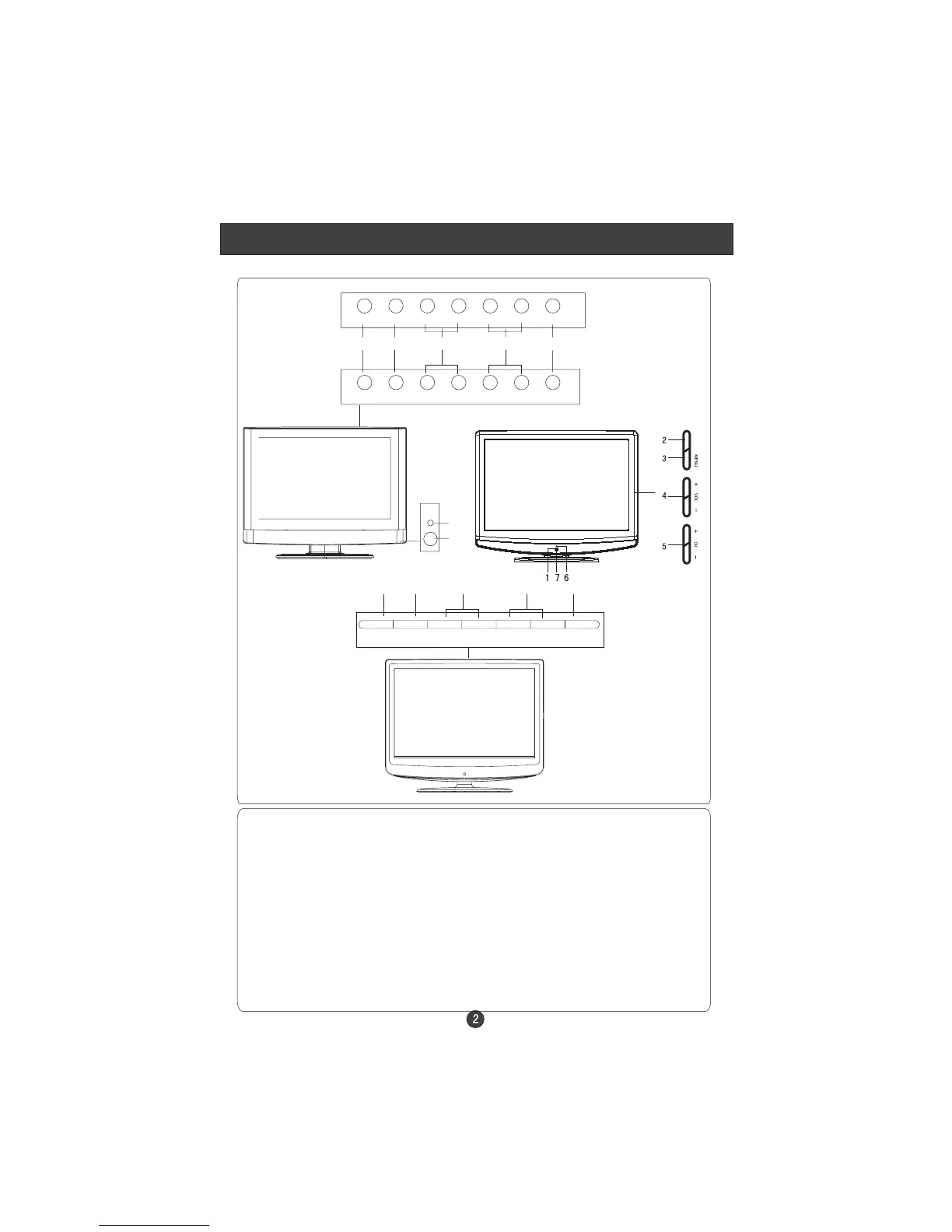
Front Panel Control
Control Panel Function
1. Standby switch
2. SOURCE Select the input signals: TV/S-VIDEO/COMPONENT/PC/
SCART/HDMI/DTV/DVD
3. MENU Press to select the main menu
4. VOL- Volume down / Left orientation to adjust the item in the OSD
VOL+ Volume up / Right orientation to adjust the item/Press to enter
5. CH- TV channel down / to select the item in the menu
CH+ TV channel up / to select the item in the menu
6. Power indicator
Illuminates red in standby mode, no light when the display is
turned on
7.Remote Sensor
6
7
SOURCE MENU VOL- VOL+ CH- CH+ POWER
2 3 4 5 1
SOURCE MENU VOL- VOL+ CH- CH+ STANDBY
(The description of the button may be different, just see the actual set.)
15 inch
Other inch
11W
T1
INPUT
SOURCE MENU VOL- VOL+ CH- CH+ STANDBY
2 3 4 5 1
R1



 To Next Page