EasyManua.ls Logo

Haier LCD19W-M3 - Connection

Haier LCD19W-M3
41 pages
Print Icon
To Next Page IconTo Next Page
To Previous Page IconTo Previous Page
Loading...
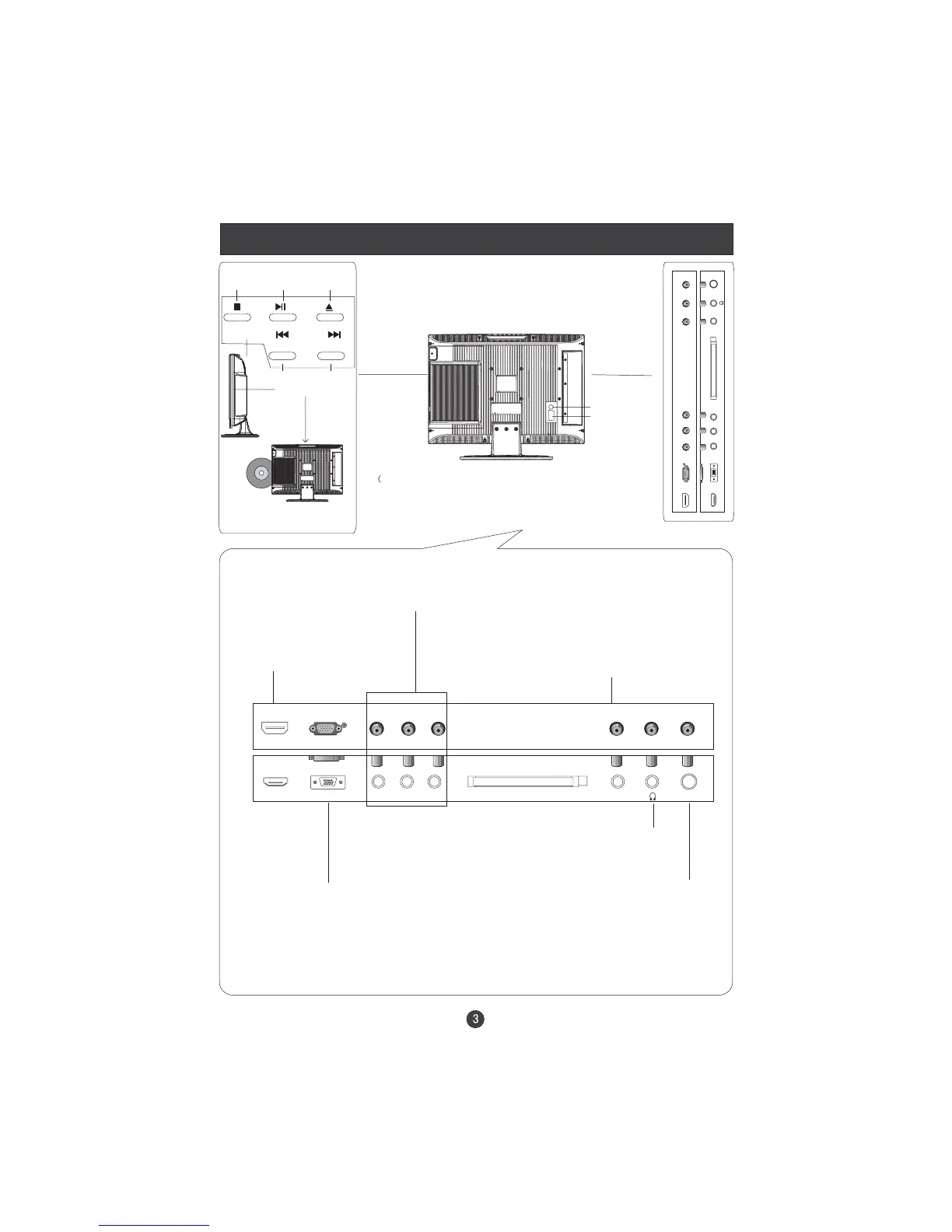
Connection
DVD
STOP
PLAY/PAUSE OPEN/CLOSE
PREV NEXT
DVD insert
(Please refer to actual product
of the DVD slot)
Just take TV with DVD for example, please see the real)
Pr
ANT IN
Pb
Y
AUDIO IN
HDMI
CI
VGA IN
HDMI
Connect to HDMI
output of other
equipment
VGA Input
Connect to the VGA
15PIN analog output
connector of the PC
display card for PC
display purpose
COMPONENT Input
Connect a component
video/audio
device to these jacks
VGA /COMPONENT/
SVIDEO Audio Input
Connect the PC output
connector from a PC to
the audio input port
Earphone port
Antenna Input
Connect cable or
antenna signals to
the TV, either direc-
tly or through your
cable box.
Pr
ANT IN
Pb
Y
AUDIO IN
HDMI
CI
VGA IN
S-Video Input
SCART