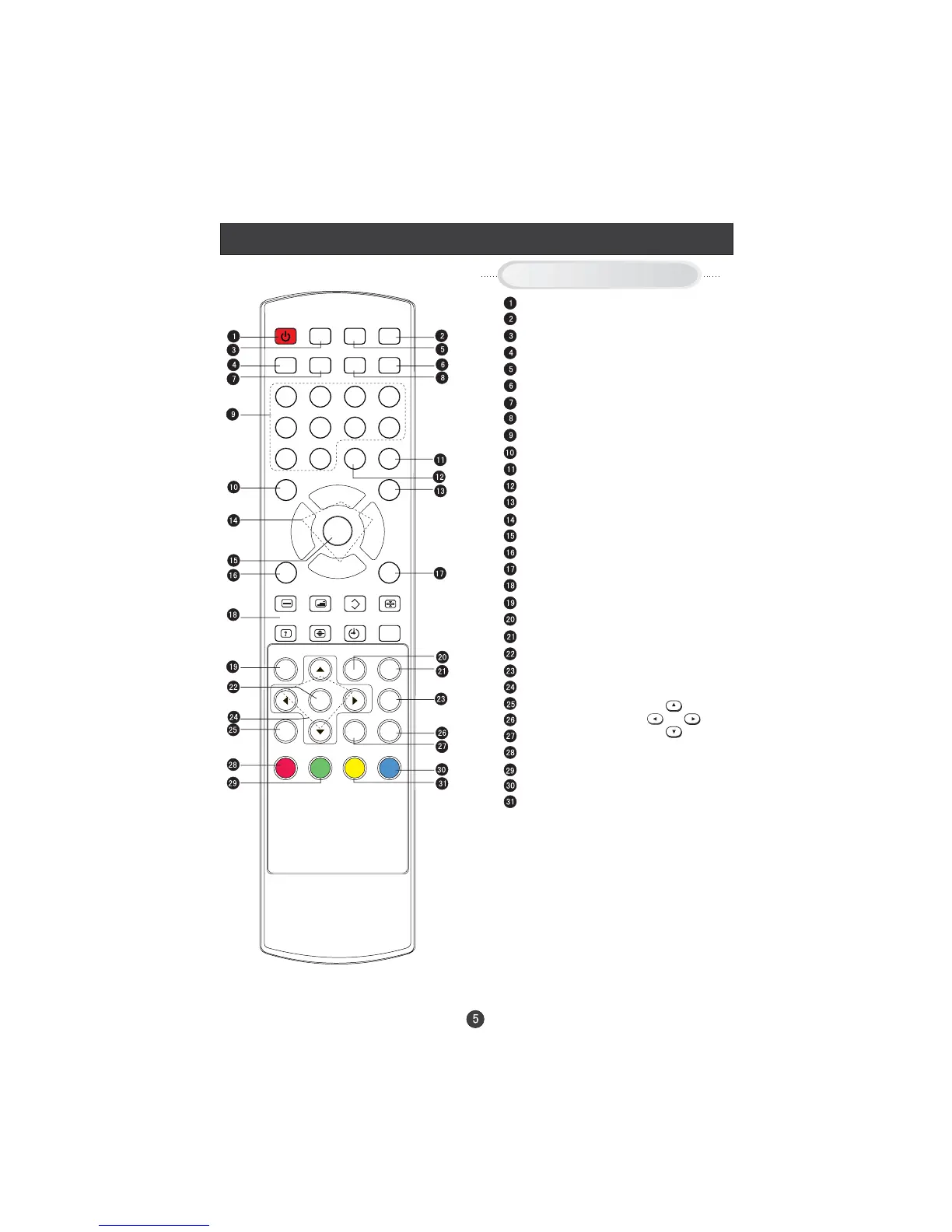
Remote Control (for TV/DTV only)
When using the remote control, aim it
towards the remote sensor on the TV
Buttons on the remote control
Stand By
NICAM
SLEEP
Switch to PC mode
Return the last watched program channel
Mute
Automatically adjust in PC mode
Call Screen Display
Program Number
Picture mode
Source Exchange
Digital Selector
DTV/TV
Volume/Channel Selection
MENU
Sound mode
Zoom
TELETEXT BUTTONS
DVB-T MENU
TEXT BUTTON
DVB-T EPG button
DVB-T ok button
DVB-T SUBTITLE
DVB-T Cursor Move button
DVB-T favourite
Exit Screen Display
DVB-T information button
RED button
Green button
Blue button
Yellow button
UP
DOWN
LEFT
RIGHT
STANDBY
NICAM
PC AUTO AD DISPLAY
MUTE
1234
5678
90


 To Next Page