EasyManua.ls Logo

Haier LE29C810C - Front Panel Controls; Rear;Side Sockets

Haier LE29C810C
192 pages
Print Icon
To Next Page IconTo Next Page
To Previous Page IconTo Previous Page
Loading...
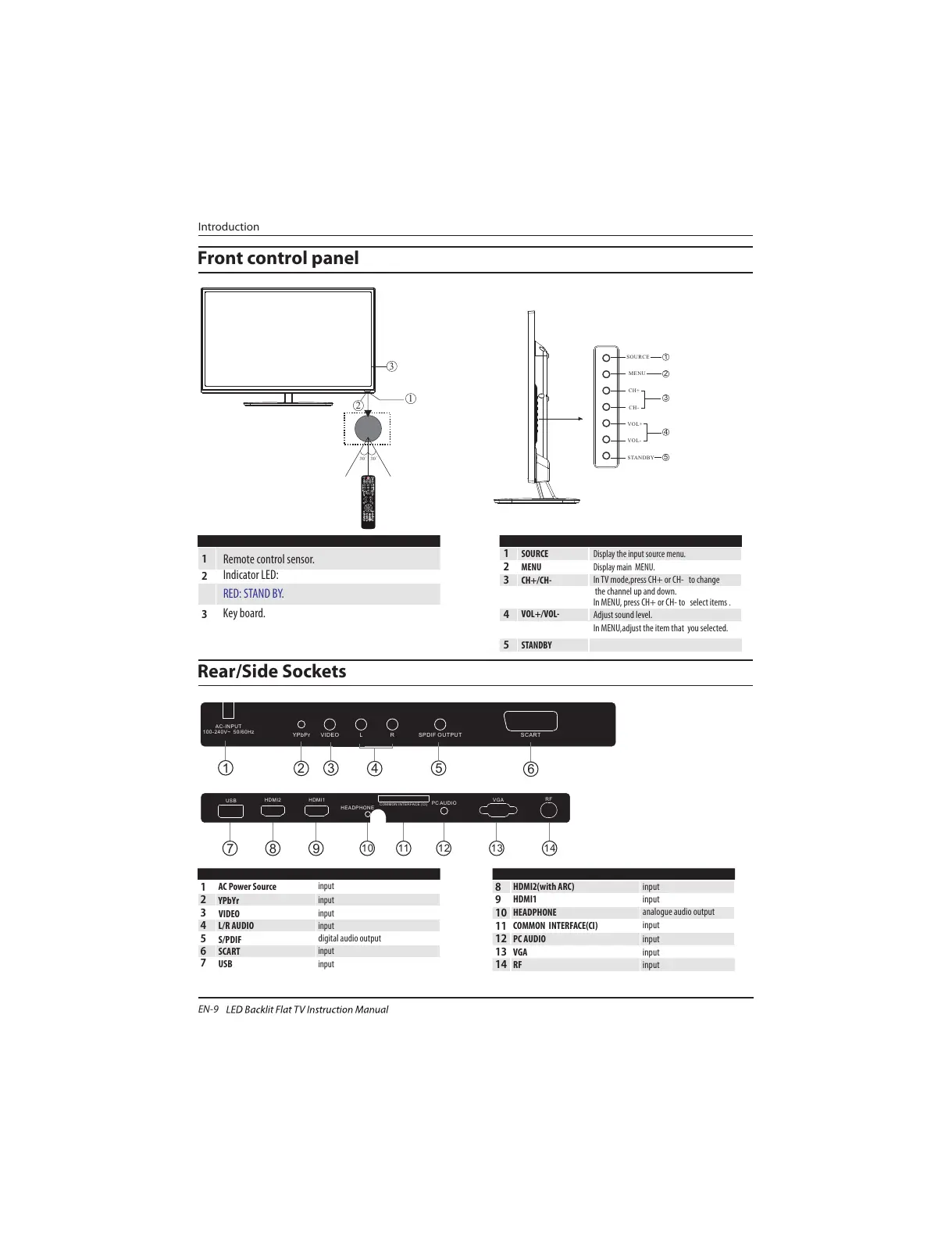
Rear/Side Sockets
1
2
3
Remote control sensor.
Indicator LED:
RED: STAND BY.
Key board.
1
SOURCE
Display the input source menu.
MENU
Display main MENU.
3
4
CH+/CH-
In TV mode,press CH+ or CH- to change
the channel up and down.
In MENU, press CH+ or CH- to select items .
STANDBY
2
VOL+/VOL-
Adjust sound level.
In MENU,adjust the item that you selected.
5
1
YPbYr
2
input
3
4
input
5
digital audio output
input
AC Power Source
6
input
S/PDIF
SCART
L/R AUDIO
VIDEO
7
input
USB
input
8
9
HDMI2(with ARC) input
10
11
12
13
input
HDMI1
COMMON INTERFACE(CI)
PC AUDIO
input
analogue audio output
input
HEADPHONE
input
VGA
14
input
RF
Introduction
Front control panel
EN-9
AC-INPUT
100-240V~ 50/60Hz
YPbPr
VIDEO L R
SPDIF OUTPUT
SCART
2 3
1
4
6
5
7 8 9
11 12 13 1410
30 30
1
2
3
MENU
CH+
CH-
VOL+
VOL-
2
SOURCE
1
3
4
STANDBY
5
COMMON INT ERFACE (CI)
VGA
RF
USB
HDMI2 HDMI1
HEADPHONE
PC AUDIO
COMMON INTERFACE (CI)
All manuals and user guides at all-guides.com