Operation
EN-23
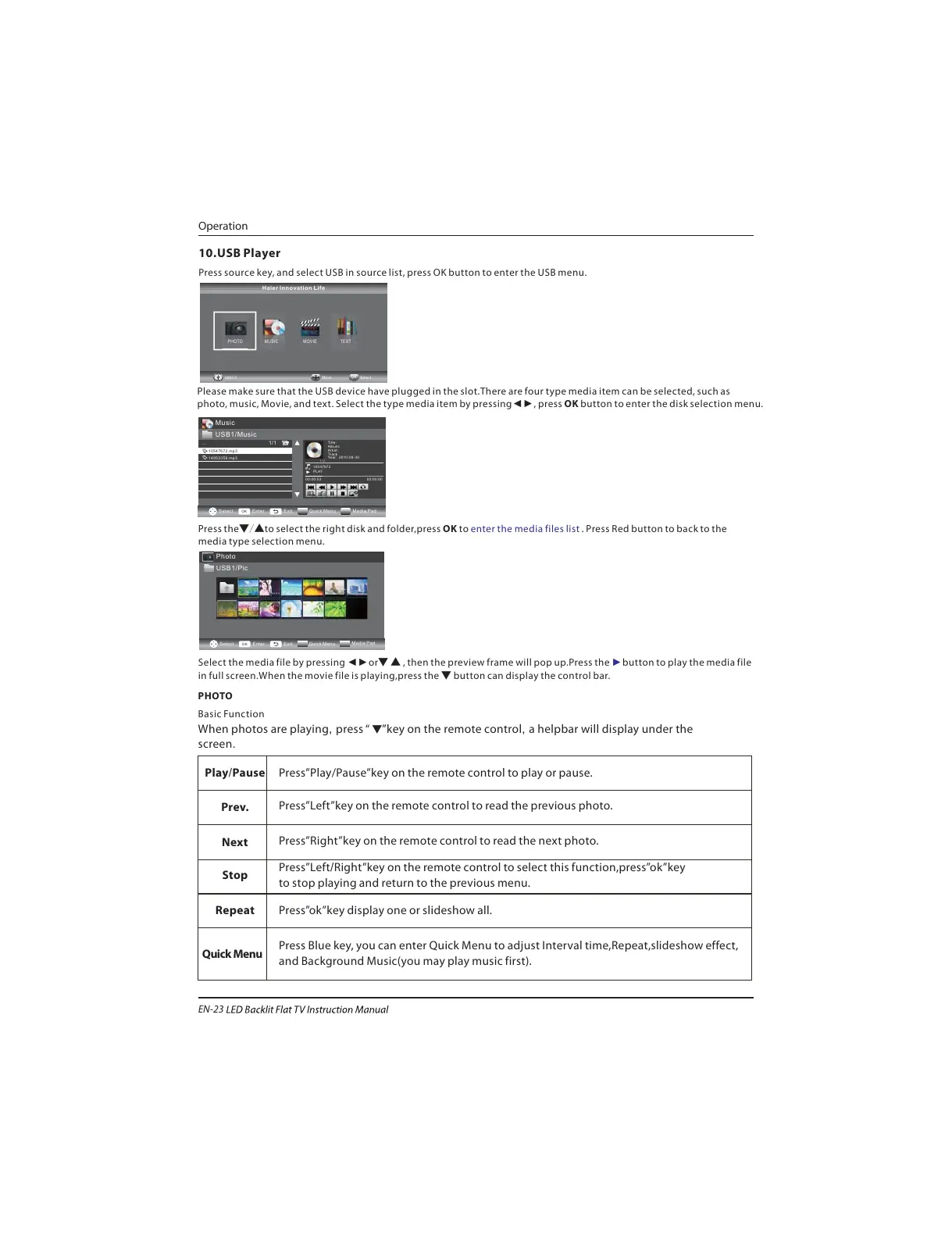
Press source key, and select USB in source list, press OK button to enter the USB menu.
10.USB Player
Please make sure that the USB device have plugged in the slot.There are four type media item can be selected, such as
photo, music, Movie, and text. Select the type media item by pressing , press OK button to enter the disk selection menu.◄►
Press the to select the right disk and folder,press OK to . Press Red button to back to the
media type selection menu.
▼/▲ enter the media files list
Select the media file by pressing or , then the preview frame will pop up.Press the button to play the media file
in full screen.When the movie file is playing,press the ▼ button can display the control bar.
◄► ▼ ▲ ►
Photo
USB1/Pic
Select
OK
Enter Exit
Quick Menu
Media Pad
PHOTO MUSIC TEXTMOVIE
Haier Innovation Life
Basic Function
screen.
When photos are playing, press
Press”Play/Pause”key on the remote control to play or pause.
Music
.. 1/1
Select
OK
Enter Exit
Quick Menu
Media Pad
Title:
Album:
Artist:
Track
Year: 2010-09-30
1 / 2
10547672
PLAY
00:00:53 00:00:00
10547672.mp3
14953359.mp3
USB1/Music
“ ▼”key on the remote control, a helpbar will display under the
Press”Left”key on the remote control to read the previous photo.
Press”Right”key on the remote control to read the next photo.
Press”
to stop playing and return to the previous menu.
Left/Right”key on the remote control to select this function,press”ok”key
Press”ok”key display one or slideshow all.
Press Blue
and Background Music(you may play music first).
key, you can enter Quick Menu to adjust Interval time,Repeat,slideshow effect,
Play/Pause
Prev.
Next
Stop
Repeat
Quick Menu
PHOTO
Usb2.0 Move Select
OK


 To Next Page