9
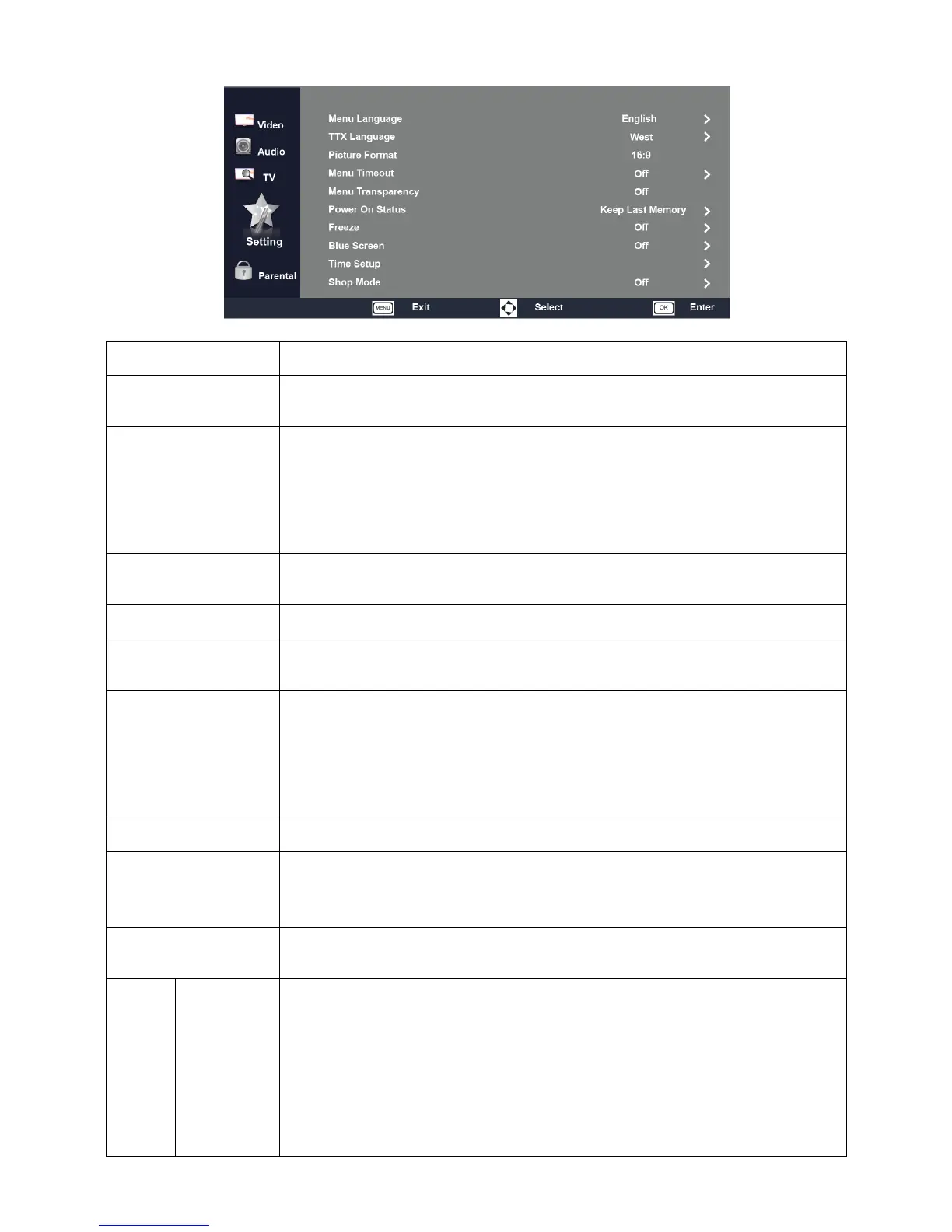
Items Description
Menu Language
Select an OSD menu language can be displayed. Default English is selected as menu
language.
TTX Language
Select a Teletext language in TTX mode.
West: Western Europe
East: Eastern Europe
Russian: Russian
Arabic: Arabic
Picture Format
Resize the aspect ratio of the picture for optimum viewing. Available formats : 16:9,
4:3, Zoom1 and Zoom2.
Menu Timeout Set up the period of time that the OSD menu screen is to be displayed.
Menu Transparency
Select an OSD menu transparency as Off, Low, Middle, High, by default OSD
transparency is set to Low.
Power On Status
Select desired TV turn on condition, when AC power switch is turned on.
Standby: TV will be in stand by condition and can be turned on by press Power key on
remote control.
Power On: TV will turn on as soon as AC power switch is turned on.
Keep Last Memory: TV will turn on as per the last power on settings.
Freeze When the Freeze Switch is On, picture is frozen while changing the channel.
Blue Screen
To select the transition type required while changing from one channel to another.
Select Off : No blue screen function
Select On : Blue screen will appear while changing the channel.
Color System
To Support Auto, PAL, PAL_60, NTSC, NTSC4.43, SECAM. (This feature is only
available in AV mode.)
Time
Setup
Time
Date : Enter TV date in year, month and date format YYYY/MM/DD. Default date is
2000/01/01.
Time : Enter desire TV time in hour, minute and second format HH:MM:SS. Default
time start from 00:00:00.
Power On Timer : Turn on TV from standby mode with pre-defined channel/source at
specified time automatically.
On : TV will turn on daily at specified time with specified channel / source.
Once : TV will turn on only once at specified time and channel/source and resets to
Off.
Timer: Set turn on/off time
Power On Setting: Select channel/source when turn on TV
Power Off Timer : Turn off the TV at the specified time.
On : TV will turn off daily at specified time.
Once : TV will turn off only once and resets to Off.
Note: Date and time will be reseted to default if AC power is turned off.
Power On Timer will work only when TV is in standby mode.
Sleep Timer
Set a time period after which the TV will be turned off and enter stand by mode.
Sleep timer can be set to Off,10,20,30,40,50,60,90 & 120 minutes.



 To Next Page