3
4. INITIAL SETUP
①
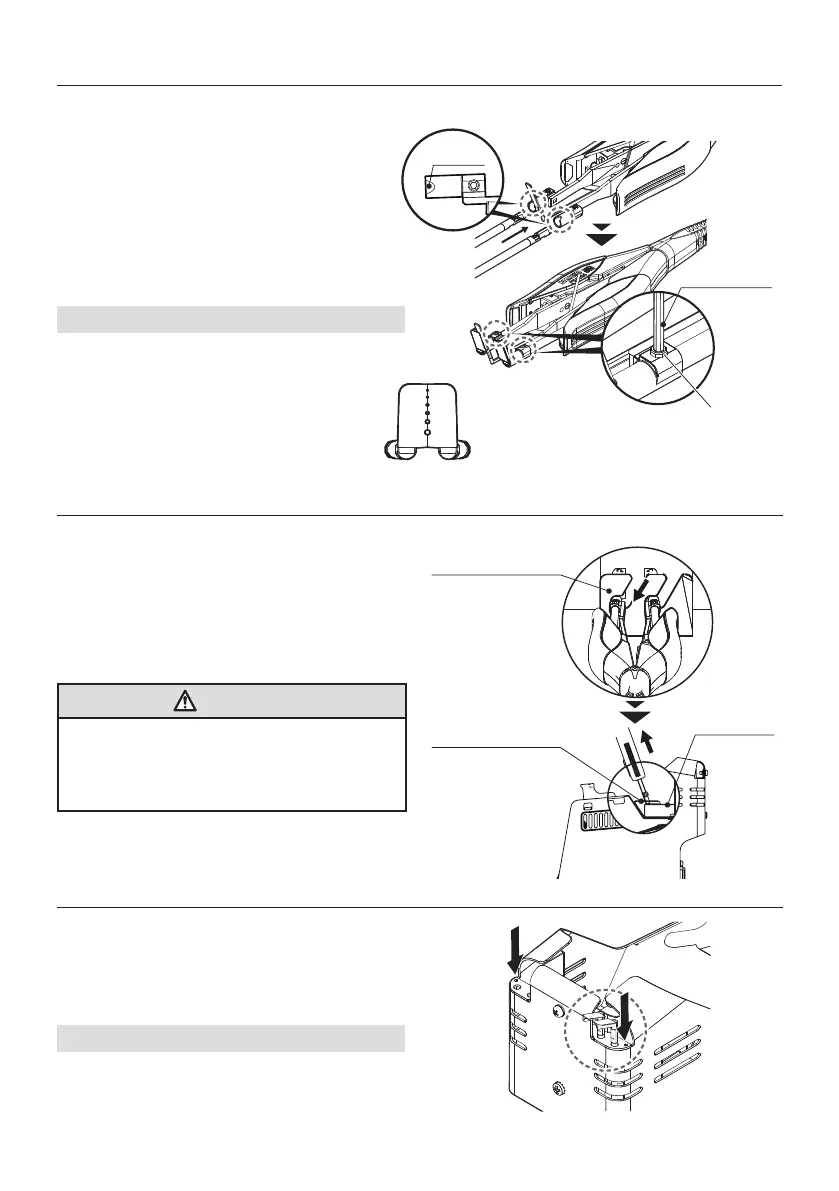
Stop provisionally in the tapped hole of the
handle, and do a set the hexagon socket set
screw.
②
Insert the blade so that the blade mounting
ange locks into the FT-8004.Merge type V
and the V-groove of the back of the blade.
NOTE:
Blades are not heated unless both blades are
inserted fully. Be sure to use the blades as
a set.
③
Fix it with a nger so that the point of a
sword does not work, tighten the hexagon
socket set screw with the hexagonal
wrench to secure the blades.
Hexagon wrench
V groove
Hexagon socket set screw (M2.5x2.5)
①
Switch off the power and wait until the blades
have cooled down.
②
Remove the screws with the hexagonal
wrench and remove the blades using the main
body blade removal plate.
CAUTION
* When pulling out or inserting blades, be sure
that the power is switched off.
* Before pulling out the blades, check that the
blades have cooled down suf ciently.
4-1-3 Blade holder
The removed blades can be placed in the holder
as shown at right.
Hex wrench can placed in the position of the
arrow.
NOTE:
Place the removed blade in the blade holder.
4-1 Blades
4-1-1 Attaching blades
4-1-2 Removing blades
Blade removal plate
Blade removal plate
Blade guard


 To Next Page