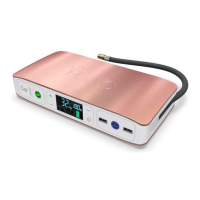
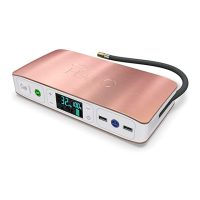
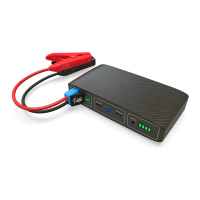
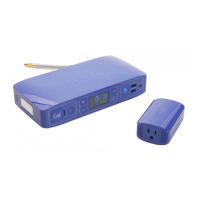
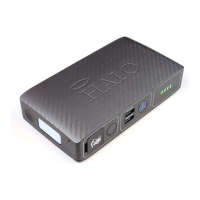
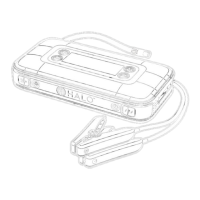
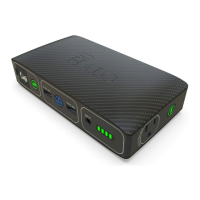
The HALO BOLT ULTIMATE 2.0 is a versatile and portable power solution designed to jump start vehicles, inflate tires, and charge electronic devices. It comes with a comprehensive set of accessories, including jumper cables, a 20W PD charging adapter, a 24-inch USB-C to USB-C cable, an interchangeable nozzle kit, a 24-inch air hose extension, and a carry pouch, making it a convenient tool for home, vehicle, or emergency use.
Function Description:
The HALO BOLT ULTIMATE 2.0 serves multiple functions:
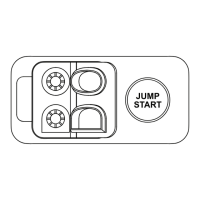
- Vehicle Jump Starting: It can safely jump start a vehicle. The process involves plugging the jumper cables into the jump start output, attaching the red clamp to the positive terminal and the black clamp to the negative terminal of the vehicle battery, and then pressing the "Jump Start" button. The digital screen displays the vehicle battery voltage, and a flashing green light indicates safety checks are in progress. A solid green light signals readiness to start the vehicle. If the vehicle doesn't start on the first attempt, a 30-second wait is recommended before repeating the process. The jump start function cannot be used simultaneously with USB, AC output, or air compressor modes. It is also designed to operate within a safe temperature range, with a "TEMP" indicator appearing if used outside this range.
- Tire Inflation (Air Compressor): The device features an air compressor for inflating tires, balls, pool floaties, and bike tires. It includes a 24-inch air hose extension and interchangeable air nozzles. Users can connect the air hose to the tire or use the appropriate nozzle for other inflatables. The desired pressure is set using the (+) or (-) buttons, and the pressure measuring units can be changed with the UNIT button. Inflation begins by pressing the Air Compressor ON/OFF button, and the compressor automatically shuts off once the set pressure is reached. The air compressor can be started or stopped at any point by pressing its ON/OFF button, and the pressure settings can be adjusted quickly by long-pressing the (+) and (-) buttons.
- Electronic Device Charging: The HALO BOLT ULTIMATE 2.0 provides portable power for charging phones, tablets, laptops, and other electronic devices.
- AC Output: Laptops and other electronic devices rated at 75 watts or less can be powered via the AC output port. Users connect the AC power plug of their device to the AC output port and press the AC Power ON/OFF Button, waiting for a solid green light. A flashing green light indicates safety checks, while a flashing red light means the connected device exceeds the 75-watt limit. The AC output automatically powers off after 30 minutes of inactivity.
- USB Output: Standard 5V USB electronic devices, including mobile phones, tablets, wireless headphones, and digital cameras, can be charged using the USB-A or USB-C outputs. The device incorporates HALO SMART CHARGE TECHNOLOGY to ensure fast and safe charging by communicating with the electronic device. USB charging automatically powers off after 30 minutes of inactivity.
- Floodlight and Emergency Light: The device includes a convenient floodlight and emergency light. A single press of the Floodlight ON/OFF Button turns on the floodlight. A second press activates a red emergency light, and a third press initiates an SOS flashing red light. The floodlight automatically turns off after 2 hours of inactivity.
Usage Features:
- Digital Display: An easy-to-use digital display shows the charge percentage, vehicle battery voltage, and other relevant information during operation.
- Portable Power: The compact and versatile design, along with its carrying pouch, makes it easy to store and transport, ensuring power is available anywhere.
- Automatic Shut-off: The air compressor automatically stops when the desired pressure is reached or if an over-temperature protection set point is reached. The AC output and USB charging features also automatically power off after 30 minutes of inactivity to conserve battery.
- Safety Features: The device includes safety checks for jump starting, indicated by flashing green lights, and warnings for incorrect jumper cable connections (flashing red light). It also has temperature indicators ("TEMP") to alert users if the device is operating outside its safe temperature range for charging or jump starting.
- Bidirectional USB-C Port: The USB-C port serves as both an input for charging the HALO BOLT ULTIMATE 2.0 and an output for charging other devices.
Maintenance Features:
- Charging: The HALO BOLT ULTIMATE 2.0 is charged using the provided 20W PD Charging Adapter and USB-C to USB-C cable, plugged into a wall outlet. The digital screen illustrates the charge percentage, and all five battery indicator lights turn solid green when fully charged (up to 9 hours). It is designed to charge between 32°F-113°F (0-45°C), with a "TEMP" indicator appearing if charging is attempted outside this range.
- Cleaning: The device should not be cleaned with harsh chemicals, soaps, or detergents. Instead, the case should be wiped with a soft cloth.
- Port Maintenance: To prevent contamination from lint or debris, the charging ports should be periodically cleared using a canned-air type of product.
- Storage: The HALO BOLT ULTIMATE 2.0 should be kept dry and away from moisture, corrosive materials, heat sources, and open flames. It should not be exposed to temperatures above 212°F (100°C) or incinerated.
- Ventilation: When charging the internal battery, it is important to work in a well-ventilated area and avoid restricting ventilation.
- Battery Disposal: Batteries should be recycled or disposed of according to state and local guidelines.
- Non-User Serviceable: The HALO BOLT ULTIMATE 2.0 contains no user-serviceable parts and should not be disassembled. Incorrect reassembly can lead to shock or fire hazards.

 Need help?
 General

 To Next Page