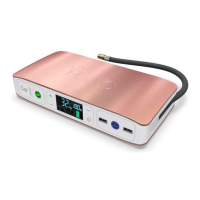
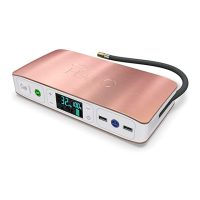
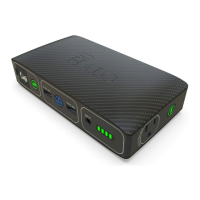
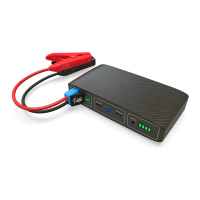
HALO BOLT AIR+ DC
Thank you for choosing HALO!
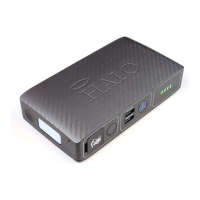
Powerful and loaded with features including an easy to use digital
display, the HALO BOLT AIR+ DC can be used to safely jump start your
vehicle, inate your tires and power your electronic devices anywhere.
The HALO BOLT AIR+ DC provides portable power so you can charge
your phone, tablet and other electronic devices anywhere! The HALO
BOLT AIR+ DC includes an all new DC output that seamlessly integrates
with 12V devices including a HALO AC inverter to power household
items. The HALO BOLT AIR+ DC also includes a convenient oodlight
and emergency light. Compact, versatile and simple to use, the HALO
BOLT AIR+ DC and all accessories t neatly in its carrying pouch and is
perfect to store in your home or vehicle for every day use or an
emergency need. Never be without a charge, a jump start, or with a at
tire again!
SAFETY PRECAUTIONS
DANGER-CAUTION Read and understand all safety information
before using this product. Failure to follow these instructions may
result in electrical shock, explosion, re which may result in serious
injuries, death or property damage.
• When used correctly, lithium- ion rechargeable batteries provide a
safe and dependable source of portable power. However, if they are
misused or abused, this may result in leakage, burns, re or explosion,
causing personal injury or damage to other devices.
• Misusing or incorrectly connecting your HALO BOLT AIR+ DC may
cause electric shock to users and damage equipment.
• Do not operate in explosive atmospheres such as in the presence of
ammable liquids, gases or dust.
• Remove jump start clamps from vehicle battery after jump starting
vehicle.
• Keep your HALO BOLT AIR+ DC dry and away from moisture and
corrosive materials. The HALO BOLT AIR+ DC should not be used near
water or wet areas such as bathtubs, showers, bathrooms, sinks,
swimming pools or basements.
• Do not expose your HALO BOLT AIR+ DC to moisture, water, rain, or
snow.
• Keep your HALO BOLT AIR+ DC away from heat sources, including
open ames, radiators, stoves, ovens, and any other devices that
product heat.
• The lithium-ion rechargeable battery used in this charging device may
present a risk of re or chemical burn if mistreated. Do not expose to
re or excessive temperature. Do not expose to heat above 212°F
(100°C) or incinerate.
• In the unlikely event of leakage or explosion use sand or a chemical
re extinguisher.
• Your HALO BOLT AIR+ DC may become warm under extended high
power operation. Do not cover, wrap, or otherwise restrict the HALO
BOLT AIR+ DC during operation.
• Do not disassemble your HALO BOLT AIR+ DC. There are no
user-serviceable parts inside. Incorrect reassembly may result in shock
or re hazard.
• Do not drop or subject to strong impacts. Do not operate your HALO
BOLT AIR+ DC if it has received a sharp blow, or has otherwise been
damaged in any way.
• Do not puncture, crush or subject to mechanical shock.
• Only charge your HALO BOLT AIR+ DC by the specied method with
the specied charging adapter provided with the unit.
• Do not use any non-HALO-branded accessories with the HALO BOLT
AIR+ DC. Doing so may cause electric shock to users and damage
equipment.
• The HALO BOLT AIR+ DC, along with its accessories, are not toys and
should be kept away from children.
• Make sure the jumper cables are fully plugged into the jump start
output before trying to jumpstart your vehicle.
• Do not touch red (positive) and black (negative) jumper clamps
together at any point.
• Do not insert any foreign object into the ports or openings of your
HALO BOLT AIR+ DC.
• Do not clean your HALO BOLT AIR+ DC with harsh chemicals, soaps or
detergents. Just wipe the case with a soft cloth.
• Make sure the HALO BOLT AIR+ DC’s charging ports do not become
contaminated with lint or other debris. Use a canned-air type of
product periodically to ensure that the port openings are clear.
• When using the air compressor, always check and follow the
manufacturer's recommended pressure. Use caution as the air hose
and connectors may get hot after extended use.
• Batteries should be recycled or disposed of as per state and local
guidelines.
• Storage: 4°F - 158°F (-15°C - 70°C), Discharge: 14°F - 140°F
(-10°C - 50°C), Charge: 32°F - 113°F (0°C - 45°C)
INCLUDED ITEMS
- HALO BOLT AIR+ DC
- Jumper Cables
- AC Inverter
- Carrying Pouch
OPERATING INSTRUCTIONS
CHARGING YOUR HALO BOLT AIR+ DC
To charge your HALO BOLT AIR+ DC, use the provided Wall Charging
Adapter, and plug the AC adapter plug into the charge input. Next,
connect the AC adapter into a wall outlet. The HALO BOLT AIR+ DC will
automatically begin charging. When the HALO BOLT AIR+ DC is fully
charged, all ve battery indicator lights will be solid green and the
digital screen will indicate 100% charge. (This could take up to 9 hours).
While charging, the digital screen will illustrate the charge percentage
of the HALO BOLT AIR+ DC. When fully charged, disconnect the cable.
JUMP STARTING YOUR VEHICLE WITH
THE HALO BOLT AIR+ DC
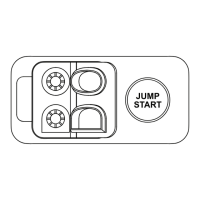
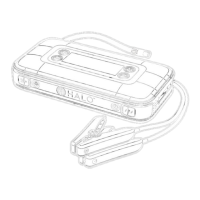
1. Plug the jumper cables into the jump start output on the
HALO BOLT AIR+ DC.
2. Attach the jumper cable clamps to the vehicle battery.
- Red clamp on positive terminal (+)
- Black clamp on negative terminal (-)
3. Press the “Jump Start” button and wait for solid green light.
4. Start your vehicle.
5. Disconnect the jumper cable clamps from the car battery.
USING THE AC INVERTER
The DC to AC inverter can be used to power any device that operates at
110VAC, this includes laptops that use a standard AC wall outlet.
Connect one end of the supplied DC cable to the DC Input on the AC
Inverter and the other end to the DC Output on the HALO BOLT AIR+
DC. Connect your device’s AC plug in the AC Inverter’s AC port. The LED
on the AC Inverter will be solid green if no safety protection is triggered
and the device is charging normally.
TROUBLESHOOTING
• If the LED on the AC Inverter is solid red, then a power fault is
detected.
• If the LED on the AC Inverter is ashing red, then a temperature
protection is triggered.
If the LED on the AC Inverter is illuminated red, solid or ashing, unplug
the device from the Inverter and disconnect the Invert from the HALO
BOLT AIR+ DC. The Inverter will reset.
USING THE 12V DC OUTPUT
The 12V DC output may be used for powering numerous DC electronics
and appliances. To use, simply connect the 5.5 x 2.5mm barrel jack
connector from your device directly into the DC output port of the
HALO BOLT AIR +DC. Turn on the DC output by pressing the ON/O
Button on the HALO BOLT AIR +DC.
CHARGING AN ELECTRONIC DEVICE USING
5V/2.4A USB OUTPUT PORT
1. Use the charging cable provided with your electronic device and
connect the Standard USB end into either one of the HALO BOLT AIR+
DC US 5V/2.4A Output ports.
2. Turn on the USB charging by pressing the
USB Power ON/OFF Button on the HALO BOLT AIR+ DC.
HALO SMART CHARGE TECHNOLOGY
Your HALO BOLT AIR+ DC contains the HALO SMART CHARGE
TECHNOLOGY to achieve higher compatibility for charging standard 5V
USB electronic devices. The HALO SMART CHARGE TECHNOLOGY will
allow the HALO BOLT AIR+ DC to communicate with your electronic
device and provide the fastest and safest charge for that device.
COMPATIBILITY
Standard 5V USB electronic devices including: Mobile phones, Tablets,
PSP, NDS, MP3, MP4, MP5, Bluetooth, GPS, Cameras, and more.
USING YOUR HALO BOLT AIR+ DC FLOODLIGHT
The oodlight can be turned on and o by simply pressing and releasing
the oodlight ON/OFF button. The rst press will turn on the oodlight.
Second press will turn on the red emergency light. Third press will turn on
SOS ashing red light. The oodlight will automatically turn o after 2
hours of inactivity.
SPECIFICATIONS
Battery Cells: 3x Li-Polymer 5000mAh
Battery Pack Energy: 55500 mWh
Jump Start: 12V/600Amps
Air Compressor: 100PSI max
Input: 14V/0.85A
USB Output: 2x USB 5V/2.4A
DC Output: 12V/10A
Dimensions: 4.65 x 9.52 x 1.85 inches
Weight: 2.54 lbs
Operating Temperature: 32°F - 113°F (0°C - 45°C)
AC INVERTER
DC Input: 12VDC
AC Output: 115VAC/60Hz
Rated Power: 100W
JUMP START TROUBLESHOOTING TIPS HALO BOLT AIR+ DC COMPRESSOR
The HALO BOLT AIR+ DC comes equipped with a 24 Inch Air Hose
Extension and Interchangeable Air Nozzles. Simply twist on the
corresponding nozzle to inate balls, pool oaties, bike tires, and more!
1. Connect the air hose to the tire or use the appropriate nozzle to
connect to your inatable device
2. Press the (+) or (-) button to set the desired pressure. The pressure
measuring units can be changed by pressing the UNIT button.
3. Once the desired pressure has been set, begin inating by pressing
the Air Compressor ON/OFF button. The air compressor will shut o
automatically once the pressure has been reached.
PLEASE READ BEFORE OPERATING THIS EQUIPMENT
COMPLIANCE WITH FCC REGULATION
This device complies with part 15 of the FCC Rules and RSS-Gen of IC
Rules. Operation is subject to the following two conditions: (1) This
device may not cause harmful interference, and (2) this device must
accept any interference received, including interference that may cause
undesired operation.
NOTE: This equipment has been tested and found to comply with the
limits for a Class B digital device, pursuant to part 15 of the FCC Rules.
These limits are designed to provide reasonable protection against
harmful interference in a residential installation. This equipment
generates, uses, and can radiate radio frequency energy and, if not
installed and used in accordance with the instructions, may cause
harmful interference to radio communications. However, there is no
guarantee that interference will not occur in a particular installation.
If this equipment does cause harmful interference to radio or television
reception, which can be determined by turning the equipment o and
on, the user is encouraged to try to correct the interference by one or
more of the following measures:
• Reorient or relocate the receiving antenna.
• Increase the separation between the equipment and receiver.
• Connect the equipment into an outlet on a circuit dierent from that
to which the receiver is connected.
• Consult the dealer or an experienced radio/TV technician for help.
CAUTION: To comply with the limits of the Class B digital device,
pursuant to Part 15 of the FCC Rules, this device must be used with
certied peripherals and shielded cables. All peripherals must be
shielded and grounded. Operation with non-certied peripherals or
non-shielded cables may result in interference to radio or reception.
TABLE OF CONTENTS
Safety Precautions
Included Items
Operating Instructions
Troubleshooting Guide
Specications
Warranty and Contact Information
LIMITED WARRANTY
HALO warrants its products to be free from defects in material and
workmanship under normal use.
For all questions or exchange requests, please call 888-907-6274,
contact us at zagg.com/support or visit
www.zagg.com/warranty-policies.
This Limited Warranty sets forth the full scope of HALO’s obligations
and liabilities with respect to the product. All implied warranties,
including without limitation the implied warranties of merchantability
and tness for a particular purpose, are limited to the duration of this
Limited Warranty. In no event shall HALO be liable for any incidental,
special, consequential or punitive damages or any damages or losses of
or to electronic equipment or products that are used with any of
HALO’s products.

 Need help?
 General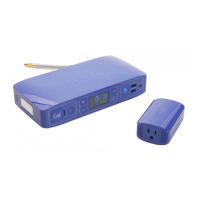

 To Next Page