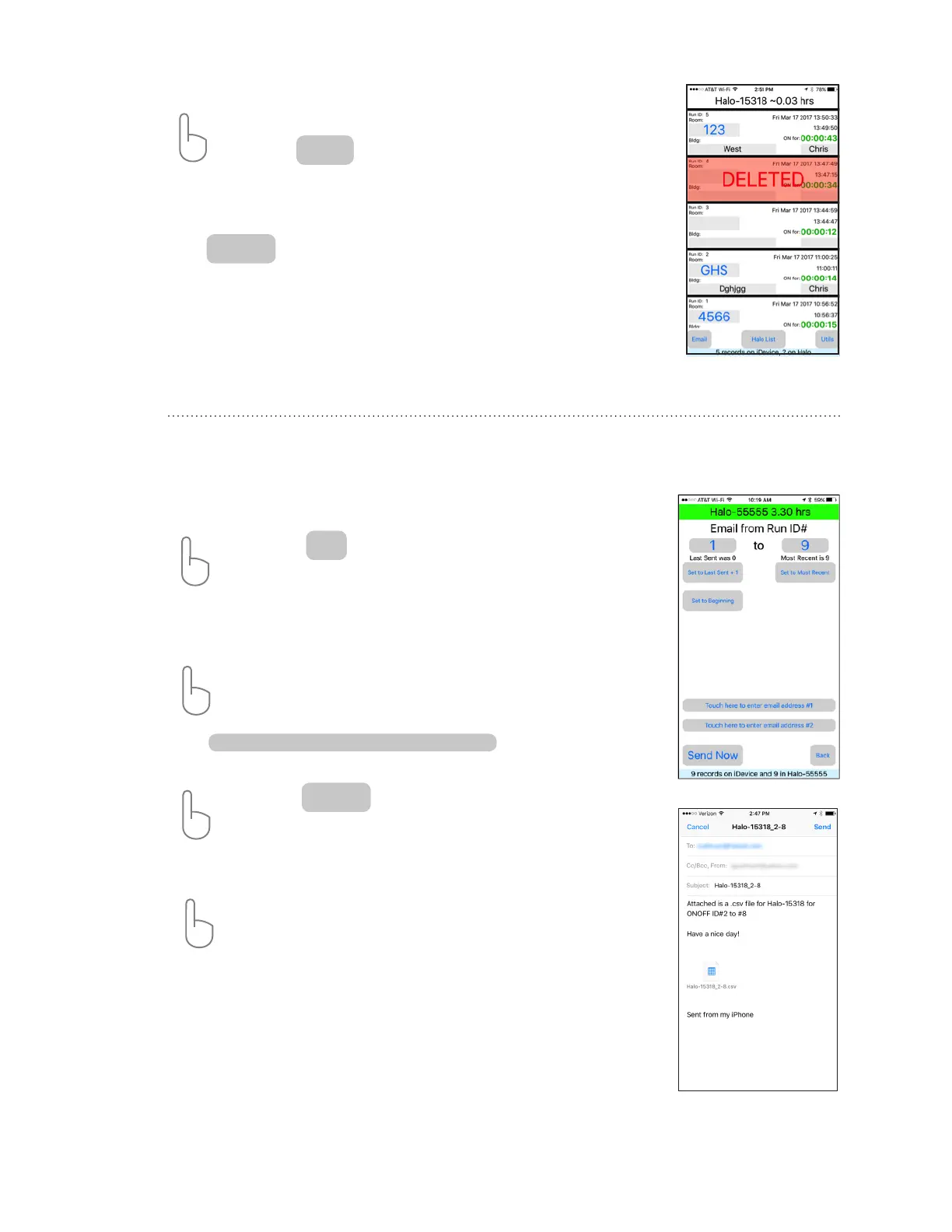
The HaloLog app allows logged data to be sent to any email address for reports, archiving and
data back-up.
*
ACTION: Tap
Select the range of HaloLog ID’s for download by either manually specifying the starting
and ending ID# or use pre-select buttons to choose a particular selection. The iDevice will
remember the ID# of the “last sent” for each HaloFogger.
ACTION: Tap on the e-mail addresses to which data is to be sent . For convenience,
the last e-mail entered address will be displayed by the iDevice.
Tap to enter new email address.
A keyboard will appear to enter address.
ACTION: Tap to email data.
The iDevice’s email screen will open to conrm message.
ACTION: Tap SEND in upper right corner of screen to send message.
*
Back-up data from the HaloFogger® regularly by sending your data by e-mail to a secure
address. Regular back-ups are the best and only protection against hardware failures.
To remove the DELETED identifcation from a Run Event
ACTION: Tap on the RED highlighted Run Event
ACTION: Tap
A conrmation window will appear. Tap ‘Ok” to continue.
The RED highlight and word DELETE are removed.
Tap to return to Run Event Screen.
UnDelete
Done
Email Screen
Send Now
Email
Touch here to enter email address #1
HaloFogger® Operation Manual_1911


 To Next Page