When connecting wires, ensure the circuit is isolated by disconnecting
the negative terminal on the battery.
Ensure correct polarity when wiring the cables. RED + BLACK -.
Wire connections and terminals must be sealed and waterproof.
Warning
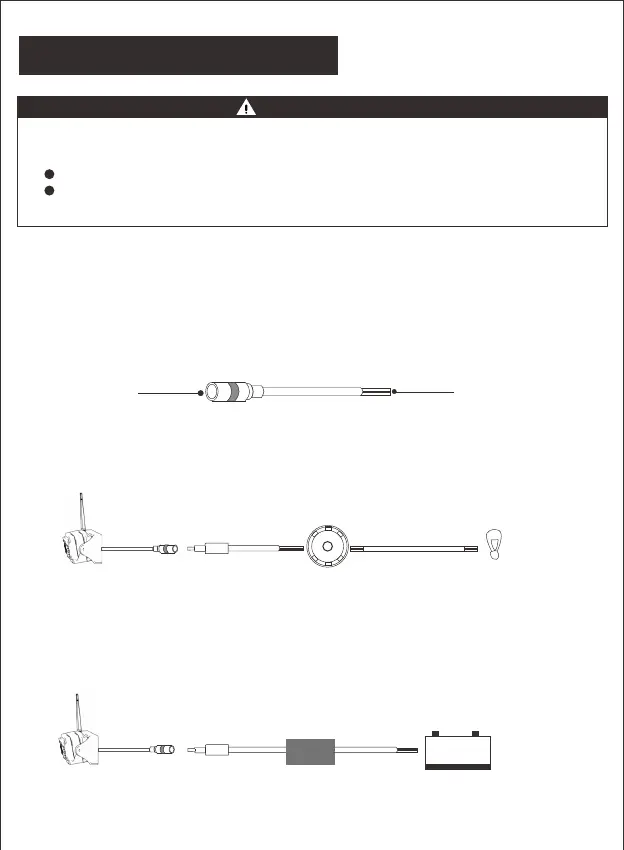
The haloview camera system can be connect to an electrical power source
via a 7 way connector
Wiring to running lights:
the camera will active when the running lights are switched on.
Wiring to reverse lights:
the camera will active when the vehicle engages reverse gear.
Consult the vehicle’s service manual for
specific wiring color code.
When wiring this camera directly to a 12V battery or converter in your RV,
use an in-line switch on the power cable to power on or off your camera.
This will enable this camera to be used when parked without a tow vehicle
connected.
Connects to
12V/24V
Power Supply
Connects to
Camera
Running
Reverse or
Auxillary
Lights
ON/OFF
+ -
DC POWER SUPPLY
-17-
Connecting the Camera


 To Next Page