5
Thank you for choosing a Hama product.
Take your time and read the following instructions and
information completely. Please keep these instructions in a
safe place for future reference. If you sell the device, please
pass these operating instructions on to the new owner.
1. Explanation of Warning Symbols and Notes
Warning
This symbol is used to indicate safety instructions or to
draw your attention to specic hazards and risks.
Note
This symbol is used to indicate additional information or
important notes.
Risk of electric shock
This symbol indicates product parts energized with a
dangerous voltage of sucient magnitude to constitute
a risk of electric shock.
2. Package Contents
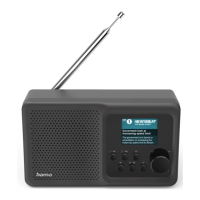
• Internet radio
• AC/DC adapter
3. Safety Notes
• The product is intended for private, non-commercial
use only.
• Protect the product from dirt, moisture and overheating
and use it in dry rooms only.
• As with all electrical devices, this device should be
kept out of the reach of children.
• Do not drop the product and do not expose it to any
major shocks.
• Do not operate the product outside the power limits
given in the specications.
• Keep the packaging material out of the reach of
children due to the risk of suffocation.
• Dispose of packaging material immediately according
to locally applicable regulations.
• Do not modify the device in any way. Doing so voids
the warranty.
Risk of electric shock
• Do not open the device or continue to operate it if
it becomes damaged.
• Do not use the product if the AC adapter, adapter
cable or power cable is damaged.
• Do not attempt to service or repair the device yourself.
Leave any service work to qualied experts.
4. General notes on use
Notes on use
• When a selection among menu items is to be made
(such as YES or NO), the one currently selected has
a light-coloured background ll.
• In menus offering a variety of different options
(such as Equaliser, Update, and so on), the currently
selected option is marked with #.


 To Next Page