4
Note –12or24-hour format
•Inthe 12-hour format, AM or PM is displayed
beforethe time.
6.2. Maximum and minimum temperature and
humidity values
•The mould alarm automatically stores the maximum
and minimum indoor temperaturevalues.
•Repeatedly press the button to switch
between the current temperature, maximum
temperature(MAX) and minimum temperature
(MIN).
Setting the alarm time
•Press the
button (5) until the alarm sign is
displayed.
•Press and then hold the button (5) for 3
seconds until the hours display begins to ash.
•Press the button (4) or button (3) to
select the individual values.
•Press the button (5) to conrm the settings.
•Ifyou do not press the button within 30
seconds, the weather station automatically switches
to normal mode.
Activating/deactivating the alarm
•Press the button (5) to activate or deactivate
the alarm.
•The alarm time now appears on the display and
ashes.
•Press the
button (4). The alarm symbol is
displayed ,meaning that the alarm is now
activated.
•Pressing the button (4) once morewill
deactivate the alarm.
•Press any button to switch off the alarm sound.
Temperature trend display
This display shows the temperaturetrend over the last
12, 9, 6, 3, 0hour(s), within amax. range of 20%-
90%. It is only for informational purposes; you cannot
make any settings on this display.
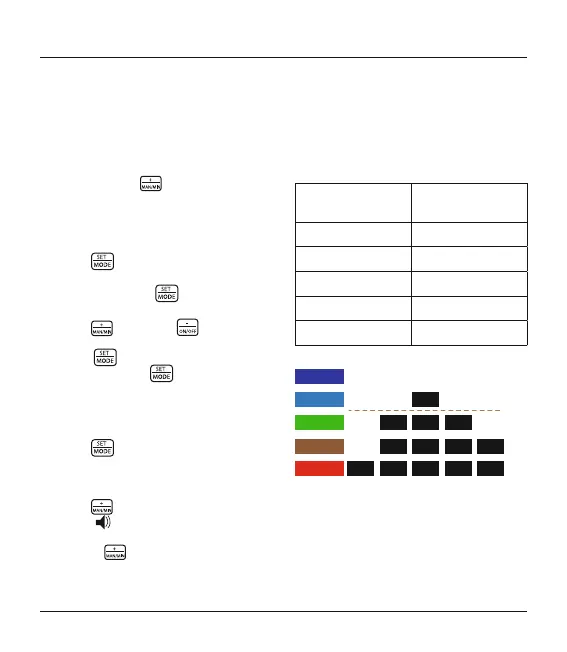
Graphic representation of humidity within the
last 12 hours
Level felt (comfort
index)
Relative humidity
Toowet 81% to 90%
Wet61% to 80%
Comfortable 41% to 60%
Dry 31% to 40%
Toodry 20% to 30%
TOODRY
DRY
COMFORT
WET
TOOWET
-12h -9h -6h -3h 0h
20%
20%
60%
80%
90%
MOLD


 To Next Page