3
5. Operation
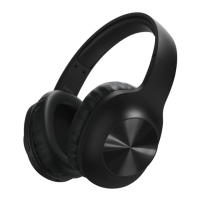
Switching the headphones on/off
•Press and hold the MFB button (5) for about 4seconds until
you hear an acoustic signal and the LED (6) emits ashes of
alternating redand blue light.
•Toswitch off the headphones, press and hold the MFB button
(5) for about 4seconds until the LED (6) goes out.
Note
The functions described in this section areonly available for
Bluetooth
®
-capable terminal devices.
5.1. Bluetooth
®
pairing
Note –Pairing
•Make surethat your Bluetooth
®
-capable terminal device is on
and Bluetooth
®
is activated.
•Make surethat your Bluetooth
®
-capable terminal device is
visible for other Bluetooth
®
devices.
•For moreinformation, please refer to the operating
instructions of your terminal device.
•The headphones and the terminal device should be no further
than one metreapart. The shorter the distance, the better.
•Make surethat the headphones areswitched off.
•Switch on the headphones by pressing and holding the MFB
button (5) for about 4seconds until you hear an acoustic signal
and the LED (6) emits ashes of alternating redand blue light.
The headphones aresearching for aBluetooth
®
connection.
•Open the Bluetooth
®
settings on your terminal device and
wait until
Hama BTH VOICE
appears in the list of Bluetooth
®
devices found.
•Select Hama BTH VOICE and wait until the headphones are
listed as connected in the Bluetooth
®
settings on your terminal
device.
•Ifthe connection was successful, you will hear another acoustic
signal and the LED (6) slowly ashes blue.
Note –Bluetooth
®
password
Some terminal devices requireapasswordinorder to connect to
another Bluetooth
®
device.
•Ifyour terminal device requests apasswordfor connection to
the headphones, enter 0000.
Note
•After asuccessful connection, the LED (6) slowly ashes blue.
•Ifthe connection could not be set up, rst switch off the
device and then repeat the steps for the Bluetooth
®
connection listed under 5.1.
5.2. Automatic Bluetooth
®
connection (after successful
pairing)
Note
Once the headphones have connected to aterminal device, they
will storethe device and automatically connect to it again when
the device is within range and has Bluetooth
®
enabled. Renewed
pairing is not required for terminal devices that have previously
been connected to these headphones.
When the headphones areswitched on, they willautomatically
attempt to connect to the terminal device last connected. If
you want to connect the headphones to anew terminal device,
please follow the steps for the Bluetooth
®
connection listed
under 5.1.
As soon as the headphones areconnected to your terminal
device, music is transmitted via Bluetooth
®
using these
headphones. Forfurther information, please also refer to the
operating instructions of your terminal device.
•Switch on the headphones with the MFB button (5). The LED
(6) begins to emit ashes of alternating redand blue light, and
the headphones automatically connect to the terminal device
last used.
Note
•Ifthe connection was successful, the LED (6) slowly ashes
blue.
•Ifthe connection could not be set up, rst switch off the
headphones and then repeat the steps for the Bluetooth
®
connection listed under 5.1.
•Itmay be necessary to change the settings on your
terminal device to enable it to automatically connect to the
headphones.
Note –Connection impaired
After the headset and terminal device have been paired, a
connection is established automatically.Ifthe Bluetooth
®
connection is not established automatically,check the following:
•Check the Bluetooth
®
settings of your terminal device to see
whether
Hama BTH VOICE
is connected. If not, repeat the
steps listed under 5.1. Bluetooth
®
pairing.
•Check whether obstacles areimpairing the range. If so, move
the devices closer together.
•The performance can also be affected by aweak battery.
5.3. Audio playback
Note
•Note that the functions described under 5.3., 5.4. and 5.5.
areonly possible with an active Bluetooth
®
connection.
•Your terminal device must also support the individual
functions.


 To Next Page