8
Programming
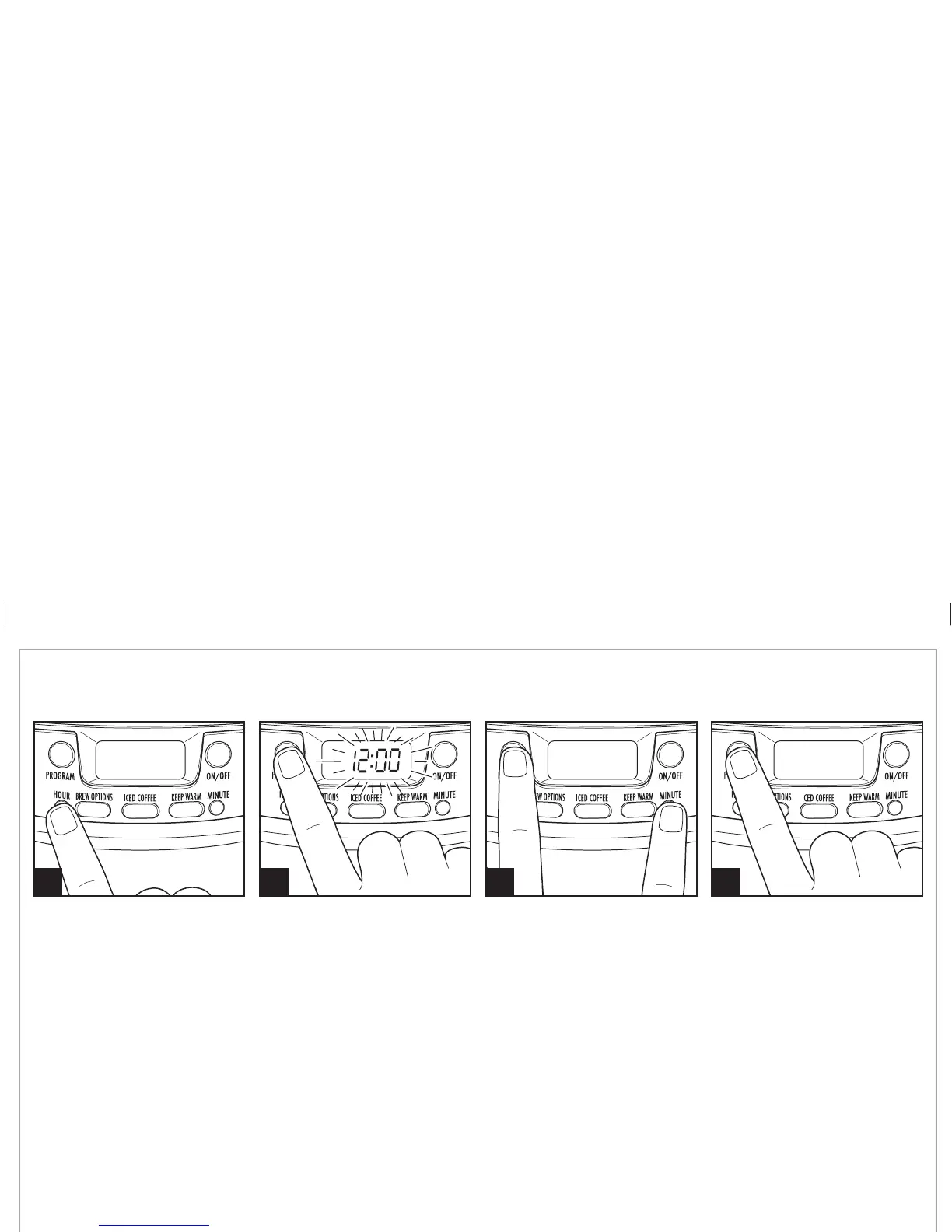
1 2 3 4
To set clock: Press
HOUR
and then
MINUTE
. NOTE: Clock time must
be set for programming function
to work.
To program auto brew: Press and hold PROGRAM until clock flashes.
Continue holding
PROGRAM;
then press
HOUR
and
MINUTE
until the
desired brewing start time is reached. “START TIME” will display
after time is selected. Select
BREW OPTIONS
and KEEP WARM settings,
if desired.
Press and release
PROGRAM
to
activate automatic brewing. A
green light will signal that the
unit is in program mode. “START
TIME” will disappear in the display
after
PROGRAM
button is pressed.
Mocha Cinnamon Iced Coffee
12 tablespoons ground coffee 1 cup chocolate syrup
1/2 teaspoon ground cinnamon 8 cups ice cubes
1 1/2 cups half-and-half
1. Fill water reservoir with water to the 6-cup line. Fill coffee tank with ice cubes to the 10-cup marking line. Place over water reservoir.
2. Place filter basket over coffee tank. Add coffee filter, coffee, and cinnamon to basket. Brew coffee.
3. For one serving, dispense 8 ounces of brewed coffee into a 12-ounce thermal cup or glass. Add 3 tablespoons half-and-half, 2 tablespoons
chocolate syrup, and 1 cup ice. Stir and enjoy. Servings: 8 (12-ounce)
Iced Coffee Recipe
840213200 ENv02.indd 8840213200 ENv02.indd 8 3/30/12 2:43 PM3/30/12 2:43 PM





 To Next Page