6
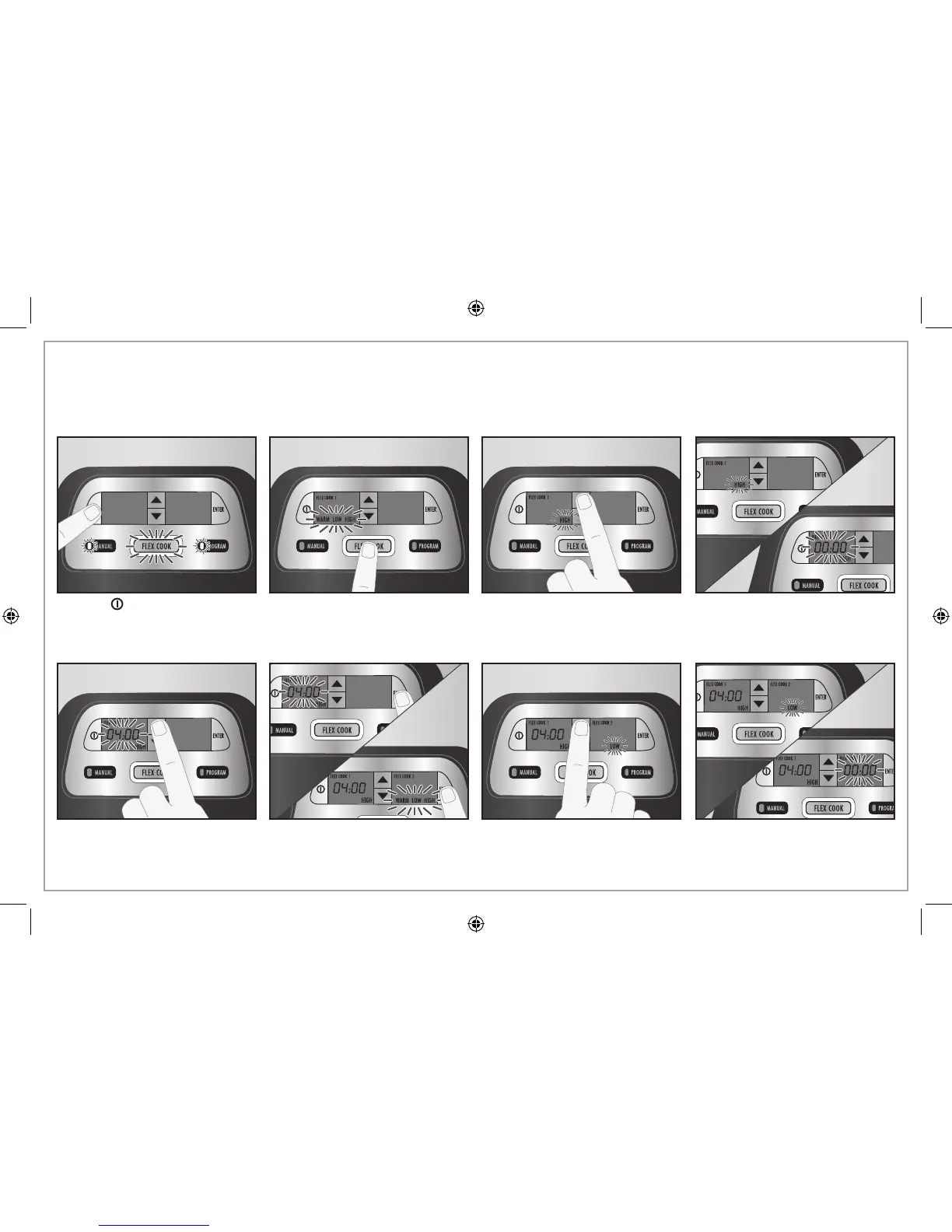
2. Press FLEX COOK.
Flex Cook Mode
1. Press to turn on. NOTE: If
no setting is selected in
30 seconds, the unit will turn off
automatically.
3. Press the up or down arrow to
select Flex Cook 1 heat setting.
4. Heat setting will flash for
5 seconds before flashing
“00:00” is displayed.
5. Press the up or down arrow
to set the timer. The timer
can be adjusted in 30-minute
increments.
6. Press ENTER. 7. Press the up or down arrow to
select Flex Cook 2 heat setting.
8. Heat setting will flash for
5 seconds before flashing
“00:00” is displayed.
IMPORTANT: NEVER lock clips during cooking. Only use wire
clips to secure lid when transporting.
Use Flex Cook when you want to program two different heat and time settings before the unit switches automatically to WARM.



 To Next Page