5
4
IMPORTANT: NEVER lock clips during cooking. Only use wire
clips to secure lid when transporting.
Manual Mode
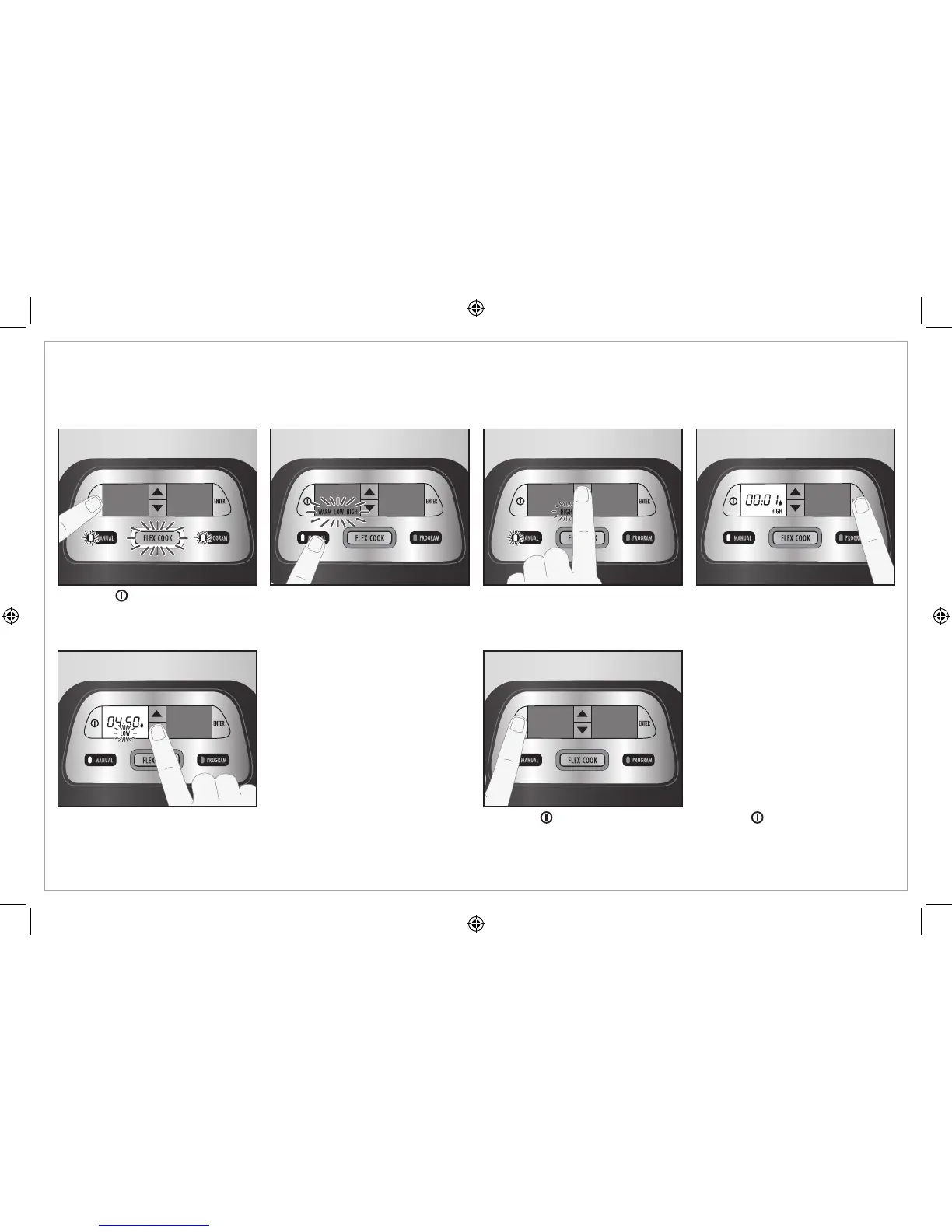
1. Press to turn on. NOTE: If
no setting is selected in
30 seconds, the unit will turn
off automatically.
Use Manual Mode when you want to select a heat setting only. Display shows actual time cooked.
2. Press MANUAL. 3. Press the up or down arrow
to select heat setting.
NOTE: Do not use WARM
setting to cook food.
4. Press ENTER to start cooking,
a long chime will sound, and
timer begins to count up.
NOTE: If ENTER is not pressed
in 5 seconds after the setting
is selected, the unit will
turn on automatically for a
maximum of 24 hrs.
5. During the cycle, the heat setting can be adjusted by pressing
the up or down arrow at any time. The new setting will flash for
5 seconds and then become solid. If the heat setting is changed,
the time will remain the same.
6. Press
to turn off slow cooker. NOTE: If is not pressed during
the cycle, the unit will stay on heat setting selected until the
maximum cooking time of 24 hours is reached. Then it will turn off
automatically.
NOTE: Press MANUAL, PROGRAM,
or FLEX COOK to cancel the
existing setting and start a new
program setting.



 To Next Page