EN © 2024 mPTech. All rights reserved. HS2403_HS2403e
27
Programmable button
Pressing on an unlocked smartphone launches a user-defined action
or application You can change its function using the settings menu.
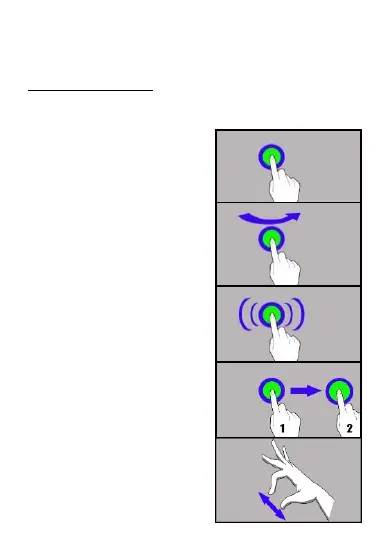
11. Using the touch screen
The smartphone's touchscreen makes it easy to select items, perform
operations and gestures. The touchscreen can be controlled by the
following actions:
11.1. Touch
Touch one to start options, app,
menu.
11.2 Swipe
Quickly swipe up, down, to the left or
to the right, to scroll the list or the
screen.
11.3 Triple click
Quickly tap the screen three times to
start zooming - if this option is
enabled in your smartphone settings.
11.4 Hold and swipe
Touch an element (an icon perhaps)
and hold it for about 1 seconds. Then
you can delete/uninstall that
element.
11.5 Slide in and out
Touch the screen with two fingers
and slide them together or apart to
zoom in or out a photo or a map.



 To Next Page