EN © 2024 mPTech. All rights reserved. HS2403_HS2403e
26
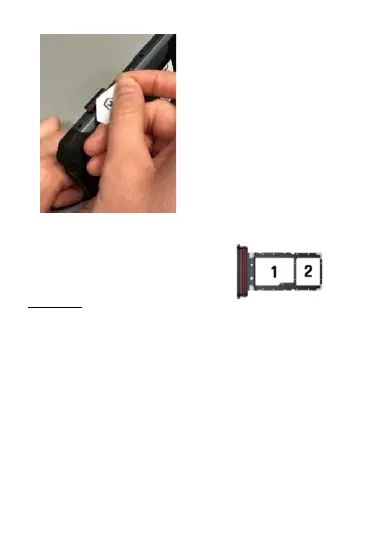
Hammer is equipped with a tray for SIM / microSD cards, thanks to
which you can use the phone in the following configurations:
1. microSD card
2. nanoSIM card
10. Buttons
Menu (virtual)
Pressing it will cause the list of open apps to appear, where you can
switch in-between or turn them off.
Home (virtual)
One quick press takes you to phone desktop. A longer press launches
Google Assistant.
Back (virtual)
Press to exit the application / return to the previous screen.
Blockade on/off button
• One quick press locks/unlocks the screen.
• Pressing the button for about 2 sec. will cause:
o If the smartphone is off - the device would switch on.
o if the smartphone is switched on, call up a menu to shut down
the device, reboot the system.
Volume increase and decrease buttons
Pressing during a voice call will cause an increase or decrease of the
audio connection volume.



 To Next Page