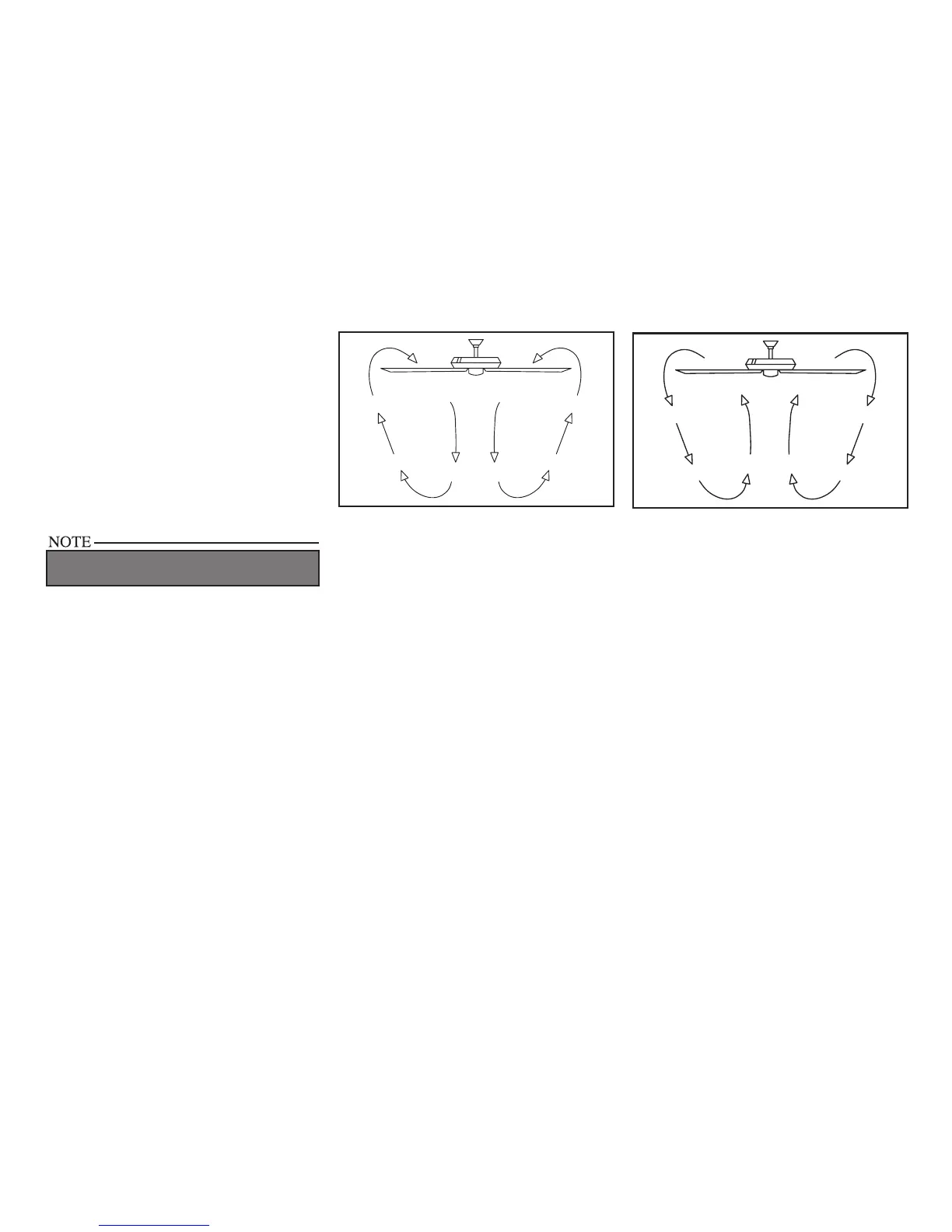
Figure 20
Figure 21
Turn on the power and check the operation of
the fan. The pull chain controls the fan speeds
as follows: 1 pull - High, 2 pulls - Medium, 3
pulls - Low and 4 pulls - Off
Speed settings for warm or cool weather depend
on factors such as room size, ceiling height,
number of fans, and so on.
The slide switch controls the direction: forward
(switch down) or reverse (switch up).
WAIT FOR FAN TO STOP BEFORE REVERSING
THE DIRECTION OF BLADE ROTATION.
Operating Your Fan 11.
Warm weather - (Forward) A downward
air ow creates a cooling effect as shown in
Figure 20. This allows you to set your air condi-
tioner on a higher setting without affecting your
comfort.
Cool weather - (Reverse) An upward air ow
moves warm air off the ceiling are as shown in
Figure 21. This allows you to set your heating
unit on a lower setting without affecting your
comfort.



 To Next Page