EasyManua.ls Logo

HAMPTON BAY ZANDRA 92382 - User Manual

HAMPTON BAY ZANDRA 92382
38 pages
Print Icon
To Next Page IconTo Next Page
Loading...
Item #1008 630 976, 1008 631 081
Model #92380, 92382
UL Model #52-CHAN
USE AND CARE GUIDE
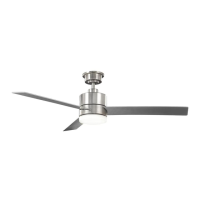
ZANDRA 52-INCH CEILING FAN
To view an instructional video on how to install this product:
1. Go to www.homedepot.com and enter either the Item or Model number, found in the top
right corner of the cover of this instruction manual, in the search eld.
2. Click on your product from the list of search results and click on the video link in the
“Product Overview” section.
Questions, problems, missing parts? Before returning to the store,
call Hubspace Customer Service
8 a.m. - 7 p.m., EST, Monday-Friday, 9 a.m. - 6 p.m., EST, Saturday
1-877-592-5233 / HOMEDEPOT.COM/HUBSPACE
THANK YOU
We appreciate the trust and condence you have placed in Hampton Bay through the purchase of this ceiling fan. We strive to continually create
quality products designed to enhance your home. Visit us online to see our full line of products available for your home improvement needs.
Thank you for choosing Hampton Bay!
Scan for text based
customer support
Scan for online product
warranty information

Questions and Answers

  • A
    amanda29Aug 12, 2025
    What to do if my HAMPTON BAY ZANDRA 92382 will not start?
    • A
      Amanda NelsonAug 12, 2025
      If your HAMPTON BAY fan won't start, begin by checking the main and branch circuit fuses or breakers. Ensure the wall switch (if applicable) is in the 'on' position. Inspect the line wire connections to the fan and switch wire connections in the switch housing. Check the battery in the transmitter and make sure you're within the normal operating range of 10-20 feet. Before checking the dip switch settings, remember to turn off the power supply.
  • A
    Anthony RamirezAug 16, 2025
    Why does my HAMPTON BAY ZANDRA 92382 move backwards and forwards when turned on?
    • D
      David BrownAug 16, 2025
      The backward and forward movement of your HAMPTON BAY fan upon start-up is normal for DC motor fans. This partial movement is due to the DC motor aligning its internal magnetic poles for proper operation. This design saves electricity and allows the fan to operate much more quietly than standard AC motor fans.
  • T
    Tammy RosarioAug 19, 2025
    Why is my HAMPTON BAY ZANDRA 92382 Fan so noisy?
    • J
      John FrazierAug 20, 2025
      Several factors can contribute to a noisy HAMPTON BAY fan. Ensure all motor housing screws are snug and the screws attaching the fan blade bracket to the motor hub are tight. Check that wire nut connections are not rattling against each other or the interior wall of the switch housing. If you're using a light kit, make sure the screws securing the glassware are tight and the light bulbs are secure. Ensure the canopy is a short distance from the ceiling and your outlet box is secure, with rubber isolator pads used between the mounting plate and outlet box. Also, allow a 24-hour 'breaking in' period.
  • S
    Stacie HollandAug 23, 2025
    Why is my HAMPTON BAY Fan wobbling?
    • L
      Leslie PrinceAug 23, 2025
      Fan wobble is often due to unequal blade levels. Start by checking that all blade and blade arm screws are secure. To check blade levels, select a point on the ceiling above the tip of one blade and measure the distance from that point to the center of each blade as you rotate the fan. Any deviation should be within 1/8 inch. Run the fan for ten minutes. If the fan continues to wobble please contact customer service and a balancing kit will be sent to you at no charge.
  • M
    Melanie OlsonAug 27, 2025
    Why is my HAMPTON BAY device offline for long periods of time?
    • J
      Joshua FigueroaAug 27, 2025
      If your HAMPTON BAY device is frequently offline, ensure your Wi-Fi signal strength is sufficient. Consider moving your router, using mesh Wi-Fi, or Wi-Fi extenders to improve connectivity.
  • D
    Daniel MoralesAug 30, 2025
    What to do if my HAMPTON BAY device cannot find any Wi-Fi networks?
    • S
      sarahramseyAug 30, 2025
      If your HAMPTON BAY device cannot find any Wi-Fi networks, make sure you have a 2.4GHz capable Wi-Fi network within range of the device you are trying to add.
  • T
    Tony FlemingSep 3, 2025
    What to do if my HAMPTON BAY hubspace device is not connecting to Wi-Fi?
    • D
      Debra ThomasSep 3, 2025
      If your HAMPTON BAY hubspace device isn't connecting to Wi-Fi, ensure it's connected to a power source and verify that your internet connection or Wi-Fi network is working properly.
  • B
    Bryan CampbellSep 7, 2025
    What to do if the app cannot connect to my HAMPTON BAY device after scanning the QR code?
    • G
      Gregory WalterSep 7, 2025
      If the app cannot connect to your HAMPTON BAY device after scanning the QR code, try turning off Bluetooth on your phone and then turning it back on. After that, scan the QR code again.

Summary

Safety Information

Electrical Safety Precautions

Details precautions for preventing electrical shock during installation and operation, including power disconnection and qualified electricians.

Mounting and Installation Safety

Outlines requirements for secure mounting, correct outlet boxes, and proper blade clearance for safe installation.

Fan Operation and Component Safety

Covers safe practices during fan use, including blade safety, specific component requirements, and wall switch installation.

Installation

Mounting Options

Explains various methods and considerations for securely mounting the fan to different types of ceiling structures.

Fan Assembly and Wiring

Preparing the Fan Mount

Steps to prepare the canopy and slide-on mounting bracket for installation.

Attaching Mounting Bracket to Ceiling

Guidance on securely fixing the mounting bracket to the electrical outlet box.

Wiring the Receiver to House Power

Steps for connecting the receiver to the household's electrical supply wires.

Wiring Fan Components to Receiver

Connects fan motor and light kit wires to the receiver using adapter plugs.

Operating Your Fan and Remote Control

Remote Wall Cradle Installation

Smart Control Setup

Voice Commands

Care and Troubleshooting

Troubleshooting Common Issues

Provides solutions for typical fan problems like starting, noise, and wobbling.

Hubspace Connectivity Troubleshooting

Addresses common issues related to Wi-Fi connection and smart device detection.

HAMPTON BAY ZANDRA 92382 Specifications

General IconGeneral
Bulb TypeLED
Indoor/OutdoorIndoor
Light TypeIntegrated
Number of Blades5
Fixture Color/Finish FamilyBronze
Light IncludedYes
Reversible MotorYes
Motor TypeAC
Blade Span52 in
Mounting TypeDownrod

Related product manuals