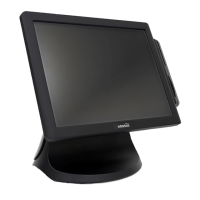
The POS300 is a point-of-sale (POS) system designed for various commercial environments, offering a blend of essential features and optional enhancements to suit different business needs. It functions as a complete POS terminal, integrating computing, display, and input capabilities into a single unit.
Important Technical Specifications:
- CPU: The system is powered by an Intel® Celeron® J1900 2.0GHz Quad Core processor, providing sufficient performance for typical POS operations.
- Operating System: It supports Microsoft® PosReady7, Windows 10 IoT Ent LTSB, and Linux, offering flexibility for different software ecosystems.
- Memory: The POS300 comes with 2GB DDR3 SODIMM memory, expandable up to 4GB, allowing for smooth multitasking and application handling.
- Storage: For data storage, it includes a SATA-III 500GB hard disk drive (HDD) or an optional 64GB solid-state drive (SSD), offering choices for capacity and speed.
- Display: It features a 15-inch TFT LCD with a resolution of 1024 x 768 pixels and a 4:3 aspect ratio. The display brightness is 250 cd/m², ensuring clear visibility.
- Touch Screen: The system incorporates a 5-wire Resistive Touch screen, known for its durability and accuracy, suitable for high-traffic environments.
- I/O Ports: The POS300 is equipped with a comprehensive set of I/O ports:
- 3 Serial ports (3ea)
- 1 D-SUB VGA port (1ea)
- 5 USB 2.0 ports (5ea)
- 1 LAN port (10/100/1000Mbit)
- Line-Out and Mic-In audio ports
- 1 PS/2 Keyboard port (1ea)
- Power Supply: It uses an external DC12V 5A (60W) adaptor, with an input range of AC 100~240V/50~60Hz, and an output of DC 12V/5A.
- Physical Characteristics:
- Dimensions: 350 x 68 x 320 (mm)
- Weight: 4.3Kg (F type)
- VESA Mounting: VESA(75mm) Compliance, allowing for flexible installation options.
- Fanless Operation: Yes, contributing to quiet operation and reduced dust accumulation.
- Optional Features:
- Magnetic Stripe Reader (MSR): Supports ISO Track2, Track 1&2, or Track 1&2&3 for card processing.
- Wireless LAN: 802.11n, 150Mbps (Internal USB Module) for wireless connectivity.
- Wall Mounting: Tilt type or Fixed type options available.
- Speaker: Built-in 1W speaker.
Usage Features:
The POS300 is designed for ease of use and reliable operation in a commercial setting.
- Power On/Off: The system is turned on by pressing the power button. For turning off, users are advised to follow the operating system's shutdown procedures to prevent data loss. It is crucial to save all data before initiating a shutdown.
- Touch Screen Calibration: For optimal touch screen accuracy, calibration is recommended, especially during initial setup or if the pointer does not precisely match touch input. The calibration process involves using the 'eGalaxTouch' utility, clicking the 'Tools' tab, and performing a '4Points Calibration'. Users are guided to touch points displayed sequentially on the screen. It is important to avoid applying severe impact or using sharp objects on the touch screen to prevent damage.
- BIOS Setup: The BIOS setup allows users to configure system hardware settings, including boot passwords, boot priority, and new device additions. Accessing the BIOS is done by pressing the
key during the booting screen. The BIOS menu provides options for Main, Advanced, Boot, Security, Chipset, Power, and Exit, each with specific configuration capabilities.
- System Block Diagram: The system's internal architecture is clearly laid out in a block diagram, showing the interconnection of components like the CPU (Intel® Celeron® J1900), memory (DDRIIIL SO-DIMM Slot), display interfaces (Analog Display, eDP, LVDS Dual 24-Bit), storage (SATA ports), and various I/O controllers (USB, PCI-E, COM, LPT, Audio CODEC, Realtek Ethernet). This diagram helps in understanding the hardware flow and potential upgrade paths.
Maintenance Features:
The POS300 includes features and guidelines to ensure its longevity and reliable performance.
- Safety Precautions: Emphasizes critical safety instructions to prevent personal injury and device damage. These include:
- Not blocking ports/vents or inserting objects into the system to avoid electric shock or fire.
- Avoiding touching the system plug or power cord with wet hands.
- Not exceeding the standard capacity of multiplugs or power outlet extensions.
- Unplugging the power cord by holding the plug, not the cable, to prevent electric shock from damaged cords.
- Connecting the power cord firmly to the AC adaptor and using only the supplied adaptor to prevent fire.
- Avoiding use in humid locations like bathrooms or saunas.
- Operating within the recommended temperature and humidity range (10~32°C, 20~80% RH).
- Avoiding direct sunlight or air-tight locations (e.g., inside a vehicle) to prevent overheating and fire hazards.
- Recovery Solution (Optional): The system offers a recovery solution, which may vary by model. This feature is crucial for system maintenance and disaster recovery.
- Backup: Users can back up their current Windows user environment to a restore field. This process is initiated by pressing during the PC POST process, then selecting "Backup" from the WinClon interface (accessed by pressing or using the mouse). A password (default "pos") is required to proceed. Keyboard and mouse connectivity are essential for this operation.
- Restore: The system can be restored quickly even if it cannot boot from the OS. This involves pressing during POST, then selecting "Recover to Recent State" (restores to the most recent backup) or "Recover to Initial State" (restores to factory default settings) using or keys or the mouse. A password (default "pos") is required. It's critical to save all important data to external storage before restoring, as the process will delete all data on the hard disk.
- Fanless Design: The fanless operation reduces the need for internal cleaning and minimizes the risk of dust-related hardware failures, contributing to lower maintenance requirements and a longer lifespan.

 Need help?
 General

 To Next Page