WG‐500PHotspotinaPrinter
57
324 SECURITY
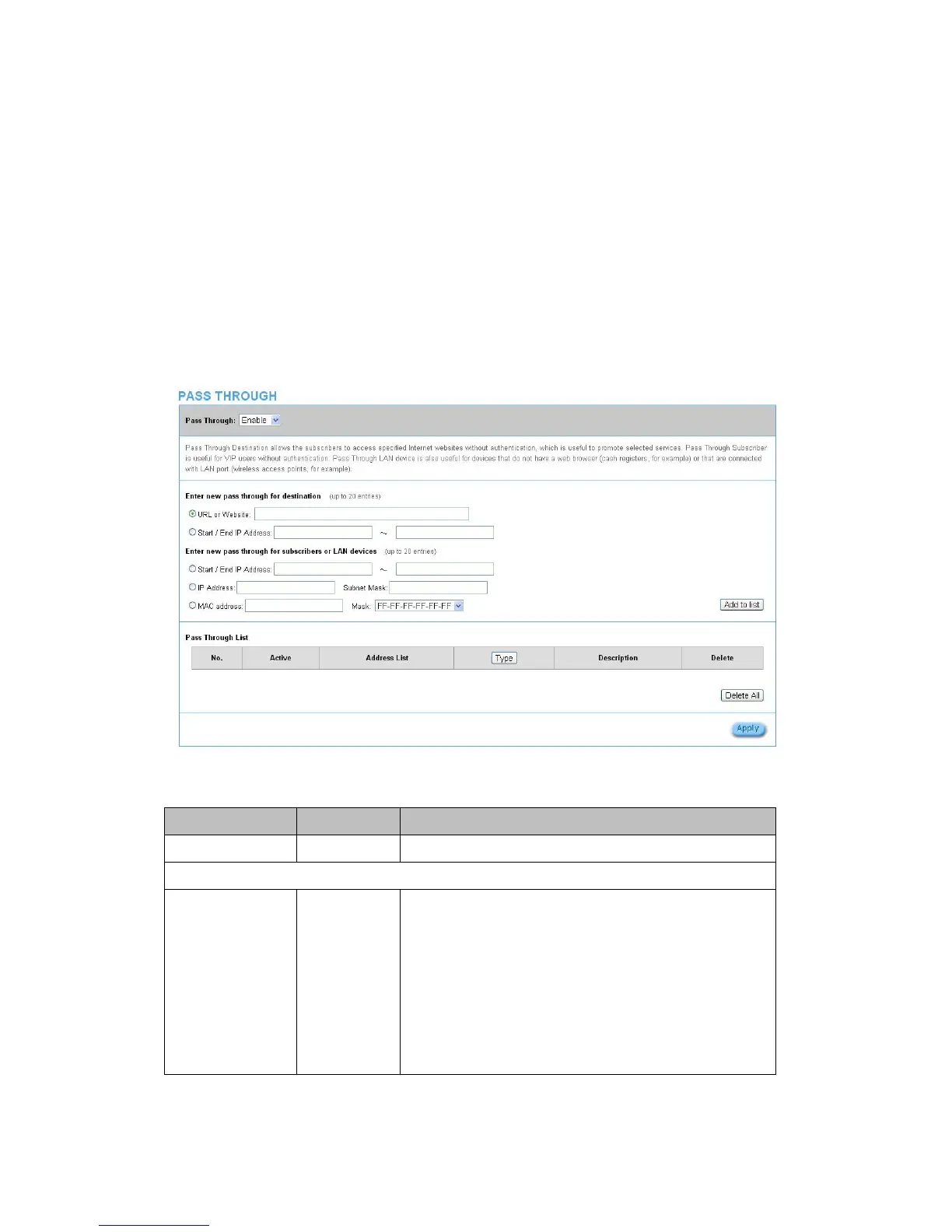
3‐2‐4‐1 PassThrough
This function allow administrator to set some special devices pass through the
WG‐500P system. Because some network devices might be constructed under the
WG‐500P.Howeverthesedevicesneedn’tbecheckedandauthorized.TheWG‐500P
providesapassthroughlistandtheadministratorcancontrolwhichdevicescanbe
passthroughwithauthentication.
Figure3‐2‐26PassthroughSettingScreen
Item Default Description
Pass Through Disable Enables or disables the pass through function.
Destination URL/IP Address Pass Through
URL or Website Empty Enter the URL Page; please use this format such like
“http://www.yahoo.com”. The maximum character of the URL Page
is 50.
Note:
1. Please add www.apple.com into PASS THROUGH list
in WG-500P. (iOS 6 device and later is required.)
2. Please add go.redirectingat.com for certain QR code apps.


 To Next Page