
 Need help?
Do you have a question about the Hanna Instruments DiST 3 and is the answer not in the manual?
Turn the meter on and place the probe in the desired solution for conductivity reading.
Step-by-step guide to calibrating the meter using standard calibration solutions.
Instructions to reset the meter to its default calibration settings.
Explanation of error codes displayed during calibration or measurement.
Detailed instructions for replacing the CR2032 Li-ion battery.
Details of the one-year warranty against defects and conditions for service.
Advice on safe usage, environmental considerations, and application suitability.
Checking the meter and accessories for damage after unpacking.
Instructions for preparing the probe and meter for initial use.
How to power on the meter and verify battery status.
Procedure to access the meter's calibration function.
Steps to access and navigate the meter's setup menu.
Configuring temperature units (°C/°F) and Auto-Off timer.
Exiting setup or calibration to resume normal measurement mode.
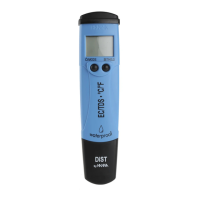
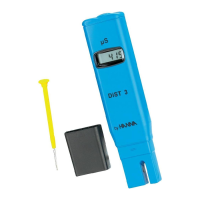
The Hanna Instruments DIST 3 HI98303 EC Tester is a compact and user-friendly device designed for measuring electrical conductivity (EC) in various solutions. This instruction manual provides comprehensive guidance on its function, usage, and maintenance, ensuring accurate and reliable measurements.
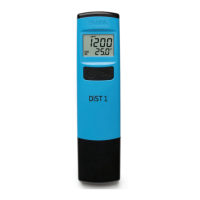
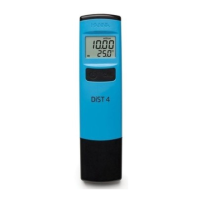
The DIST 3 HI98303 EC Tester is primarily an EC meter that automatically compensates for temperature variations. It displays the conductivity value in µS/cm on the main LCD and the measured temperature in degrees Celsius or Fahrenheit on a secondary LCD. The device is equipped with a CAL button for entering calibration mode and an ON/OFF button for power control and accessing setup parameters. A low battery indicator and "dEAd batt" message alert the user when the battery needs replacement, ensuring continuous operation. The probe, which includes a temperature sensor, is designed for immersion in the solution to be tested, providing real-time readings.
Turning On and Initial Check: To turn the meter on, press the ON/OFF button. Upon startup, all LCD segments are displayed for one second, followed by a percentage indication of the remaining battery life for another second, before entering the normal measuring mode. Holding the ON/OFF button during startup will display all LCD segments as long as the button is pressed.
Measurement Procedure: Before taking any measurements, ensure the meter has been calibrated. Remove the protective cap from the probe and immerse its tip in the solution to be tested. Stir gently and wait for the stability tag to disappear. The device automatically compensates for temperature, and the reading is directly expressed in µS/cm. After use, rinse the probe with water and always replace the protective cap.
Calibration Procedure: Frequent calibration is recommended for better accuracy, at least once a month, or when high accuracy is required. To calibrate, press the CAL button to enter calibration mode. The meter will display "µS/cm 1413 USE" with the CAL tag blinking. Pour a standard solution (e.g., 1413 µS/cm) into a container and place the probe, ensuring the tip is centered and submersed 1.18″ (3 cm). The meter will automatically recognize the solution. If the solution is not recognized or is out of the accepted range, "---- Err" will be displayed. Once recognized, "REC" will be displayed until the reading is stable and accepted. After acceptance, "Stor" is displayed, and the meter returns to measurement mode.
Clear Calibration: To clear the current calibration and revert to default settings, enter calibration mode and press the ON/OFF button. "Clr" will be displayed, indicating that the calibration has been reset.
Error Messages: During user calibration, if the reading is out of the accepted range, the meter will display "---- Err," with the measured value blinking (e.g., 2000 µS/cm blinking). If the measured temperature is higher than 50.0 °C or lower than 0.0 °C, the temperature value will blink on the LCD in measure mode.
Meter Setup: To access setup mode, remove the battery cover and press the Setup button located on the side of the battery compartment. The meter will enter setup mode, allowing users to configure parameters such as temperature unit and auto-off time. Press the ON/OFF button to cycle through setup parameters and use the CAL button to change options. Default settings are "Set t" to °C and "AOFF" to 8 minutes.
Selecting Temperature Unit: When "SET t" is displayed in setup mode, press the CAL button to toggle between °C and °F.
Selecting Auto-Off Time: When "AOFF" is displayed, press the CAL button to choose between 8 minutes, 60 minutes, or disabled auto-off.
Returning to Measurement Mode: After configuring settings, press the ON/OFF button to exit setup mode and return to measurement mode.
Care and Maintenance: To ensure the highest accuracy, it is crucial to use fresh calibration solutions for each calibration, as their values change over time. The probe should be rinsed with purified water each time before placing it in a calibration solution or sample.
Battery Replacement: The meter features a low battery indicator that blinks when the battery is below 10%. When the battery is fully discharged, "dEAd batt" will be displayed for 2 seconds, and the meter will turn off. To replace the CR2032 Li-ion battery, turn the battery cover counterclockwise to unlock, remove the cover, and replace with a new battery, ensuring the + side faces up. It is important to replace batteries only in a safe area and dispose of old batteries according to local regulations.
General Recommendations: Users should ensure that Hanna Instruments products are suitable for their specific application and environment. Any user-introduced variations may degrade the instrument's performance. For safety, avoid using or storing the instrument in hazardous environments.
Warranty: The meter is warranted for one year against defects in workmanship and materials, provided it is used for its intended purpose and maintained according to instructions. Probes are warranted for six months. The warranty covers repair or replacement free of charge but does not cover damage due to accidents, misuse, tampering, or lack of prescribed maintenance. For service, contact your local Hanna Instruments Office, providing the model number, date of purchase, serial number, and nature of the problem. If the repair is not covered by the warranty, charges will be incurred. If returning the instrument, obtain a Returned Goods Authorization (RGA) number from the Technical Service department and ship it with prepaid costs, ensuring it is properly packaged for complete protection.
 Measurement Specifications
| conductivity range | 0 to 2000 µS/cm |
|---|---|
| temperature range | 0.0 to 50.0 ˚C (32.0 to 122.0 ˚F) |
| conductivity resolution | 1 µS/cm |
| temperature resolution | 0.1 ˚C (0.1 ˚F) |
| accuracy | ±0.5 °C (±1.0 °F) |
Power and Battery| battery type | CR2032 Li-Ion 3V (1 pc.) |
|---|---|
| battery life | approximately 250 hours of continuous use |
 Weight and Dimensions
| weight | 68 g (2.4 oz.) |
|---|---|
| recommended operating environment temperature | 0 to 50 ºC (32 to 122 ºF) |
| recommended operating environment humidity | RH 100% max |


 To Next Page