User’s Manual
OSD Diagram OSD Description
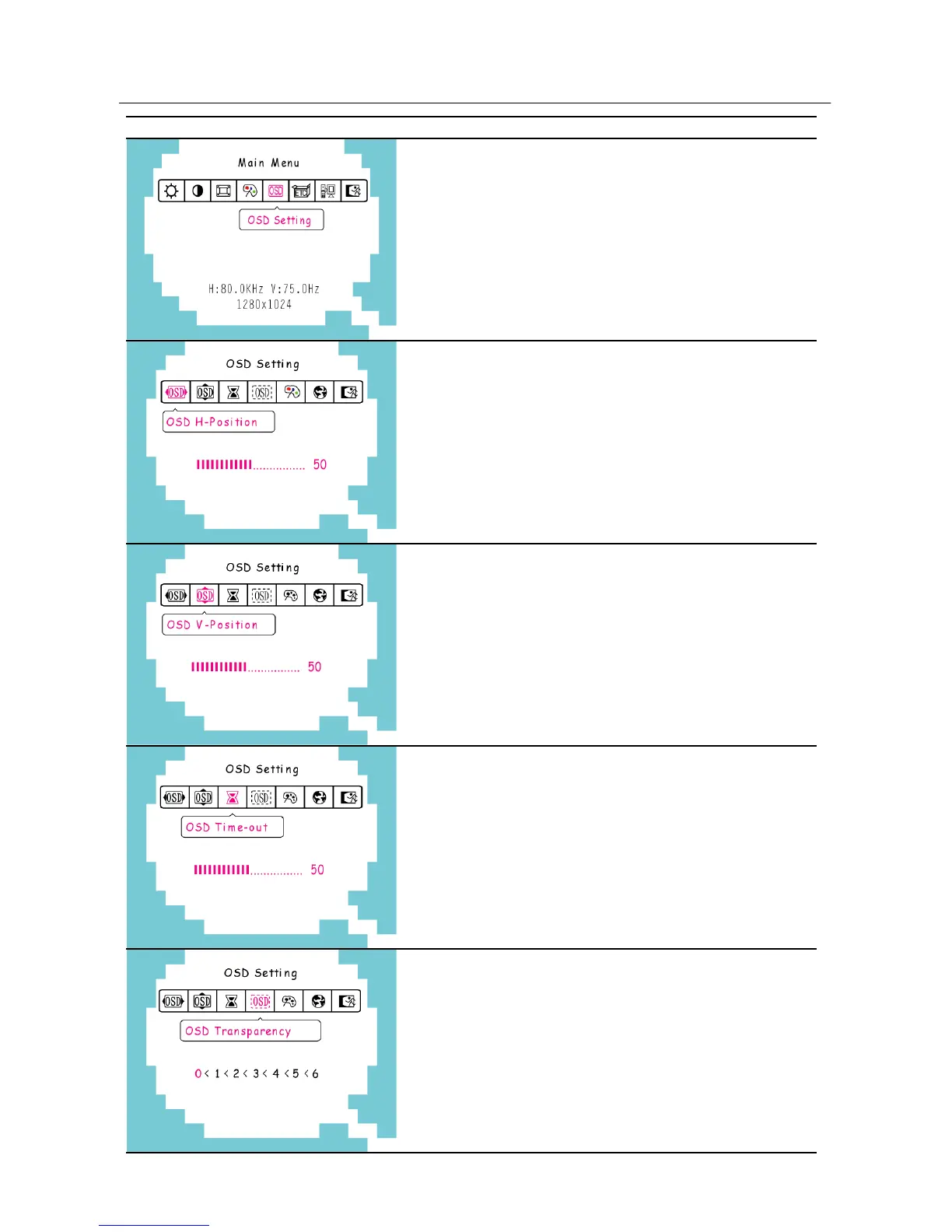
How to set the OSD:
Select 「OSD Setting」on the 「Main
Menu」, and then enter the option.
OSD horizontal adjustment:
Select the 「OSD H-Position」option to
adjust the horizontal position of the OSD.
Enter the option and adjust the level.
OSD vertical position adjustment:
Select the 「OSD V-Position」option to
adjust the vertical position of the OSD.
Enter the option and adjust the level.
OSD timer setting:
Select the 「OSD Time-out」option to set
the OSD time out from 10 to 120 seconds.
Enter the option and adjust the level.
OSD Transparency setting:
Select the 「OSD Transparency」option to
adjust the transparency of the OSD. Enter
the option and adjust the level.
14


 To Next Page
 Loading...