INSTALLATION INSTRUCTIONS
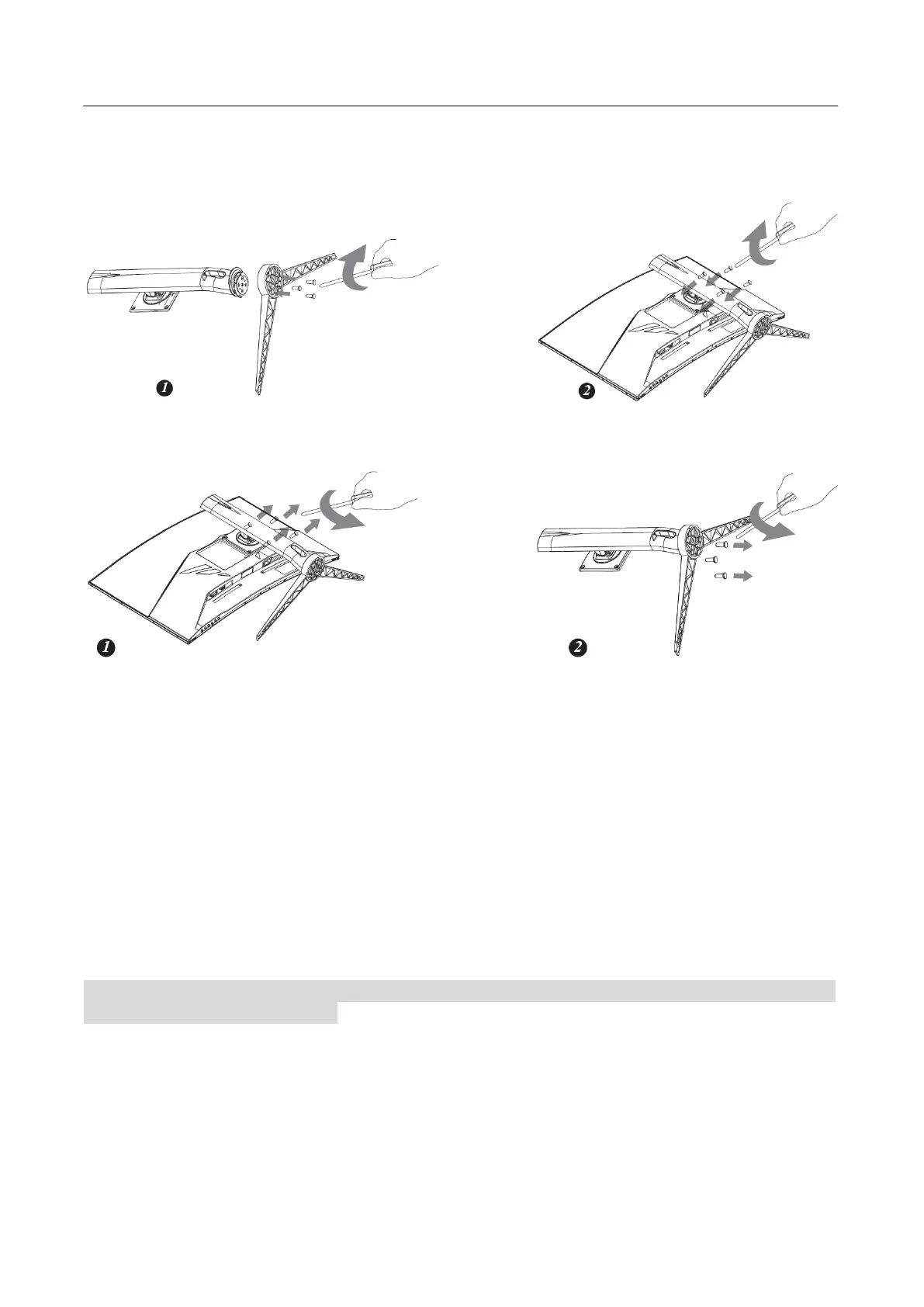
INSTALL
REMOVE
Figure.1. Installing and Removing the Base
INSTALLATION:
1. Align the Arm with the opening in the base.
2. Install the Arm on the base with 3 screws.
3. Install the Arm on Monitor with 4 screws.
4. Pendant snaps on the Arm and gently press down
REMOVAL:
1.Lift the pendant up
2.Remove the screws so that the stand base can be removed
3.Gently pull the stand base from the monitor until they are unattached.
4.Remove the screws,then gently remove the stand base.
Warm prompt: Place the Monitor face down on a soft and flat surface (blanket, foam, cloth, etc) to
Monitor while install and remove.
POWER
POWER SOURCE:
1. Make sure that the power cord is the correct type required in your area.
2. This LCD monitor has an Internal universal power supply that allows operation in either
100/120V AC or 220/240V AC voltage area (No user adjustment is required.)
3. Connect the AC-power cord one end to your LCD monitor’s AC-input socket, the other end to
wall-outlet.








 To Next Page