V4000 SERIES OWNER’S MANUAL
10
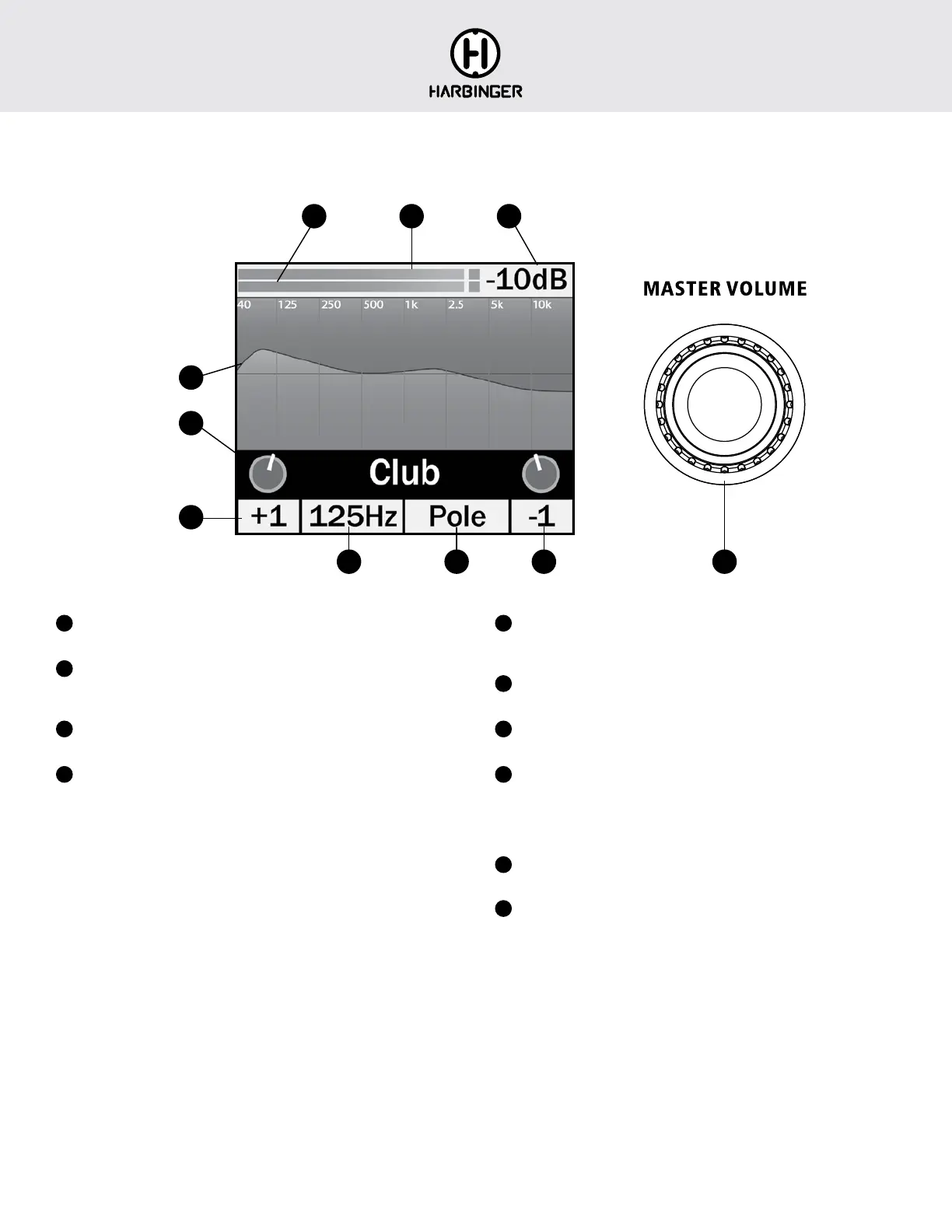
DSP DISPLAY FEATURES: HOME PAGE
1
VOLUME METER
Displays the current audio output level.
2
CLIP INDICATORS
Red indicates clipping: turn down MASTER VOLUME, or CHANNEL
knobs for active inputs.
3
MASTER VOLUME VALUE
Shows current Master Volume value, as set by MASTER VOLUME knob.
4
Frequency Curve
Shows the frequency response resulting from current settings of:
• Voicing
• Bass
• Treble
• Sub Cut
• Location
As you make a change to any of these settings, the curve will show the
effect on frequency response.
The curve is flat when all these factory standard initial settings are in use:
• Bass: 0dB
• Treble: 0dB
• Voicing: Standard
• Sub Cut: Off
• Location: Pole
4
5
6
1 2 3
7 8 9 10
5
VOICING
Name of currently active Voicing is shown.
• Standard is the normal tuning of the VARI.
6
BASS
Knob graphic and number indicate current BASS knob setting.
7
SUB CUT
Current setting of Sub Cut filter.
8
LOCATION
Current setting of Location.
• Pole is the standard location.
• Floor and Wall locations reduce low frequencies, as shown by the
frequency curve when one of these locations is active.
9
TREBLE
Knob graphic and number indicate current TREBLE knob setting.
10
MASTER VOLUME KNOB
• Turn this knob to set volume from the speaker
• Press knob to access DSP parameters on the display
• Follow instructions on display to adjust DSP (see page 10-14)



 To Next Page