8.19INSTRUMENTS: FXD
REMOVAL
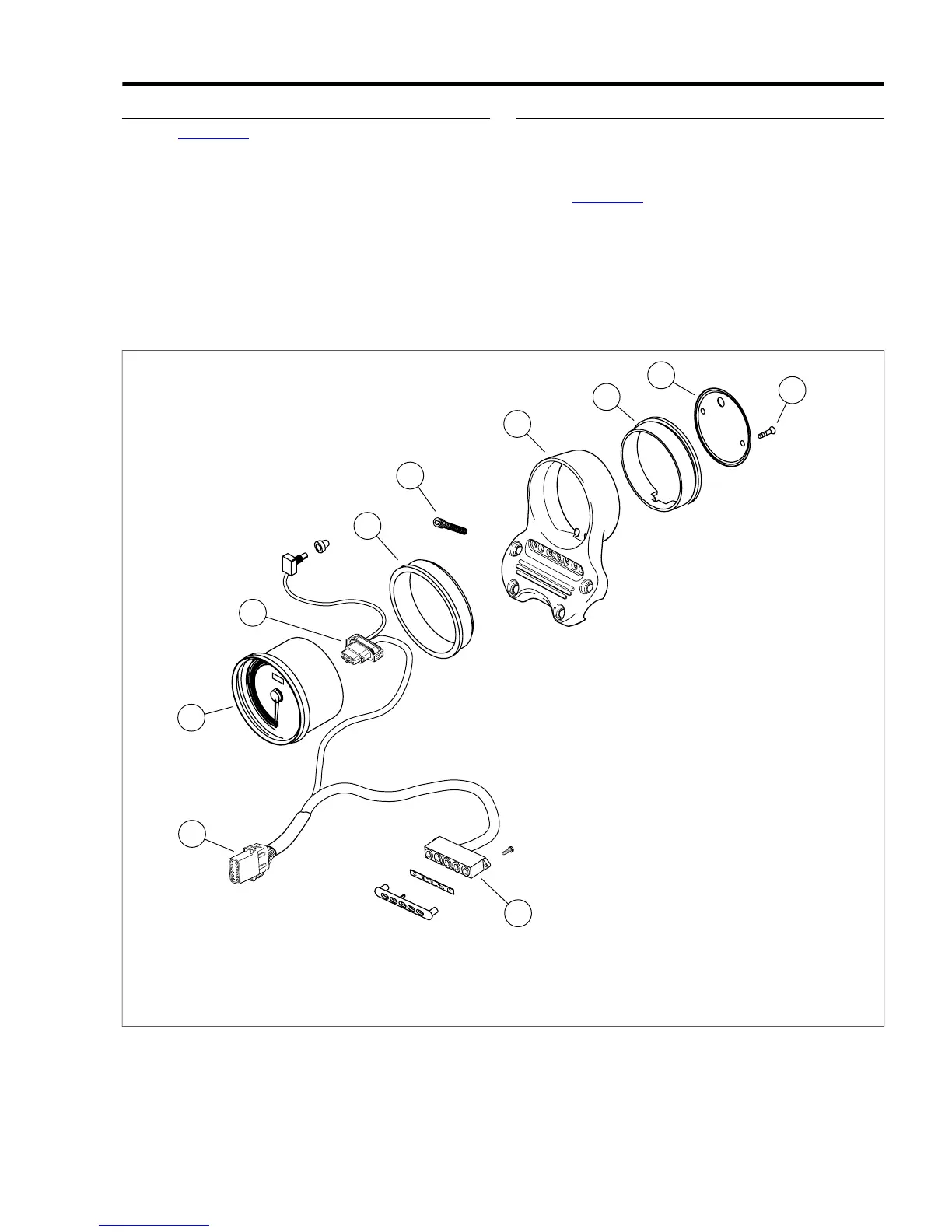
1. See Figure 8-53. Remove two screws (8) and backplate
(7).
2. Depress tab and remove 12-pin connector (2) [39] from
back of speedometer.
3. Push speedometer (1) through front of housing (5).
4. Remove front gasket (3) from speedometer.
INSTALLATION
NOTE
To ease installation, glass cleaner or alcohol may be applied
to the inside surface of the gasket.
1. See Figure 8-53. Install front gasket (3) to speedometer
and slide speedometer into housing. Press firmly until fully
seated.
2. Connect 12-place connector (2) [39] to back of speedo-
meter.
3. Route wires through slot in back of instrument housing.
Install rear gasket (6) on back of housing. Install backplate
(7) with two screws (8).
6.1. Rear gasketSpeedometer
2. 7.Connector [39] Backplate
8.3. ScrewFront gasket
4. 9.Bolt @ 12-18 ft-lbs (16.3-24.4 Nm) LED assembly
10.5. Connector [20]Housing
Figure 8-53. Instrumentation: FXD
2008 Dyna Service: Electrical 8-37


 To Next Page
 Loading...