8.25HORN
INSPECTION
If the horn fails to sound or does not sound satisfactorily, check
for loose, frayed or damaged wires leading to horn terminal,
discharged battery or corroded ground.
The horn is permanently sealed and non-repairable. Only the
mounting hardware is replaceable.
NOTE
No tonal adjustments may be made to this horn.
REPLACEMENT
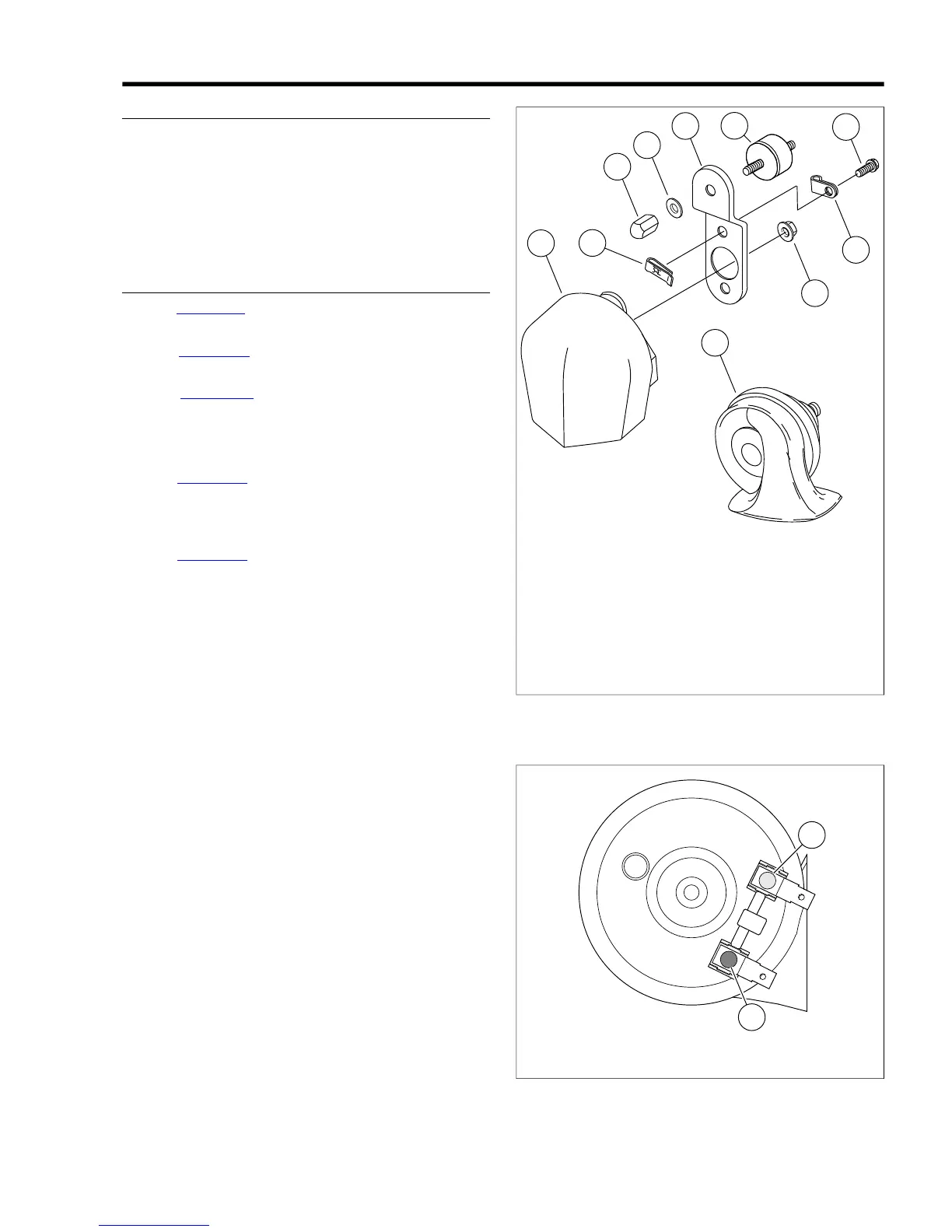
1. See Figure 8-65. Remove nut (4) and washer (5) to detach
horn bracket (6) from vehicle.
2. See Figure 8-66. Disconnect wires from posts (1, 2) on
back side of horn.
3. See Figure 8-65. Remove screws (8) and nut (10) to
detach horn from bracket. Free wires from clamp (9).
4. Install new horn on bracket. Secure with screws (8), push
nuts (3) and nut (10). Fold wires under clamp (9).
5. See Figure 8-66. Attach wiring.
a. Connect Y/BK wire to gold post (1).
b. Connect BK wire to silver post (2).
6. See Figure 8-65. Attach horn to vehicle using washer (5)
and nut (4). Tighten nut to 10-15 ft-lbs (13.6-20.3 Nm).
When tightening fasteners, be sure the horn does not
contact the horn cover or other parts.


 To Next Page
 Loading...