EasyManua.ls Logo

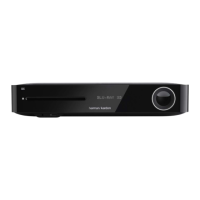
Harman Kardon BDP 10 - User Manual

Harman Kardon BDP 10
34 pages
Print Icon
To Next Page IconTo Next Page
Loading...
BLU-RAY DISC
PLAYER
OWNER’S MANUAL

Other manuals for Harman Kardon BDP 10

Questions and Answers

  • W
    william58Aug 17, 2025
    Why is there no picture on my Harman Kardon BDP 10 Blu-ray Player?
    • M
      Michael GarciaAug 17, 2025
      If your Harman Kardon Blu-ray Player isn't displaying a picture, first ensure all video connections are secure. Then, verify that your TV or receiver is set to the correct input. If the issue persists, the video display may not support the selected video output resolution; try pressing the Video Mode Button to change the resolution. Also, confirm that your HDMI Output is connected to an HDCP-compliant display. As a last resort, try turning off all HDMI devices (Blu-ray Player, receiver, TV), then turn them back on in the following order: TV, receiver, Blu-ray Player.
  • C
    Curtis PhillipsAug 20, 2025
    Why is there no sound coming from my Harman Kardon Blu-ray Player?
    • Z
      Zachary PerryAug 20, 2025
      If your Harman Kardon Blu-ray Player is not producing any sound, begin by checking all audio connections to ensure they are secure. Next, verify the digital audio settings both on the Blu-ray Player and your receiver. If you're playing a video disc, note that there is no audio playback during fast or slow modes. Finally, if your surround receiver isn't compatible with 96kHz PCM audio, change the PCM Downsampling setting in the Audio Setup menu to “Off.”
  • J
    Justin SchultzAug 22, 2025
    What to do if Harman Kardon Blu-ray Player remote is not working?
    • L
      Lauren ChapmanAug 22, 2025
      If your Harman Kardon Blu-ray Player is not responding to the remote, first replace the remote batteries, ensuring they are inserted with the correct polarity. If that doesn't work, make sure the remote sensor on the front panel of the player is not obstructed and is within the line of sight of the remote. Alternatively, you can connect an optional remote sensor.
  • A
    Ann PerkinsAug 26, 2025
    Why won't my Harman Kardon Blu-ray Player play the disc?
    • P
      Paul WeaverAug 26, 2025
      If your Harman Kardon Blu-ray Player isn't playing a disc, make sure the disc is loaded correctly, label-side up, aligned with the guides, and placed properly. Confirm that the disc type is compatible (CD, CD-R, CD-RW, MP3, WMA, JPEG, DVD-R/RW, DVD+R/RW, BD-Video, or DVD-Video). Ensure you're using a Region B, Region 2, or Open Region disc. If parental controls are enabled, enter the password to override or adjust the rating settings.
  • D
    Donald JacksonAug 27, 2025
    Why does the picture jump on my Harman Kardon BDP 10 during fast forward?
    • D
      Darren JacobsAug 27, 2025
      If the picture on your Harman Kardon Blu-ray Player is distorted or jumps during fast forward or reverse play, this is a normal artifact of DVD playback due to MPEG-2 decoding. Also, due to the format of DTS recordings, fast-play may overshoot or undershoot the desired place.
  • A
    aarontaylorAug 30, 2025
    Why some remote buttons do not operate on my Harman Kardon BDP 10?
    • S
      Shawn GriffinAug 30, 2025
      If some remote buttons on your Harman Kardon Blu-ray Player do not operate and a Prohibit icon appears, it means that the function is not permitted at that specific time or with that particular disc. With most discs, some functions are restricted at certain times or entirely.
  • M
    marcusgrahamSep 1, 2025
    How to change the language on my Harman Kardon Blu-ray Player?
    • S
      Stephen HesterSep 1, 2025
      To change the OSD menu language on your Harman Kardon Blu-ray Player, go to the Setup menu and select the correct language.
  • W
    William JonesSep 4, 2025
    How to change aspect ratio on Harman Kardon Blu-ray Player?
    • U
      umurraySep 4, 2025
      To correct the aspect ratio on your Harman Kardon Blu-ray Player, change the aspect-ratio setting in the Setup menu to match your disc or TV.
  • J
    Joel RamosSep 6, 2025
    Why disc will not copy to VCR from Harman Kardon Blu-ray Player?
    • A
      Adam TurnerSep 7, 2025
      Many video discs are encoded with copy protection to prevent copying from your Harman Kardon Blu-ray Player.
  • S
    Susan JordanSep 9, 2025
    Why screen saver not activated on Harman Kardon Blu-ray Player?
    • C
      Crystal OchoaSep 9, 2025
      The screen saver on your Harman Kardon Blu-ray Player will not activate when Setup menus are displayed. Clear Setup menus to avoid burn-in on plasma and CRT displays.

Summary

SAFETY INFORMATION

Important Safety Instructions

Key instructions and warnings for safe operation and maintenance of the apparatus.

FEATURES

Optical Disc Player

Capabilities and features of the disc playback mechanism, including format support.

General Playback Features

Information on video upscaling, playback modes, and disc format compatibility.

MEDIA COMPATIBILITY

Disc Formats Supported by This Player

Lists the types of prerecorded discs that the BDP 10 can play.

The BDP 10 Will NOT Play the Following

Details discs and formats that are not compatible with the BDP 10 player.

USB Device Compatibility

Information on connecting and using USB storage devices with the player.

FRONT-PANEL CONTROL DESCRIPTIONS

Playback Control Buttons

Functions of Play/Pause, Stop, Skip, and Search buttons on the front panel.

REAR-PANEL CONNECTION DESCRIPTIONS

Video Output Connections

Details on Composite, Component, and HDMI video output options.

Audio Output Connections

Details on Analog, Coaxial, and Optical digital audio output options.

REMOTE CONTROL FUNCTIONS

REMOTE CONTROL FUNCTION DESCRIPTIONS

Basic Playback Controls

Functions of Power, Open/Close, Play, Pause, Stop, and Skip buttons.

Navigation and Selection Controls

Using Navigation, OK, Return, Find, and Previous/Next buttons.

INSTALLATION

Step Two - Connect to A;V Receiver or Processor

Instructions for connecting the BDP 10 to an A/V receiver or processor.

Step Three - Connect Directly to Television

Instructions for connecting the BDP 10 directly to a TV.

INSTALLATION STEPS

Step Six - Network Connection

Connecting the player to a network for BD-Live functionality.

INITIAL SETUP

INITIAL SETUP CONTINUED

Step Five - Audio Setup

Configuring digital audio output and dynamic range control settings.

INITIAL SETUP FURTHER STEPS

OPERATION

Playback Basics

General instructions for playing discs, including handling and loading precautions.

OPERATION CONTINUED

Playback Control

Using front-panel and remote controls for playback functions like play, pause, skip, and search.

OPERATION DETAILS

OPERATION MODES

TROUBLESHOOTING GUIDE

Harman Kardon BDP 10 Specifications

General IconGeneral
BrandHarman Kardon
ModelBDP 10
CategoryBlu-ray Player
LanguageEnglish

Related product manuals