EasyManua.ls Logo

Harman Kardon CHAMPAGNE - User Manual

Harman Kardon CHAMPAGNE
14 pages
Print Icon
To Next Page IconTo Next Page
Loading...
Page 1
User’s Guide
harman/kardon
Champagne
950-0010
English
French
German
Italian
S
p
anish

Questions and Answers

  • C
    Cheryl BrownJul 30, 2025
    What to do if Harman Kardon Speakers volume is low?
    • R
      Russell MccoyJul 31, 2025
      If the volume level on your Harman Kardon speakers is low, increase the volume level on the control/right speaker. Also, check the volume level and mute setting in Windows Volume Control.
  • L
    Laura HollandAug 7, 2025
    What to do if my Harman Kardon Speakers have no sound?
    • B
      Brittany VelezAug 7, 2025
      If your Harman Kardon speakers aren't producing sound, first, ensure the unit is receiving power by checking the wall outlet or power strip. Confirm that all switches for the outlet, power strip, and speaker system are turned on. Toggle the power switch and, if necessary, replace the fuse located on the back of the subwoofer between the power cord connector and the power switch. A spare fuse was included with the product.
  • R
    Ronald RiddleAug 14, 2025
    What to do if Harman Kardon Subwoofer emits a loud hum or buzzing noise?
    • J
      Justin MendozaAug 14, 2025
      If your Harman Kardon subwoofer is emitting a loud hum or buzzing noise, check the input cable connection to ensure it's properly plugged in.
  • G
    Gregory TuckerAug 22, 2025
    What to do if my Harman Kardon Speaker system emits a loud hum or buzzing noise?
    • T
      Travis AvilaAug 23, 2025
      If your Harman Kardon speaker system emits a loud hum or buzzing noise when used with a stereo soundcard, it might be that the rear audio connector is touching the computer case. Replace the rubber cover or insulate the rear audio connector to prevent contact with any metallic surfaces.

Summary

Safety Instructions

Introduction to HK 695

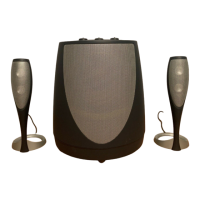
Overview of the HK 695, its technologies (Vmax, Odyssey I transducer, Magnum subwoofer), and basic controls.

Setup and Connections

Connecting to Integrated Stereo Sound

Illustrates connecting the speaker system to integrated stereo sound via numbered steps.

Connecting to STEREO Sound Card

Illustrates connecting the speaker system to a stereo sound card via numbered steps.

Connecting to MULTI-CHANNEL Sound Card

Illustrates connecting the speaker system to a multi-channel sound card via numbered steps.

Connecting to Notebook STEREO Sound

Illustrates connecting the speaker system to a notebook via numbered steps.

Placement of Speakers

Using the Speaker System

On;Off Switch Operation

Details the location and function of the on/off switch on the subwoofer.

Volume and Mute Controls

Explains the volume adjustment and muting functions on the satellite speaker.

Subwoofer Controls and Diagnostics

System Diagnostics

Explains the built-in diagnostic system for optimal setup and troubleshooting.

Troubleshooting Guide

Specifications and Regulatory Information

Regulatory Compliance

FCC Statement and Warning regarding digital device compliance and potential interference.

Harman Kardon CHAMPAGNE Specifications

General IconGeneral
BrandHarman Kardon
ModelCHAMPAGNE
CategorySpeakers
LanguageEnglish

Related product manuals