EasyManua.ls Logo

Harman Kardon HK620 - User Manual

Harman Kardon HK620
10 pages
Print Icon
To Next Page IconTo Next Page
Loading...
Integrated
Amplifier
OWNERS
MANUAL

Other manuals for Harman Kardon HK620

Question and Answer IconNeed help?

Do you have a question about the Harman Kardon HK620 and is the answer not in the manual?

Summary

Product Features

HCC (High Instantaneous Current Capability)

Amplifier sections react rapidly to musical transients for precise drive and control of loudspeakers.

Ultrawide Bandwidth

Unit features exceptionally wide bandwidth, independent of negative feedback, improving transient accuracy and phase linearity.

Low Negative Feedback

Designed for low distortion and wide bandwidth without high negative feedback, improving dynamic accuracy.

Discrete Component Circuitry

Employs discrete electronic circuitry for high performance, avoiding integrated circuits.

Sophisticated Electronic Protection Circuitry

Unique circuitry guards amplifier from speaker/wire issues without impairing sound quality.

General Instructions

Always Use at 120 V AC

Unit designed for 120V AC operation. Use domestic outlets only to prevent fire hazard.

Handle the Power Cord Gently

Disconnect by pulling the plug, not the cord. Avoid damage, kinks, or heavy objects on the cord.

Place of Installation

Install on a firm, level surface away from moisture, direct sunlight, heat, cold, dust, or poor ventilation.

Do Not Open the Cabinet

Do not tamper with internal components to prevent shock and maintain performance. Consult service if foreign objects enter.

Cleaning

Wipe with a soft dry cloth. Use mild soapy water if necessary, then dry. Avoid harsh chemicals and sprays.

Abnormal Smells

Turn off, unplug, and contact service if abnormal smell or smoke is detected.

Warranty and After-sale Service

Find warranty card, keep it safe. Warranty is two years. Consult manual or service station for issues.

Connections

Connecting Other Components

Turn off components before connecting. Use correct color plugs for Left/Right channels. Connect tape decks to TAPE 2.

Wired Remote Control

Connect remote sensor to REMOTE IN jack. Compatible with other Harman Kardon units with Remote Out.

Connecting Speakers

Use high-quality cables. Check impedance when connecting two pairs to avoid overheating.

AC Power

Plug cord into a polarized wall socket. Remove cord from outlet when not in use for prolonged periods.

AC Convenience Receptacles

Use receptacles for other components. Switched powers with amplifier; Unswitched powers always.

Controls and Functions

Power Switch

Press to turn the unit on and off.

Headphone Jack

Plug in headphones. Output supplied to headphones when speaker switches are off.

Speakers Switches

Push to select speaker sets (1, 2, both, or neither for headphones).

Function Selector Buttons

Press buttons to select the desired input source.

Bass Control

Turn to increase or decrease the proportion of low frequency sound.

Treble Control

Turn to increase or decrease the proportion of high frequency sound.

Balance Control

Adjust relative output level of left and right speakers.

Volume Control

Turn to raise or lower output volume.

Indicators and Remote Control

Independent Remote Control

Remote keys function like amplifier controls. Can control other HK components. Requires AA batteries.

Operating Conditions

Effective within 7m and 30° angle. Avoid fluorescent lights, dust, or blocking line of sight.

Operating Instructions

Listening to Source Components

Turn volume down, power on, select speakers, choose source, play component, adjust volume/tone controls.

Making a Recording

Select source, make recordings on tape decks 1 or 2. Monitor tape deck 2. Copy tape from deck 1 to deck 2.

Troubleshooting

No Power Lights

Ensure unit is plugged into a live outlet.

No Sound Heard

Check speaker switches, function button, volume, and wire connections.

Sound from One Speaker Only

Verify speaker wires and connection wires are correctly connected and balance control is centered.

Reversed Stereo Sound

Check speaker wire connections for correct left/right wiring.

Buzzing or Hissing

Ensure unit is away from fluorescent lights, TVs, motors, and other electrical appliances.

Cannot Monitor Recording (Tape 1)

This function is not possible. Use Tape 2 for monitoring.

Controls Not Working

Disconnect AC power for 5 minutes, then reconnect. Check batteries and sensor.

Phono Sound Issues

Connect ground wire, keep cables away from power cords, move turntable from speakers/appliances.

Specifications

Summary

Product Features

HCC (High Instantaneous Current Capability)

Amplifier sections react rapidly to musical transients for precise drive and control of loudspeakers.

Ultrawide Bandwidth

Unit features exceptionally wide bandwidth, independent of negative feedback, improving transient accuracy and phase linearity.

Low Negative Feedback

Designed for low distortion and wide bandwidth without high negative feedback, improving dynamic accuracy.

Discrete Component Circuitry

Employs discrete electronic circuitry for high performance, avoiding integrated circuits.

Sophisticated Electronic Protection Circuitry

Unique circuitry guards amplifier from speaker/wire issues without impairing sound quality.

General Instructions

Always Use at 120 V AC

Unit designed for 120V AC operation. Use domestic outlets only to prevent fire hazard.

Handle the Power Cord Gently

Disconnect by pulling the plug, not the cord. Avoid damage, kinks, or heavy objects on the cord.

Place of Installation

Install on a firm, level surface away from moisture, direct sunlight, heat, cold, dust, or poor ventilation.

Do Not Open the Cabinet

Do not tamper with internal components to prevent shock and maintain performance. Consult service if foreign objects enter.

Cleaning

Wipe with a soft dry cloth. Use mild soapy water if necessary, then dry. Avoid harsh chemicals and sprays.

Abnormal Smells

Turn off, unplug, and contact service if abnormal smell or smoke is detected.

Warranty and After-sale Service

Find warranty card, keep it safe. Warranty is two years. Consult manual or service station for issues.

Connections

Connecting Other Components

Turn off components before connecting. Use correct color plugs for Left/Right channels. Connect tape decks to TAPE 2.

Wired Remote Control

Connect remote sensor to REMOTE IN jack. Compatible with other Harman Kardon units with Remote Out.

Connecting Speakers

Use high-quality cables. Check impedance when connecting two pairs to avoid overheating.

AC Power

Plug cord into a polarized wall socket. Remove cord from outlet when not in use for prolonged periods.

AC Convenience Receptacles

Use receptacles for other components. Switched powers with amplifier; Unswitched powers always.

Controls and Functions

Power Switch

Press to turn the unit on and off.

Headphone Jack

Plug in headphones. Output supplied to headphones when speaker switches are off.

Speakers Switches

Push to select speaker sets (1, 2, both, or neither for headphones).

Function Selector Buttons

Press buttons to select the desired input source.

Bass Control

Turn to increase or decrease the proportion of low frequency sound.

Treble Control

Turn to increase or decrease the proportion of high frequency sound.

Balance Control

Adjust relative output level of left and right speakers.

Volume Control

Turn to raise or lower output volume.

Indicators and Remote Control

Independent Remote Control

Remote keys function like amplifier controls. Can control other HK components. Requires AA batteries.

Operating Conditions

Effective within 7m and 30° angle. Avoid fluorescent lights, dust, or blocking line of sight.

Operating Instructions

Listening to Source Components

Turn volume down, power on, select speakers, choose source, play component, adjust volume/tone controls.

Making a Recording

Select source, make recordings on tape decks 1 or 2. Monitor tape deck 2. Copy tape from deck 1 to deck 2.

Troubleshooting

No Power Lights

Ensure unit is plugged into a live outlet.

No Sound Heard

Check speaker switches, function button, volume, and wire connections.

Sound from One Speaker Only

Verify speaker wires and connection wires are correctly connected and balance control is centered.

Reversed Stereo Sound

Check speaker wire connections for correct left/right wiring.

Buzzing or Hissing

Ensure unit is away from fluorescent lights, TVs, motors, and other electrical appliances.

Cannot Monitor Recording (Tape 1)

This function is not possible. Use Tape 2 for monitoring.

Controls Not Working

Disconnect AC power for 5 minutes, then reconnect. Check batteries and sensor.

Phono Sound Issues

Connect ground wire, keep cables away from power cords, move turntable from speakers/appliances.

Specifications

Overview

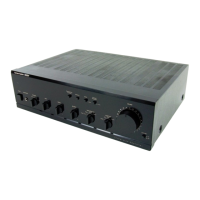
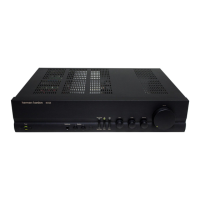
The Harman Kardon HK620 is an integrated amplifier designed to provide high-quality audio performance. It combines pre-amplification and power amplification into a single unit, making it a central component for a stereo audio system. The amplifier is engineered with several advanced features to ensure accurate and dynamic sound reproduction.

Function Description:

The primary function of the HK620 is to amplify audio signals from various source components, such as CD players, tuners, tape decks, and video players, and then output these amplified signals to loudspeakers. It acts as the control center for your audio system, allowing you to select different input sources, adjust volume, and fine-tune the sound characteristics.

Key features contributing to its performance include:

  • HCC (High Instantaneous Current Capability): This design allows the amplifier sections to react quickly to musical transients, providing the necessary instantaneous current to precisely drive and control a wide range of loudspeaker systems. This ensures dynamic and impactful sound reproduction, especially during sudden changes in music.
  • Ultrawide Bandwidth: The amplifier boasts an exceptionally wide bandwidth, which is independent of negative feedback. This characteristic is crucial for improving transient accuracy and phase linearity, resulting in a more faithful reproduction of the original audio signal.
  • Low Negative Feedback: The HK620 is designed to achieve low distortion and wide bandwidth with minimal negative feedback. This approach further enhances its dynamic accuracy, preserving the subtle nuances and energy of the music.
  • Discrete Component Circuitry: To meet its performance goals, the amplifier utilizes discrete electronic circuitry rather than integrated circuits. This choice allows for a higher level of performance and fine-tuning that might not be achievable with off-the-shelf integrated solutions.
  • Sophisticated Electronic Protection Circuitry: Harman Kardon has incorporated a unique protection system that safeguards the amplifier from damage caused by short-circuited or faulty speakers and wires. Importantly, this protection operates without compromising sound quality through current limiting or output relays, ensuring that the audio performance remains unhindered even under challenging conditions.

The amplifier also supports recording functions, allowing users to record from selected sources to one or two tape decks simultaneously. It provides a direct record output signal that is not affected by the volume, bass, treble, or balance controls, ensuring a pure signal for recording.

Usage Features:

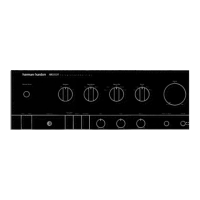
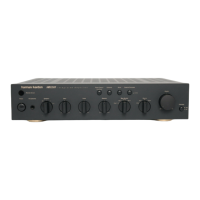
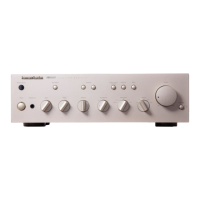
The HK620 offers a user-friendly interface with intuitive controls for managing your audio experience.

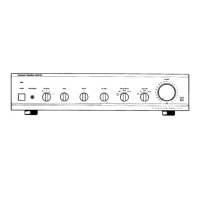
  • Power Switch: A simple push-button switch to turn the unit on and off.
  • Function Selector Buttons: Dedicated buttons for selecting the desired input source, including Tape 1/Copy, CD, Aux, Tape 2/Monitor, Tuner, and Video. This allows for quick switching between different audio components.
  • Speakers Switches: These switches enable you to select between two sets of speakers (Speakers 1 and 2), both, or neither (for headphone-only listening). This flexibility is useful for multi-room setups or comparing different speaker pairs.
  • Headphone Jack: A convenient jack for private listening with headphones. When both speaker switches are in the "Off" position, audio is routed exclusively to the headphones.
  • Volume Control: A large rotary knob for adjusting the overall output volume.
  • Bass Control: A rotary knob to increase or decrease the proportion of low-frequency sound, allowing users to tailor the bass response to their preference or room acoustics.
  • Treble Control: A rotary knob to increase or decrease the proportion of high-frequency sound, providing control over the treble response.
  • Balance Control: A rotary knob to adjust the relative output level between the left and right speakers, useful for correcting imbalances in speaker placement or room acoustics.
  • Indicators: The front panel includes indicators to show when the unit is switched on and which function is currently selected, providing clear visual feedback.
  • AC Convenience Receptacles (120V units only): The rear panel features switched and unswitched AC outlets, allowing other stereo components to be powered directly from the amplifier. The switched outlet provides power only when the amplifier is on, while the unswitched outlet provides continuous power.
  • Wired Remote Control: The amplifier supports an external infrared remote sensor, allowing for remote operation. It also features a REMOTE OUT jack for connecting to other compatible Harman Kardon components, enabling a unified system remote control.
  • Optional Phono Board: For turntable users, an optional Phono board can be installed, configurable for either MM (Moving Magnet) or MC (Moving Coil) cartridges. Note that installing the Phono board will disable the AUX input.

Maintenance Features:

Maintaining the HK620 involves simple care routines to ensure its longevity and optimal performance.

  • Cleaning: The unit should be wiped with a soft, dry cloth. For more stubborn dirt, a soft cloth dampened with mild soapy water, followed by a dry cloth, can be used. It is important to avoid harsh chemicals like benzene, thinner, alcohol, or other volatile agents, and never spray insecticide near the unit.
  • Ventilation: To prevent overheating and ensure long-term reliability, the ventilation slots on the top surface of the unit must not be obstructed. Objects should not be placed over these slots.
  • Power Cord Handling: The power cord should be handled gently. Always pull the plug itself, not the cord, when disconnecting from the AC outlet. Avoid placing heavy objects on the cord, making knots, or damaging it, as this can lead to short circuits or fire hazards. If the unit will not be used for an extended period, disconnect the power cord from the AC outlet.
  • Cabinet Integrity: The cabinet should not be opened by the user to prevent electric shock and to avoid voiding the warranty. Internal components are not user-serviceable. In case of accidental liquid or foreign object ingress, immediately unplug the unit and consult an authorized service station.
  • Troubleshooting Guide: The owner's manual includes a troubleshooting section to help users diagnose and resolve common operational issues, such as no sound, sound imbalance, or remote control problems. This guide encourages users to check basic connections and settings before seeking professional service.
  • Packaging Retention: It is recommended to save all original packing material. This is essential for safe transportation if the unit needs to be moved or sent for repair, protecting it from damage.
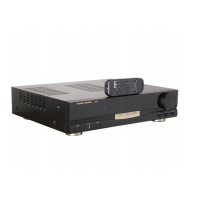
  • Remote Control Battery Care: The remote control unit is powered by two AA batteries. Both batteries should be replaced simultaneously when they become weak. For extended periods of disuse, the batteries should be removed to prevent corrosion and potential damage to the remote.
  • Professional Service: For persistent problems or issues beyond basic troubleshooting, users are advised to consult an authorized Harman Kardon service center. Repairs within the warranty term are handled according to the conditions specified in the warranty card.

Harman Kardon HK620 Specifications

Power IconPower
continuous average power per channel (8 Ohms)40 Watts
continuous average power per channel (4 Ohms)60 Watts
dynamic power (8 Ohms)70 Watts
dynamic power (4 Ohms)100 Watts
dynamic power (2 Ohms)135 Watts
high instantaneous current capability (HCC)+40 Amps
power supplyAC120V, 60Hz (or AC230V, 50Hz)
power consumption160W (180W for 230V version)
Audio Performance IconAudio Performance
frequency response0.5Hz - 100kHz
damping factor120
signal-to-noise ratio (Tuner/CD)98dB
signal-to-noise ratio (Phono MM)80dB
signal-to-noise ratio (Phono MC)75dB
tone control range (Bass @ 50Hz)+10dB
tone control range (Treble @ 10kHz)+10dB
Input Specifications IconInput Specifications
input sensitivity/impedance (Tuner/CD)135mV/22kΩ
input sensitivity/impedance (Phono MM)2.2mV/47kΩ, 125pf
input sensitivity/impedance (Phono MC)120 nV/56 Ohms
phono-overload (Phono MM)100mV
phono-overload (Phono MC)5mV
Weight and Dimensions IconWeight and Dimensions
dimensions (Width x Height x Depth)17-3/8 x 4 x 14-1/8" (443 x 104 x 359mm)
weight16.3lbs/7.4kg

Related product manuals