2
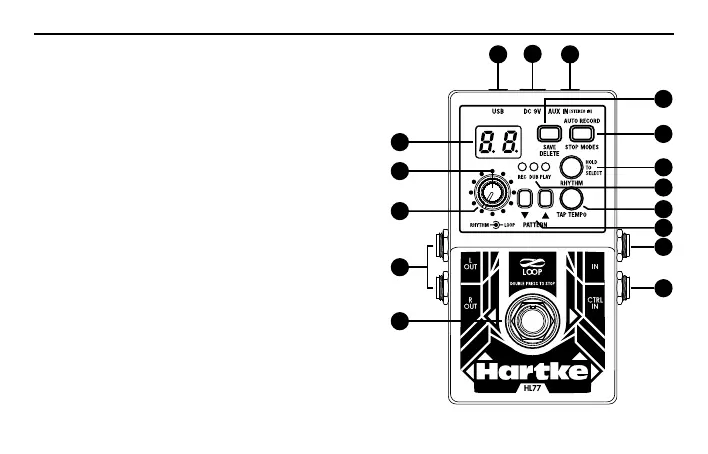
1. USB Jack - Connect the HL77 to a computer using a
mini USB cable to import or backup audio data.
2. DC Input - Connect a 9V DC 300mA with center negative
3. AUX IN - 1/8” (3.5mm) stereo line input for connecting
an external audio source to the HL77.
4. Display - Indicates phrase or rhythm number, as well as
other settings information.
5. SAVE/DELETE - Press this button to save or delete a phrase
in the current memory location.
6. AUTO RECORD/STOP MODES - Press this button to
select the way the HL77 will stop during playback
or set the pedal to Auto record when a signal is
detected.
7. RHYTHM Knob - Adjusts the level of the internal
rhythm tracks.
8. LOOP Knob - Controls the amount of the recorded audio.
9. RHYTHM - Press this button to turn on/off the rhythm
track or select the rhythm pattern.
10. TAP TEMPO - Press this button at the desired rate to
set the tempo of the rhythm. Adjusting the tempo will
change the playback speed of the current phrase.
6
9
10
11
5
2
1 3
7
4
8
12
13
14
15
16
Controls



 To Next Page