OPERATION
8
Form No. ITQM-0313
English
Operating the Toaster
Startup
1. Make sure the toaster is plugged into a properly grounded
electrical outlet of the correct voltage, size and plug
configuration. See the SPECIFICATIONS section for
details.
2. Move the power switch
located on the back of the
toaster to the “On” position.
• Graphics and software
version information will
appear on the display.
3. Wait 10 seconds to allow the
toaster to run internal
diagnostics.
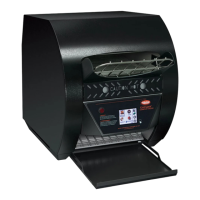
4. Touch and hold the key
on the touchpad control for
three seconds to activate the
toaster.
• “Preheat” will show on the
touchpad display, and the
heating elements inside the toaster will energize.
• The preheating cycle lasts approximately 5 minutes.
When the preheating cycle is complete, the conveyor
starts and the available menu items will appear on the
touchpad display.
5. Touch the appropriate
program key (keys 1–5) on
the touchpad control for the
desired menu item.
• The elements and
conveyor belt will adjust
settings to the selected
menu item.
6. Place food product between the product sensors on the
conveyor belt.
• The product sensors detect the presence of the food
product.
• For menu items that include two-directional or custom
conveyor belt movement, the sensors signal the toaster
to begin the toasting sequence.
• Change the toasting
shade of the food product
any time by touching
either the or keys
up to five
times.
7. Change the selected menu item at any time by touching
the desired program key on the touchpad control.
NOTE: If the Warning light comes on, the unit may be
overheating. Turn off and unplug the unit. Refer to the
“Cleaning the Fan Filters” procedure in the
MAINTENANCE section of this manual. If the unit does
not function properly after cleaning the fan filters,
contact an Authorized Service Agent or Hatco for
assistance.
I
TQ
-
1
0
0
0
-
1
C
Mo
d
e
l
Shor
t
T
e
r
m Shutdown
Us
e
s
h
o
rt te
rm
s
h
u
t
d
o
wn
to
th
e
p
u
t th
e
to
a
s
te
r i
n
s
t
a
n
d
b
y
.
1
.
T
o
u
c
h
a
n
d
h
o
l
d
th
e
k
e
y
o
n
th
e
to
u
c
h
pa
d
c
o
n
tro
l
fo
r
th
re
e
s
e
c
o
n
d
s
to
s
h
u
t d
o
wn
o
p
e
ra
ti
o
n
a
n
d
p
u
t th
e
to
a
s
te
r
i
n
to
s
t
a
n
d
b
y
.
•
Th
e
h
e
a
ti
n
g
e
l
e
m
e
n
t
s
a
n
d
c
o
n
v
e
y
o
r
wi
l
l
s
h
u
t
d
o
wn
,
a
n
d
th
e
to
u
c
h
pa
d
d
i
s
p
l
a
y
wi
l
l
g
o
d
a
rk
.
•
Th
e
c
o
o
l
i
n
g
fa
n
s
wi
l
l
ru
n
fo
r
2
0
m
i
n
u
te
s
to
c
o
o
l
th
e
u
n
i
t.
Dai
l
y
Shutdown
Us
e
d
a
i
l
y
s
h
u
t
d
o
wn
to
tu
rn
o
ff th
e
to
a
s
te
r.
1
.
T
o
u
c
h
a
n
d
h
o
l
d
th
e
k
e
y
o
n
th
e
to
u
c
h
pa
d
c
o
n
tro
l
fo
r
th
re
e
s
e
c
o
n
d
s
to
s
h
u
t d
o
wn
o
p
e
ra
ti
o
n
a
n
d
p
u
t th
e
to
a
s
te
r
i
n
to
s
t
a
n
d
b
y
.
•
Th
e
c
o
o
l
i
n
g
fa
n
s
wi
l
l
ru
n
fo
r
2
0
m
i
n
u
te
s
to
c
o
o
l
th
e
u
n
i
t.
2
.
Af
te
r th
e
c
o
o
l
i
n
g
fa
n
s
s
to
p
, m
o
v
e
th
e
p
o
we
r s
wi
tc
h
l
o
c
a
te
d
o
n
th
e
b
a
c
k
o
f th
e
u
n
i
t to
th
e
“O
ff” p
o
s
i
ti
o
n
to
tu
rn
o
ff th
e
toaster.
N
OTIC
E
:
D
o not
t
ur
n of
f
unit
while cooling f
ans
a
re
running. Da
m
a
ge
to unit m
a
y
oc
c
ur.
Pow
er Save M
ode
All ITQ series toasters have a built-in Power Save mode. This
feature significantly reduces heat levels and energy
consumption when the toaster has not been used for a specified
period of time or when activated by the operator.
To start Power Save mode manually during operation:
1. Touch the
key.
• The conveyor belt will
speed up temporarily to
clear product from toaster.
• “Power Save” will show on
the touchpad display.
To exit Power Save mode:
1. Touch any of the program keys (keys 1
–5) or place food
product between the product sensors on the conveyor belt.
The unit will be ready to toast in approximately two minutes
or less (a countdown will appear on the touchpad display).

 To Next Page
 Loading...