Page 7 on 16WIFI SmartTemp module
USE ONLY HAYWARD GENUINE REPLACEMENT PARTS
4. SIMPLE-WIFI CONFIGURATION
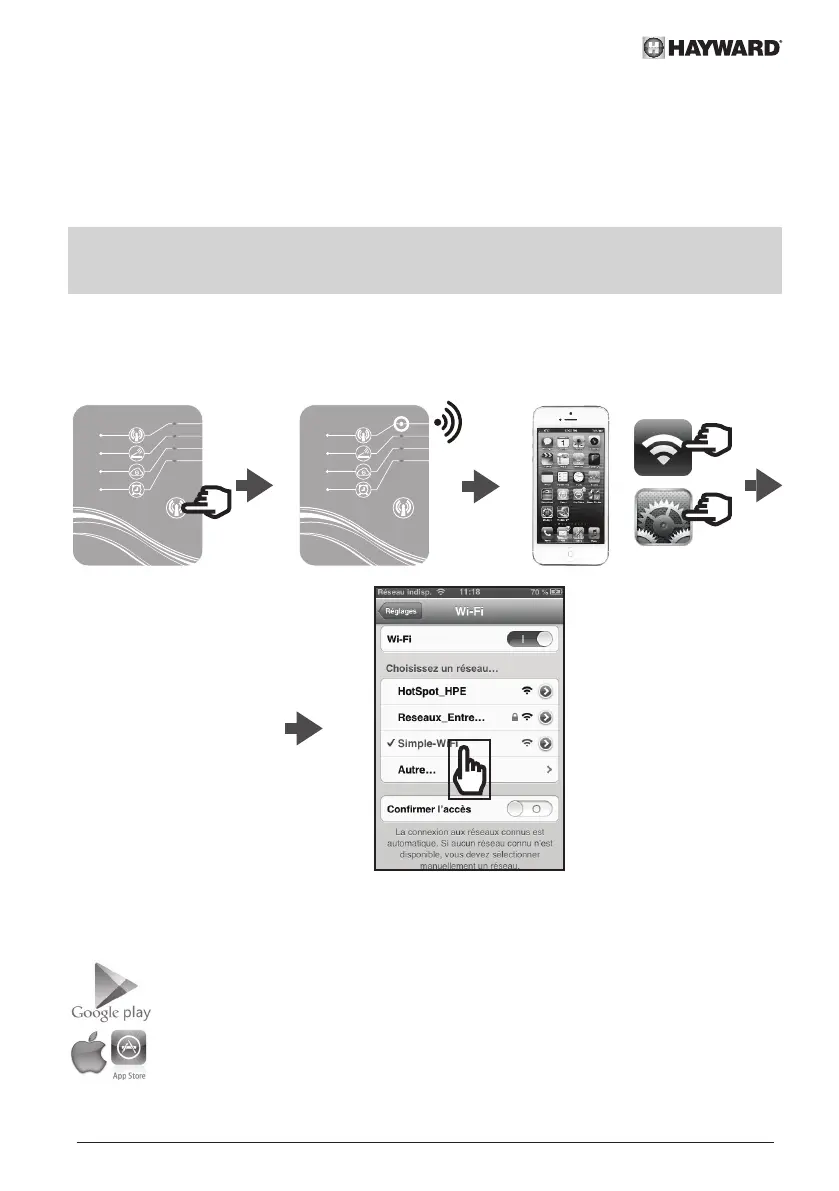
With Simple-WiFi mode you can connect to the heat pump locally, i.e. by using the WiFi
signal transmitted by the SMART TEMP module. This mode is only available if your
mobile device is within the range of the module's Simple-WiFi network. Using the Smart
Temp application on your telephone you can therefore connect to the heat pump and
access the user interface.
Note: This manual is not intended to explain the operation of the Smart Temp
application, for that we recommend that you read the instructions for use
included in the application.
4.1 Connection in Simple-WiFi mode
• Ensure that the power to the heat pump is on, then follow the steps below
2 s
4.2 Local configuration
• Before starting the configuration, download the Smart Temp application.


 To Next Page