Page 11 on 16WIFI SmartTemp module
USE ONLY HAYWARD GENUINE REPLACEMENT PARTS
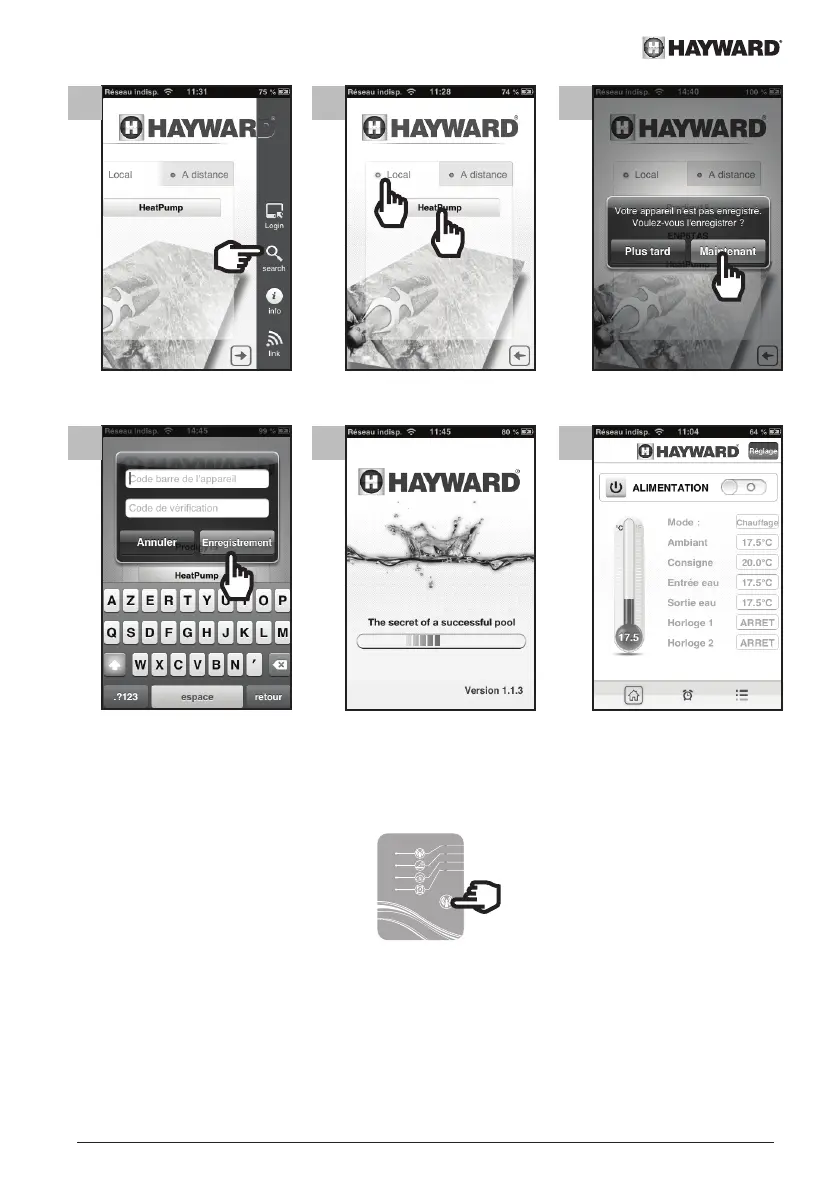
14 15 16
Register the device
17 18 19
From step 19 your Smart Temp application is ready to use. Your heat pump can now be
managed either in Local mode using your home WiFi network, or in Remote mode using
any mobile device equipped with the Smart Temp application and an Internet connection.
5.2 Linking from a computer
• Activate the Simple-WiFi function in the
SMART TEMP module (see section 4.1)
• Make sure that your computer's WiFi
detection function finds the Simple-WiFi
signal emitted by the Smart Temp
module
...
2 s
• Activate the WiFi on your computer
• Open the browser and go to
http://192.168.2.1


 To Next Page