Retrieve system information
Here you can retrieve diverse pieces of information about the radio system that can be of high value in a
service case. The menu contains the following sub-menus:
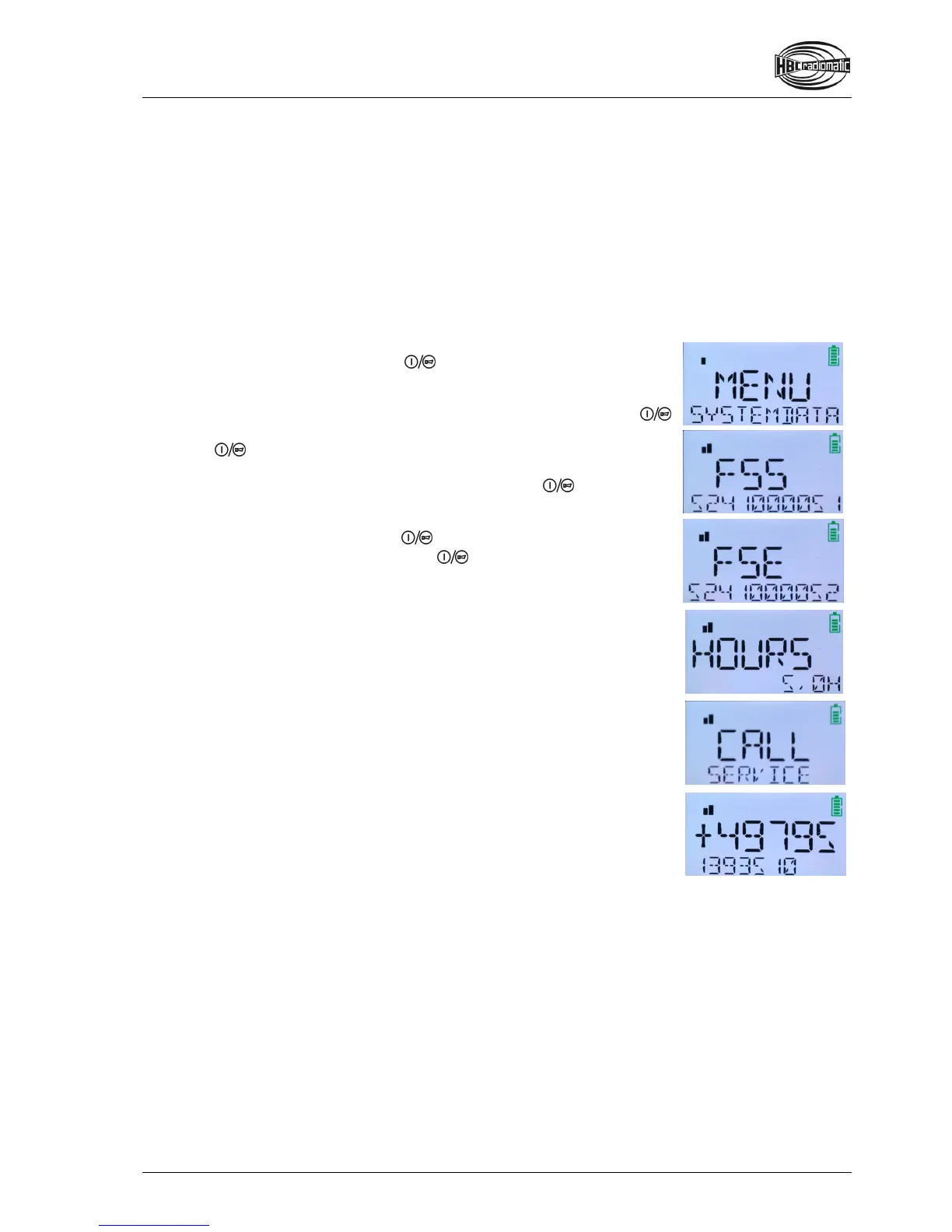
Indication of the transmitter’s fabrication number (FSS)
Indication of the receiver’s fabrication number (FSE)
Indication of operating hours (HOURS)
Indication of the service phone number (CALL)
Show data
If you are not in the selection menu (= first menu level), change to this
menu now. To achieve this, press
in the second step for longer than
2 seconds. MENU is now displayed. The lower text line automatically
displays the sub-menu ADJUSTMENT.
Change to the sub-menu SYSTEMDATA via the first step of the
button.
Press
in the second step. The upper text line now shows FSS, the
lower line shows the transmitter’s fabrication number.
All further data can be retrieved via the first step of the
button.
Please be aware that the service phone number is shown on two display
pages. The first page shows the text CALL SERVICE. You can see the
service number by again pressing
.
To return to the selection menu, press
in the second step for longer
than 2 seconds.


 To Next Page