161939
3
Vedpak 228_Version 1_01.2020
Precautions:
1. Do not disassemble the monitor without professional instructions. If there are any questions,
please contact our service center for advice.
2. Do not use any organic solvents to clean the housing of monitor, as it will dissolve its surface coating.
3. Do not twist, pull or damage the cables, as this may cause short circuit or disconnection.
4. Do not expose the monitor to excessive heat, moisture or environment with direct sunlight.
5. Avoid dropping or striking the monitor.
6. Before use, please make sure that all cables are connected properly as our wiring instruction.
7. Do not make any operation while driving.
8. Attention: It is very dangerous to use the monitor beyond its stated operating temperature/working
voltage range.
5” Wireless Rear View System
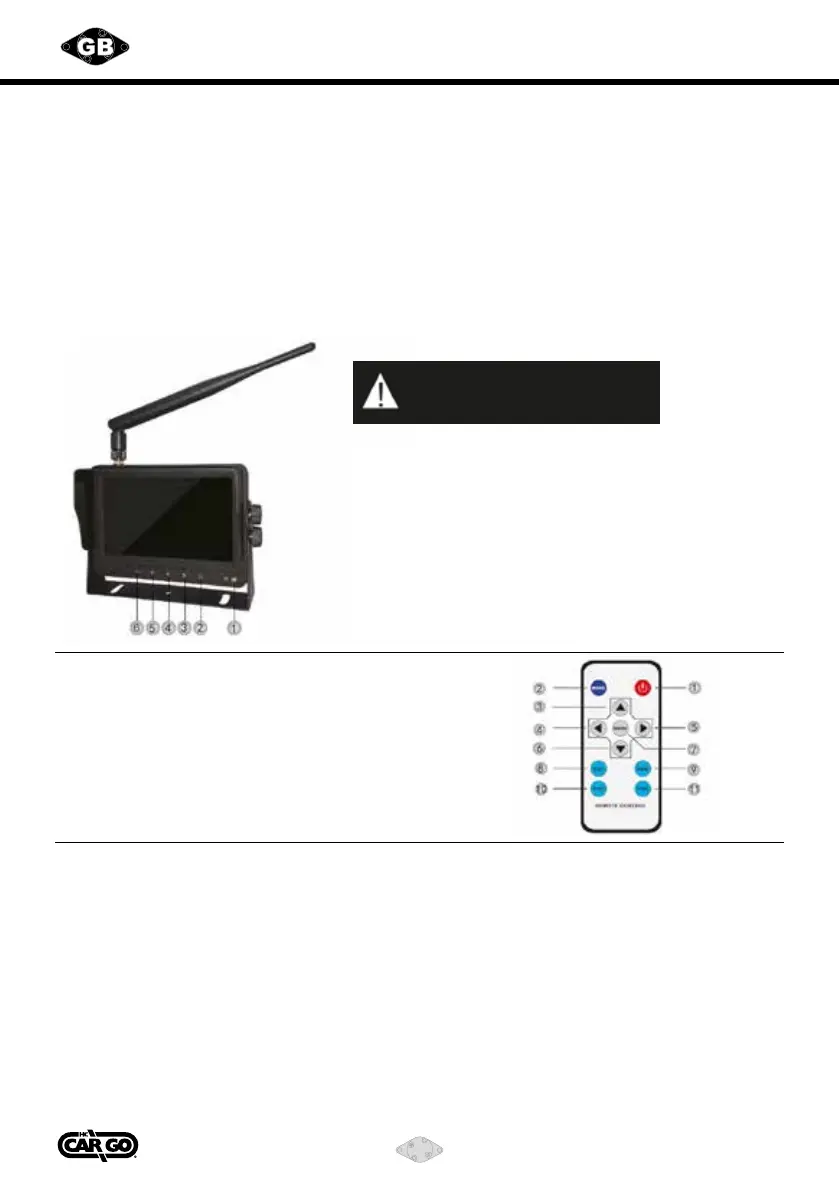
Screen Button Function Demonstration
1) Remote control signal receiver
2) Power switch
3) Menu selection button / Camera view switch button
4) Forward in Menu / Volume “+”
5) Menu
6) Backward in Menu / Volume “-”
1) Power switch
2) Mode
3) Mode “+”
4) Volume “-”
5) Volume “+”
6) Mode “-”
7) Menu
8) CH1
9) CH2
10) CH3
11) CH4
For your safety, please do not
operate the monitor while driving.
Features
1. This LCD monitor has high resolution display with wide angle view.
3. Dual split image views available.
4. Auto pairing: cameras automatically pair with monitor once activated.
5. Full-functional remote control.
6. Support 2 camera inputs.
7. Input signal mode: PAL / NTSC.
8. Working voltage: DC 10-30V.
9. Audio function included.
10. When the trigger lines of the cameras are connected, its image will automatically
display on monitor.



 To Next Page