161939
6
Vedpak 228_Version 1_01.2020
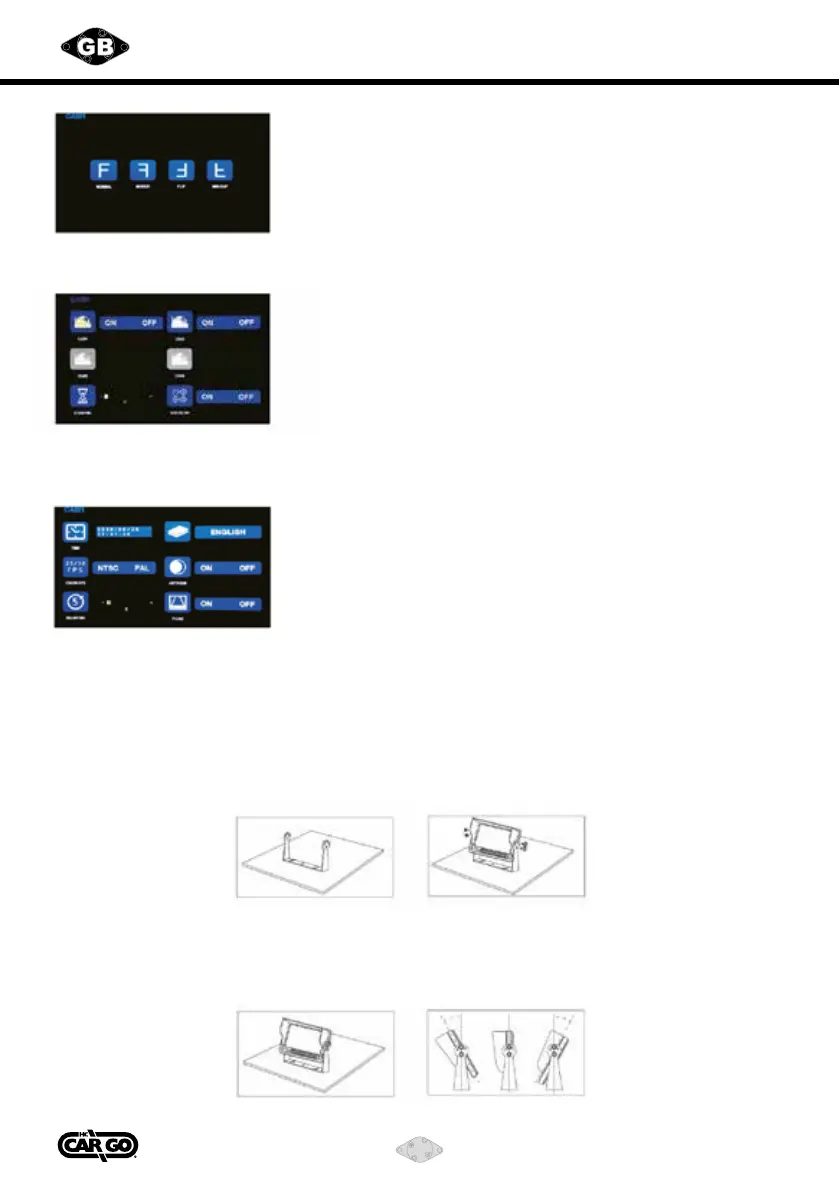
Bracket installation guide for monitor
Bracket material: Metal
Glare shield material: Plastic
Installation guide of the U-shape metal bracket / glare shield
1) Fix the U-shape bracket with screws onto your designated place;
2) Install the monitor onto the bracket, adjust to the angle (usually 30°)
you prefer and fasten it with screws within the monitor package set.
3) Install the glare shield onto the monitor according to the insertion hole.
3. Mirror View / Flip Screen Function
Press “+” and “-” to select Mir-Flip function,
Press “+” and “-” to select normal / mirror view image,
4. Camera Setup
Optional channels: CAM 1 / CAM 2 / Dual image
When the icon selected is in red color,
selection can be changed by pressing “+” and “-”.
Press “M” to return to previous menu, press again to return to main
menu.
P.S.: If any of the channels is closed,
its view will not appear under AUTOSCAN (image loop display) mode.
5. Settings
selection.
Press “M” to return to previous menu, press again to return to main
menu.



 To Next Page