Roommate AP Operations Manual Rev 1.0
Bank Quick Edit Features
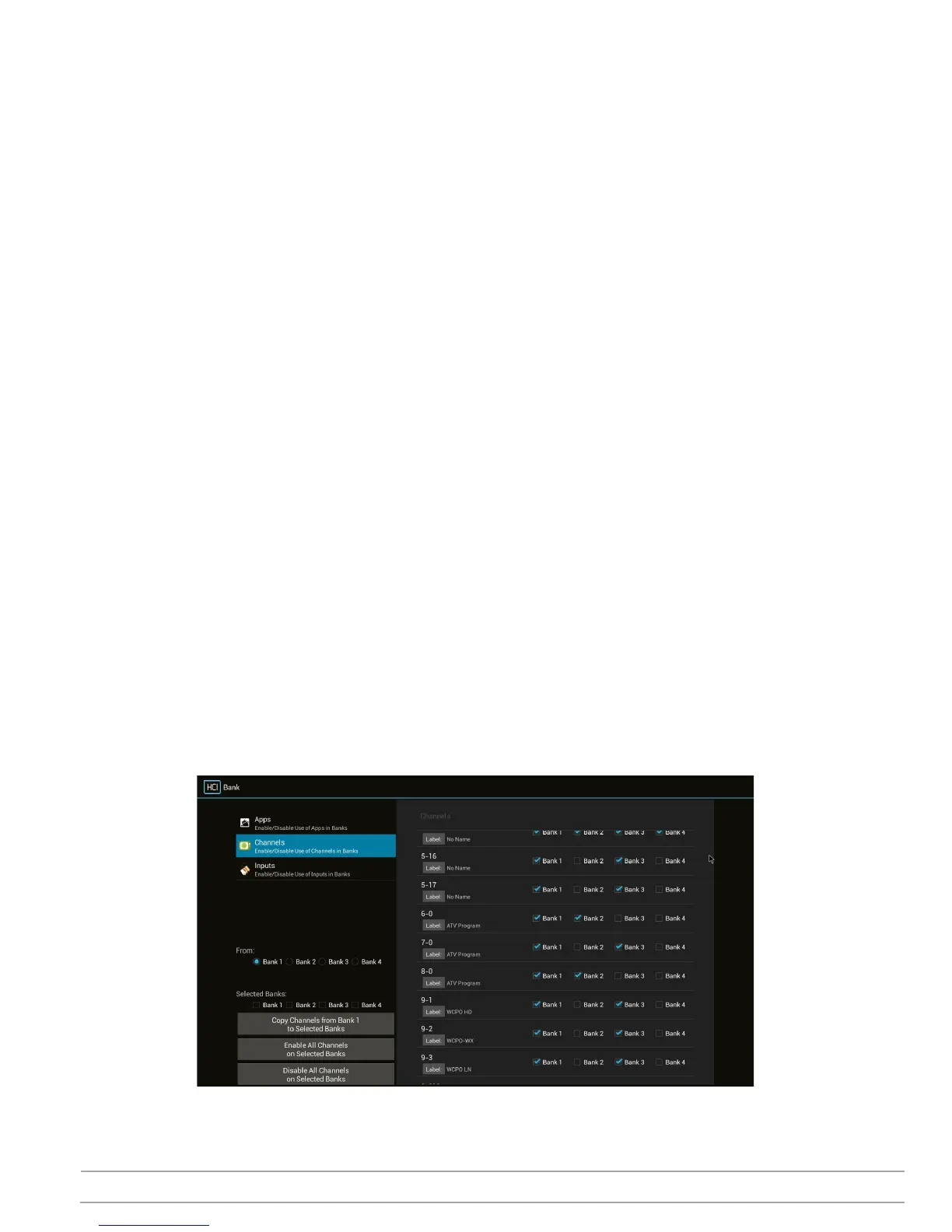
At the lower left column there are 3 quick edit features, Copy Bank to Bank(s), Enable All Channels, and Disable
All Channels.
Copy
1. Select the Bank for copy from in the From: row.
2. Select Bank(s) to copy to in the Selected Banks: row.
3. Select the Copy Channels from Bank x to Selected Banks button. Selected From bank will be copied to
the Selected Bank(s)
Enable All Channels
1. Select Bank(s) to Enable All Channels in on the Selected Banks: row.
2. Select the Enable All Channels on Selected Banks button. All channels in the selected Bank(s) will be
enabled.
Disable All Channels
1. Select Bank(s) to Disable All Channels in on the Selected Banks: row.
2. Select the Disable All Channels on Selected Banks button. All channels in the selected Bank(s) will be
enabled
Sample
In this sample screen capture
1. All channels in Bank 1 are enabled.
2. All channels in Bank 4 are disabled
3. Channels 6, 8 are enabled in Bank 2.
4. Channels 5-16, 5-17, 7, 9-1, 9-3 and 9-3 are enabled in Bank 3.


 To Next Page