Operation Manual Ver. 1.3
1.2 Front / Rear Panel Introduction
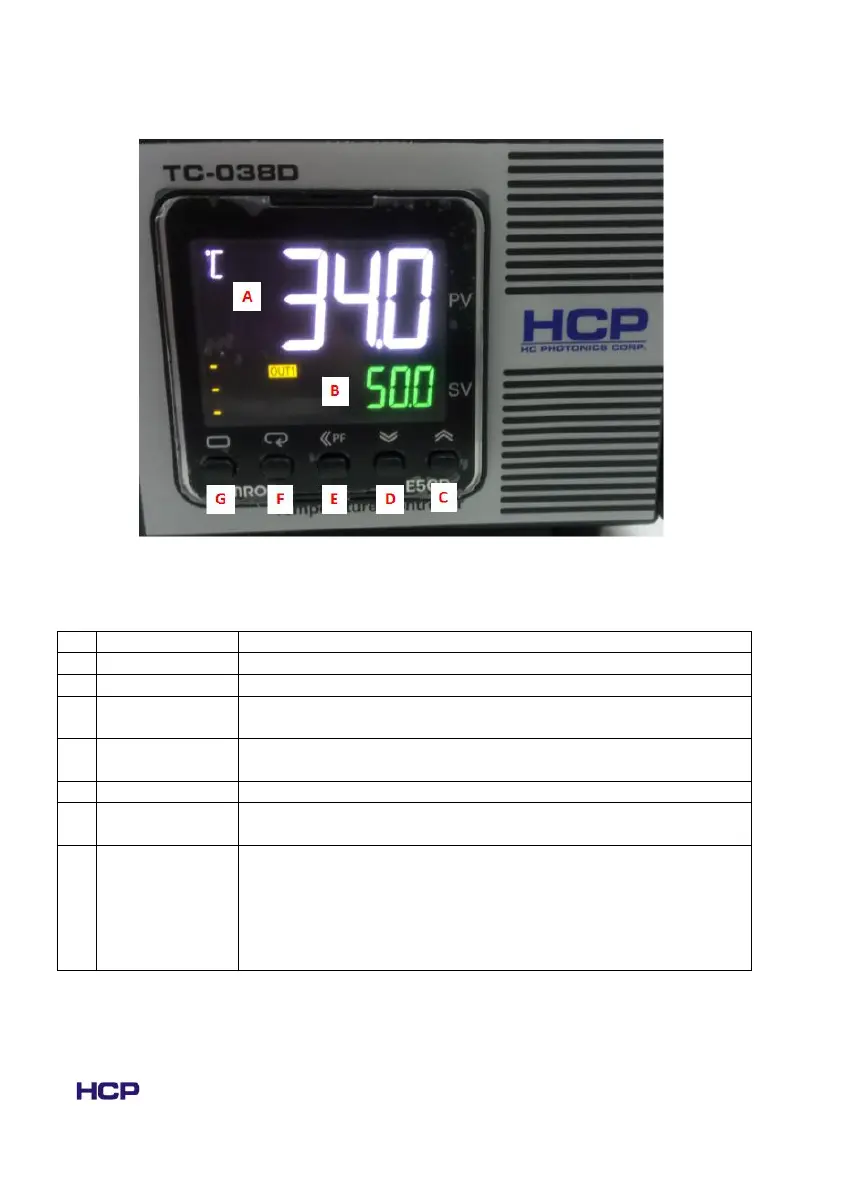
Fig. 1.2.1 The front panel of TC-038D controller, the function of A ~G has been
listed in the table below.
Indicates PV (measured temperature) or function codes
Indicates SV (target set temperature) or function values
Changes the value on SV, press to increase the value.
Holding down the key will gradually increase the speed of change.
Changes the parameter value on SV, press to decrease the value.
Holding down the key will gradually increase the speed of change.
Shift the digits on SV, press to shift the digits left.
Change the displayed function on PV, press to change the content
on display.
Change the levels on PV.
Press to change the levels (Initial setting level, operation level,
adjustment level)
Setting -> operation: Hold for >1s
Operation -> Setting: Hold for >3s
Operation <-> Adjustment: Press for <1s



 To Next Page