VER1.0B1 HeartCheck HANDHELD ECG MONITOR
- 5 -
1. General Description
1.1 Know Your Device
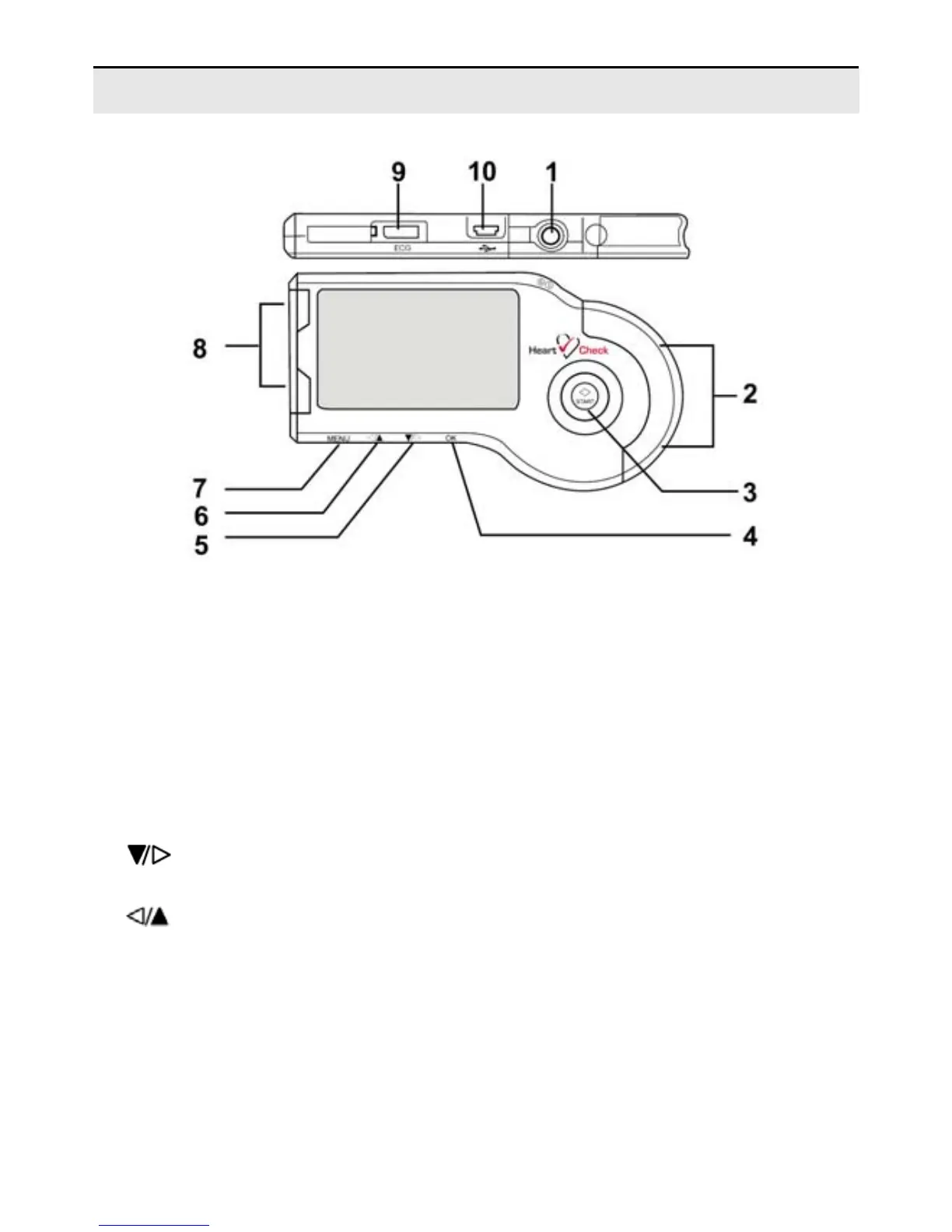
Picture 1-1
Description of Picture 1-1:
① POWER button: Power on or off the device.
② Right Metal Electrodes: Hold these two with right index finger when taking a
measurement.
③ START button: The shortcut key for ECG measurement.
④ OK button: Press this button to confirm the selection or set date and time when in the
Date and Time Setting Mode.
⑤
Button: Press this button to move the cursor to your desired menu or change
the number, or move the wave form to the left.
⑥
Button:Press this button to move the cursor to your desired menu or change
the number, or move the wave form to the right.
⑦ MENU button: Return to the previous menu by pressing this button.
⑧ Left Metal Electrodes: Place this against the center of left palm or chest when taking
a measurement.
⑨ ECG cable socket: When taking a measurement by ECG cable, connect the ECG
cable with this port.


 To Next Page