EasyManua.ls Logo

Heathkit IB-5281 - Page 23

Heathkit IB-5281
65 pages
Print Icon
To Next Page IconTo Next Page
To Previous Page IconTo Previous Page
Loading...
Gegueasryuxir?
2
ra
S
SWITCH
~
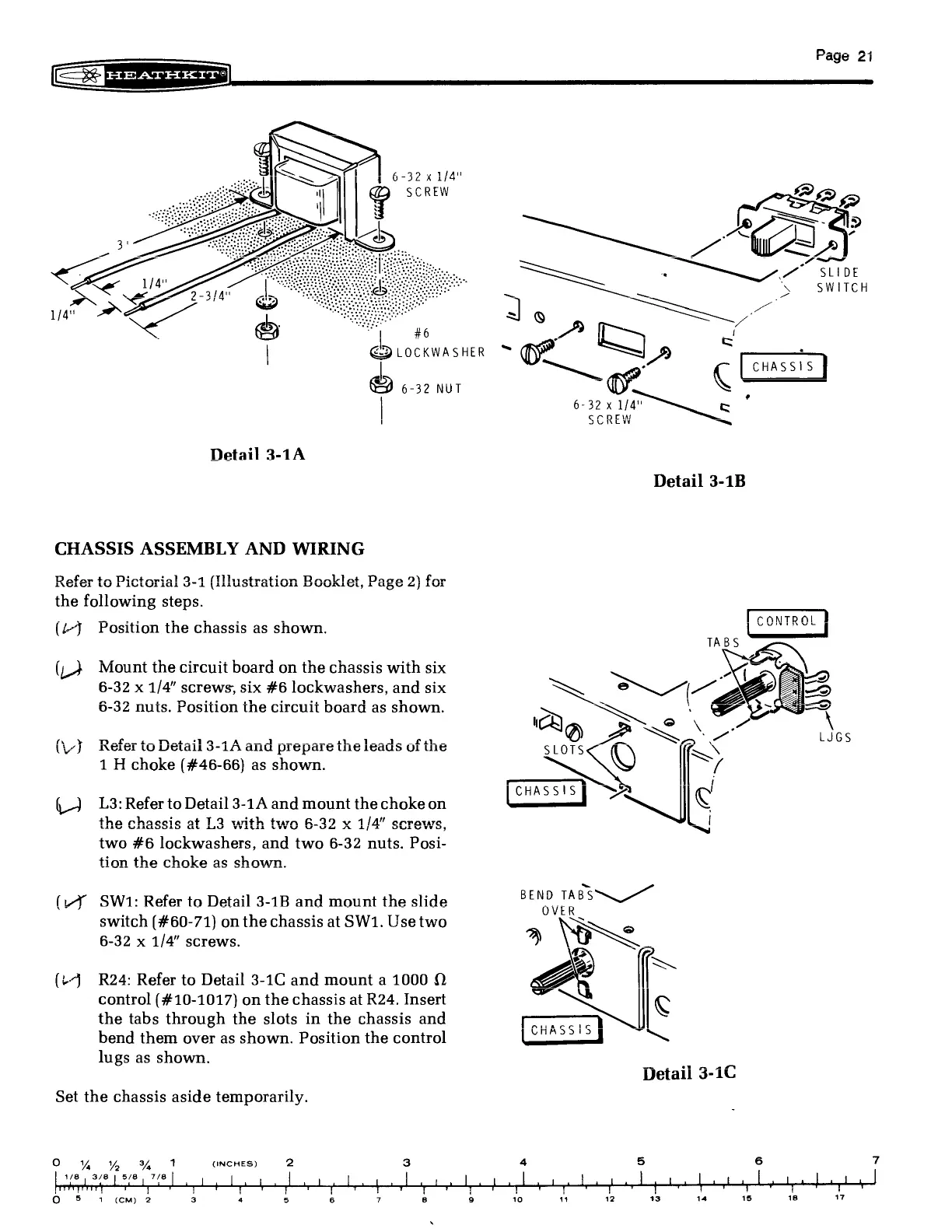
#6
|
D
GD
LOCKWASHER
Go
Pe,
9
6-32
NUT
~
AO.
Sy
|
6-32
x
1/4"
cerbDEOw
'
DURCW
a
Detail
3-1B
CHASSIS
ASSEMBLY
AND
WIRING
Doaofar
ta
Dintarial
9.1
(Mlhuiatratinn
Danlliat
Daga
91
far
INGLE
LU
TL
LuUlLUTidl
ori
patiuolldaliuil
VPVUVUAILUL,
L
aBY
as
sul
the
following
steps.
hE
ges
OR
ahd
eS
Soe
dss
Ccontro.
}
(4J
Position
the
chassis
as
shown.
Hiaasen
eS
|
TABS
(4
Mount
the
circuit
board
on
the
chassis
with
six
XS
B\_-
6-32
x
1/4”
screws,
six
#6
lockwashers,
and
six
esc
NN
Z
Ze)
pan
.
n
tae
a1
*
2
1
1 1
~
wae
ger:
a,’
6-32
nuis.
Position
the
circuit
board
as
shown.
.
FySa
iQ
Sf“
oe
\
f
¥
BDafasn
tioNisnts!)]
9.4
A
HS)
See
meee
the
lente
afiLhe
®
eae
a,
LUGS
(vd
NEL!
LO
VOltdll
O-1LA
alla
prepare
U1
Ledus
OL
UIE
SLOTS
Ce)
SS
1
H
choke
(#46-66)
as
shown.
RON
{
———
j
CHASSIS]
SSR
(Y
(J)
13:
Refer
to
Detail
3-1A
and
mount
the
choke
on
:
the
chassis
at
L3
with
two
6-32
x
1/4”
screws,
~
two
#6
lockwashers,
and
two
6-32
nuts.
Posi-
tion
the
choke
as
shown.
(LY
SW1:
Refer
to
Detail
3-1B
and
mount
the
slide
Pe
SN
switch
(#60-71)
on
the
chassis
at
SW1.
Use
two
NT
6-32
x
1/4”
screws.
%
~~
Se
[*
(-4
R24:
Refer
to
Detail
3-1C
and
mount
a
1000
2
G
control
(#10-1017)
on
the
chassis
at
R24.
Insert
<b
C
the
tabs
through
the
slots
in
the
chassis
and
ENE
|
bend
them
over
as
shown.
Position
the
control
eee
|
™~
lugs
as
shown.
n
Detail
3-10
Set
the
chassis
aside
temporarily.
oO
“4%
%
1
(INCHES)
2
3
4
5
6