EasyManua.ls Logo

Heathkit IB-5281 - Page 28

Heathkit IB-5281
65 pages
Print Icon
To Next Page IconTo Next Page
To Previous Page IconTo Previous Page
Loading...
Page
26
SCREWDRIVER
HANDLE
|
|
|
|
u
)
LARGE
KNOB
Ss”
OPENING
BUSHING
/
KNOB
BUSHING
ow
LW)
Refer
to
Pictorial
3-5
(Illustration
Booklet,
Page
3)
for
the
following
steps.
(
Position
the
chassis
as
shown.
oe
Qe”
tA
anv:
(
+}
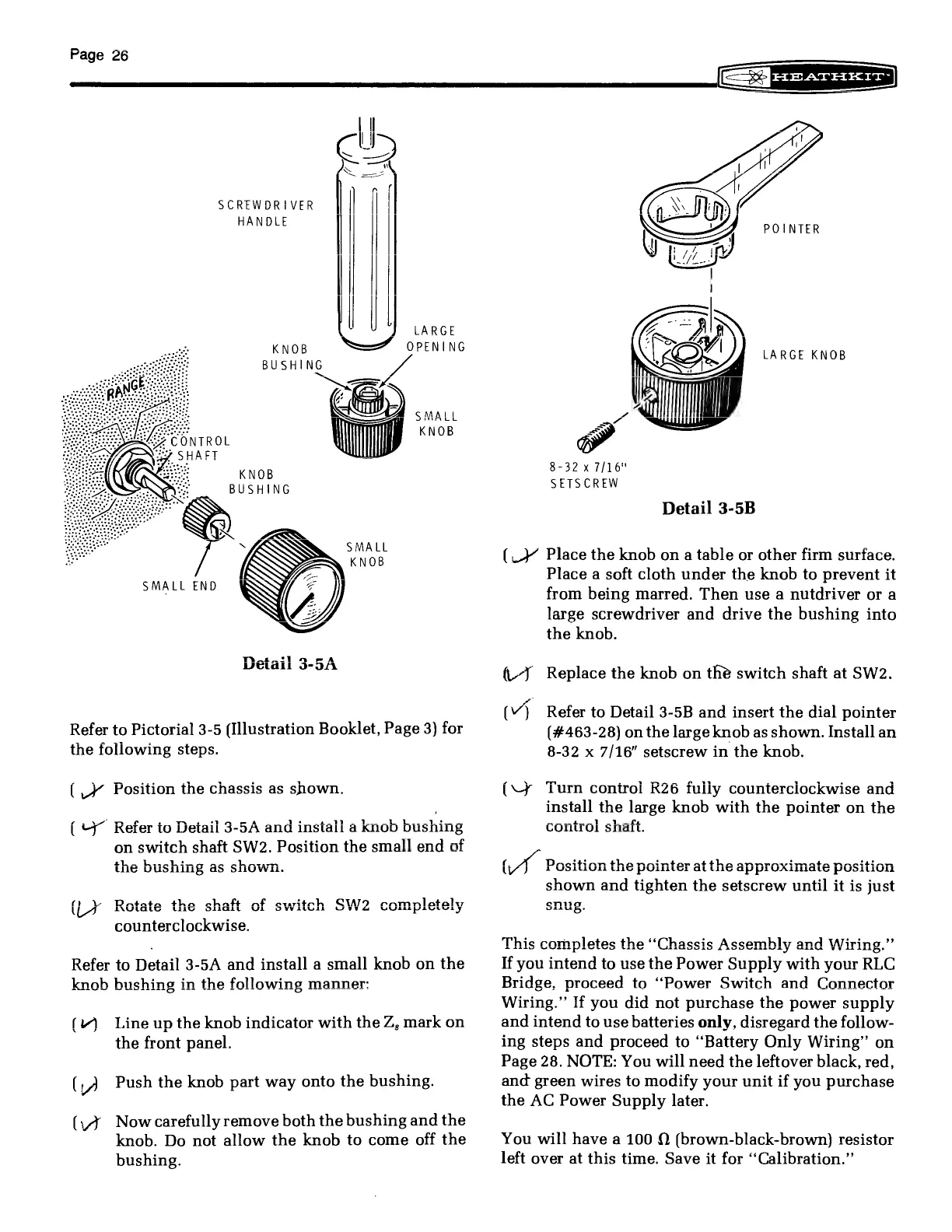
Refer
to
Detail
3-5A
and
install
«
on
switch
shaft
SW2.
Position
t
2
ehazwam
the
bushing
as
snown
a
&
ie)
5
ot)
=
oO
=]
°
Fr
fr
&
Datata
tha
cha
ft
nfs
exarito
QW9
enmnilataly
(LI
ANULALG
LUIG
OLIGLL
UL
OVALE
WTF
Ge
VU
pUley
counterclockwise.
Refer
to
Detail
3-5A
and
install
a
small
knob
on
the
knob
bushing
in
the
following
manner:
B2iVyY
bush
ag
f44
tt
Ol
(Line
up
the
knob
indicator
with
the
Z,
mark
on
the
front
panel.
ey)
Push
the
knob
part
way
onto
the
bushing.
(WW
Nowcarefully
remove
both
the
bushing
and
the
knob.
Do
not
allow
the
knob
to
come
off
the
bushing.
Ge
grearnnit-
ee
|
[;
POINTER
7
|
eA
f/f.
I
W
|
‘Peby
gq
i
.
Pi
%
=
a
ial
8-32
x
7/16"
SETSCREW
LARGE
KNOB
Detail
3-5B
(_}’
Place
the
knob
on
a
table
or
other
firm
surface.
Place
a
soft
cloth
under
the
knob
to
prevent
it
from
being
marred.
Then
use
a
nutdriver
or
a
large
screwdriver
and
drive
the
bushing
into
the
knob.
(J
Replace
the
knob
on
the
switch
shaft
at
SW2.
(“)
Refer
to
Detail
3-5B
and
insert
the
dial
pointer
(#463-28)
on
the
large
knob
as
shown.
Install
an
8-32
x
7/16”
setscrew
in
the
knob.
(\¥
Turn
control
R26
fuliy
counterclockwise
and
install
the
large
knob
with
the
pointer
on
the
_
>
ew
wr
ie)
°
=
om
ar
i}
io)
aay
St
a
=
int
=
pas
This
completes
the
‘‘Chassis
Assembly
and
Wirin
his
completes
the
“Chassi
ably
and
Wiring.
If
you
intend
to
use
the
Power
Supply
with
your
RLC
Bridge,
proceed
to
“Power
Switch
and
Connector
Wiring.”
If
you
did
not
purchase
the
power
supply
and
intend
to
use
batteries
only,
disregard
the
follow-
ing
steps
and
proceed
to
“Battery
Only
Wiring”
on
Page
28.
NOTE:
You
will
need
the
leftover
black,
red,
and
green
wires
to
modify
your
unit
if
you
purchase
the
AC
Power
Supply
later.
You
will
have
a
100
0
(brown-black-brown)
resistor
left
over
at
this
time.
Save
it
for
“Calibration.”