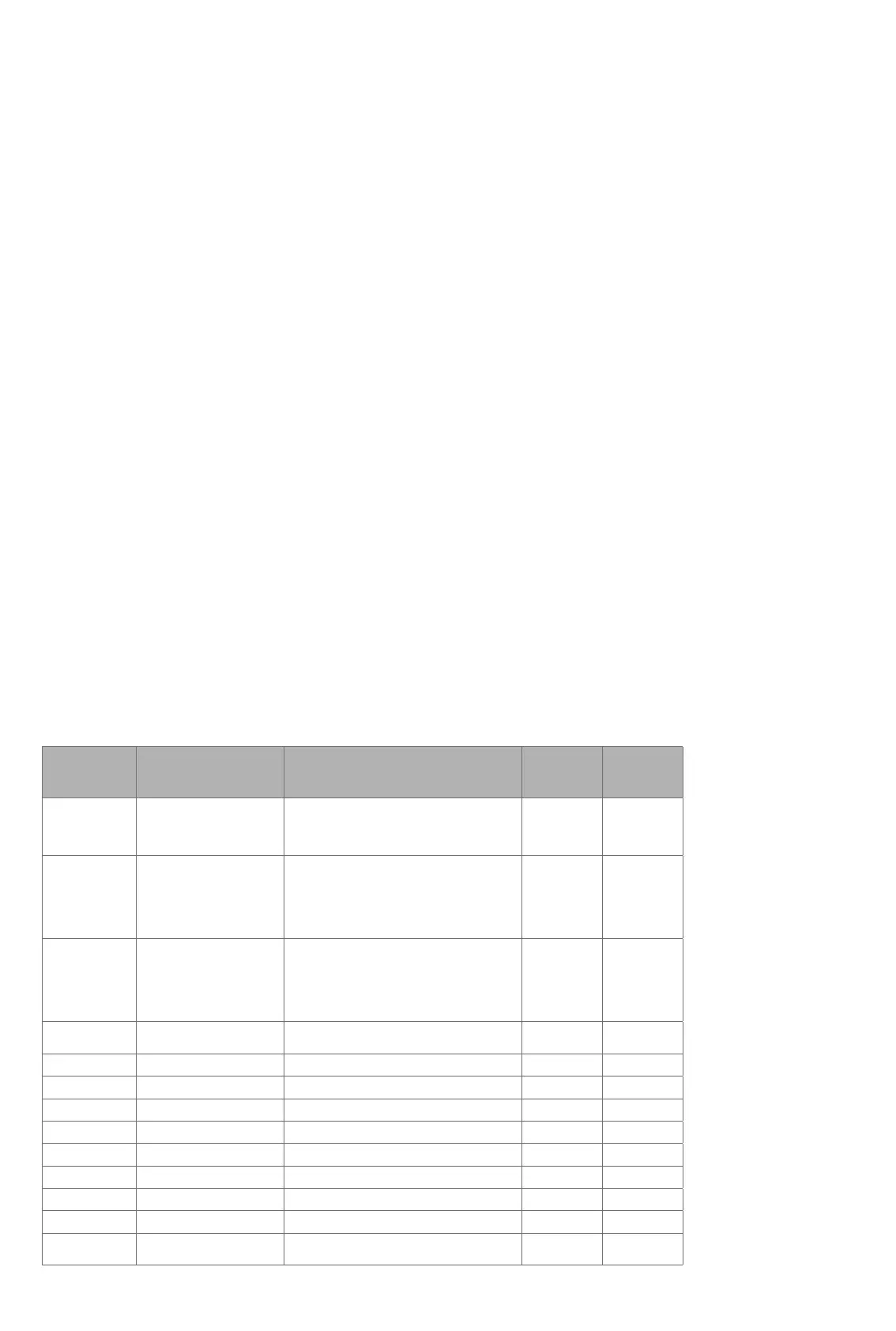
PARAMETER DESCRIPTION RANGE DEFAULT WHAT IF
VALUE OUT
OF RANGE:
1 Operation mode 0x00 OFF
0x01 HEAT
(0x02 COOL)
0x0B ENERGY SAVE HEAT
0x01 HEAT Ignored
2 Sensor mode 0: F-mode
1: A-mode
2: AF-mode
3: A2-mode
4: P-mode
5: FP-mode
1: A Ignored
3 Floor sensor type 0: 10k NTC
1: 12k NTC
2: 15k NTC
3: 22k NTC
4: 33k NTC
5: 47k NTC
0: 10k NTC Ignored
4 DIFF l. Temperature control
Hysteresis
3-30 (0,3°C 3,0°C) 5: 0.5°C Ignored
5 FLo, Floor min limit 50-400 (5,0°C 40,0°C) 50: 5.0°C Ignored
6 FHi, Floor max limit 50-400 (5,0°C 40,0°C) 400: 40.0°C Ignored
7 ALo, Air min limit 50-400 (5.0°C 40,0°C) 50: 5.0°C Ignored
8 AHi, Air max limit 50-400 (5.0°C 40,0°C) 400: 40.0°C Ignored
9 PLo, FP-mode P setting 0-9 0 Ignored
10 CO mode setpoint 50-400 (5,0°C 40,0°C) 210: 21.0°C Ignored
11 ECO mode setpoint 50-400 (5,0°C 40,0°C) 180: 18.0°C Ignored
12 P setting 0-10 2 Ignored
13 (only if
cooling enabled)
COOL setpoint 50-400 (5,0°C 40,0°C) 210: 21.0°C Ignored
13. CO/ECO MODE
The thermostat has 2 main programs, CO – comfort mode and
ECO - economy mode. When Center (confirm) button is pushed
for 2 seconds you switch between the 2 modes. You would
normally have 2 different set-points for the different modes.
CO – mode: Is used for normal use. Example: 21°C.
ECO – mode: Is a setback mode that you can use if the
thermostat is installed in a room or a house that is rarely used.
The ECO-mode can also be activated by the pilot wire if this
is connected. Example: 18°C.
Some gateways also support switching between CO/ECO mode.
In most circumstances, the CO/ECO function can be regarded as
a home/away function.
14. COMMAND CLASSES
In order to run some schedule or week program, the primary
controller/gateway should be responsible for controlling the
thermostat using those selected command classes.
Classes:
GENERIC_TYPE_THERMOSTAT
SPECIFIC_TYPE_SETPOINT_THERMOSTAT
COMMAND_CLASS_BASIC
COMMAND_CLASS_THERMOSTAT_SETPOINT_V3
COMMAND_CLASS_THERMOSTAT_SETBACK
COMMAND_CLASS_SENSOR_MULTILEVEL
COMMAND_CLASS_VERSION
COMMAND_CLASS_MANUFACTURER_SPECIFIC
COMMAND_CLASS_ASSOCIATION
+ All other mandatory classes for selected device type
Thermo-Floor AS can
not be held liable for
typographical errors, other
errors or omittances in
our information.
Product specifications
may change without
further notice.
All electrical installations
must be carried out by a
licensed electrician.
The product must be installed
in accordance with national
building codes and our
installers manual.
COMMAND_CLASS_CONFIGURATION_V2
Supports parameter numbers from 1 to 12 (if cooling enabled,
from 1 to 13). Accepts byte sizes 1.2 and 4 bytes, but it is
recommended to use 2-byte parameters in order get access to
the whole temperature range.
15. ERROR CODES
Er1: Internal error
Er2: Z-Wave error
Er3: Internal error
Er4: Floor sensor error
Er5: External sensor error
If you have chosen F or AF sensor mode without having a floor
sensor connected, Er4 will be shown in the display. If you have
chosen A2 or A2F, and there is no external sensors installed, Er5
will be shown in the display. If the Er1, Er2 or Er3 error codes are
shown, contact your local dealer or Thermo-Floor AS.
Heatit Controls AB l Läkarvägen 4, 454 31 BRASTAD, SWEDEN
Phone: +47 61 18 77 77 l post@heatit.com – www.heatit.com



 To Previous Page
 Loading...