1. CHOICE OF SENSOR
The thermostat has a range of choices when it comes to
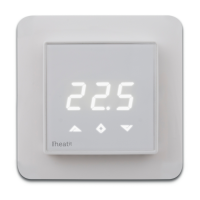
sensors. To get to the menu you have to press Center (confirm)
for 10 seconds, then press Right (down) once and an A shows
in the display. Then press Center (confirm) again and you can
choose one of these modes, while moving up and down with
buttons Left or Right.
F Floor sensor
A Internal room sensor
AF Internal room sensor + Floor sensor
A2 External room sensor
P Power regulator
FP Floor sensor + Power regulator
A2F External room sensor + Floor sensor
When you have decided on the sensor mode you want to use,
press the Center (confirm) button. If you choose F or AF without
having a floor sensor connected, Er4 will be shown in the
display. If you choose A2 or A2F and there is no external sensor
installed, Er5 will be displayed on the screen.
In power regulator mode the thermostat regulates the power
consumption by switching on and switching off in time
intervals. Switch-on and switch-off is done according to a
time proportional controlcycle of 30 minutes. This means that
the heating element is switched on and off in a pulse/pause
interval. This functionality is not supported in Z-Wave.
NOTE: Wooden floors require that a floor sensor is connected
in order to limit the floor temperature to a maximum of 27°C
(in accordance with specifications from most wooden floor
manufacturers).
2. SELECT THE RIGHT OHM VALUE FOR YOUR EXTERNAL/
FLOOR SENSOR
The following values are available: NTC type (10, 12, 15, 22, 33 or
47kΩ). Default 10kΩ. The function is only active when an external
sensor is connected. Confirm with Center (confirm) button.
3. CALIBRATION
In this mode you are able to adjust the displayed temperature.
If the thermostat of some reason (or sensor) is not calibrated
properly you are able to make minor changes to the
temperature. You are able to raise/lower the set point by up to
4°C. Confirm with Center (confirm) button.
This function is only available for the floor sensor and external
room sensor. When calibrating the room sensor, only the
setpoint is changed. The display will not change.
4. BRIGHTNESS
Use Left and Right (up and down) button to adjust the
brightness between 0-9. Confirm with Center (confirm) button.
5. INCLUSION/EXCLUSION
To include the thermostat to your home automation gateway,
press Center (confirm) button for 10 seconds.
The display will show OFF. Press Right (down) 4 times till you see
Con in the display.
Now start add device in your home automation software.
Start inclusion mode by pressing Center (confirm) button for
approximately 2 seconds. The inclusion/exclusion icon will
appear in the display.
Confirmation will show Inc/EcL in the display.
If inclusion fails, Err (error) will appear.
6. HYSTERESIS (DIF)
In this mode you are able to make changes to the hysteresis in
the thermostat. This means that you can changes the hysteresis
from 0,3°C up to max 3,0°C. Confirm with Center (confirm)
button. Default setting is 0,5°C. When using a waterbased
heating, the recommended hysteresis is a minimum of 1,0°C.
7. MIN/MAX TEMPERATURE SETTINGS
FLO Min Floor temperature
FHI Max Floor temperature
ALO Min Air/room temperature
AHI Max Air/room temperature
PLo Min temperature in Power Reg Mode
Confirm with Center (confirm)
8. HEA Choose whether the thermostat is to be used for heating
or cooling.
ESC Leaving programming mode. Confirm with Center
(confirm) button.
9. STANDBY AND MAIN SCREEN
When the thermostat remains untouched for a while, it will
automatically go to standby screen. Standby screen shows the
temperature in the room or floor if the thermostat is connected
to external sensors. By pressing Left or Right (up or down)
button the setpoint will be shown in the display. If the internal
room sensor is used, the thermostat display shows the setpoint.
10. DISPLAY ON/OFF - DON/DOF
Activate by pressing Left and Center (up and confirm) button for
10 seconds. The display light is temporarily activated if one of
the buttons is pushed.
In case doF is activated, the screen will be blank (can be used if
installed where people are sensitive to the light of the display).
A very nice feature when used in a bedroom. When touching
the display, the screen lights up.
11. CHILDLOCK - LOC
By pressing Left and Right (up and down) buttons for 10
seconds, child lock will be activated and no changes can be
made. Trying to make changes causes the LOC text to appear
in the display. Child lock is deactivated by pressing Left and
Right (up and down) buttons for 10 seconds. OPn will appear
in the display.
12. FACTORY RESET - RES
By pressing buttons Right and Center (down and confirm) for 20
seconds, the thermostat will perform a complete factory reset.
NB! Please use this procedure only when the primary controller/
gateway is missing or otherwise inoperable.



 To Next Page
 Loading...